*** This version of Confluence is for testing only and contains a copy of content from June 29th 2026. No changes will be preserved. ***

 Sharon Helen Markus, last updated by Joanne Elisa Leary on Mar 23, 2026
4 minute read
Sharon Helen Markus, last updated by Joanne Elisa Leary on Mar 23, 2026
4 minute read
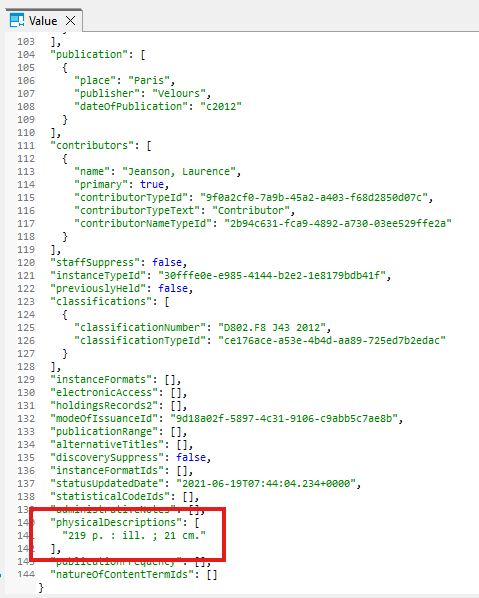
This example below shows 236 pages in the item, which is an electronic resources. If your query is only pulling items from a physical location, you should not get any electronic resources. However, it is good to be aware that the physical description may include
It is impossible to account for every variation of page number entry in your query


Code to extract the physical description using derived tables
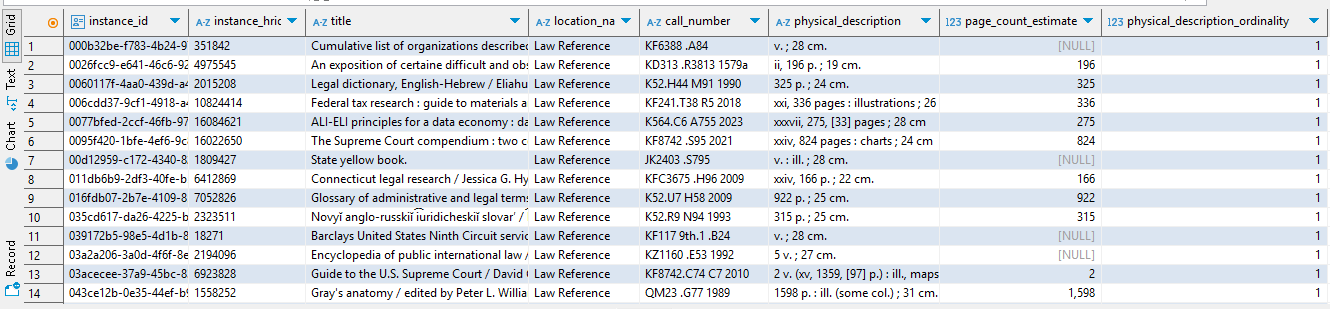
This method finds an estimated page count from the instance_physical_descriptions derived table. Because the physical description field of the instance record is a text-entry field that has no enforced data entry format, the parsing statement will not yield highly accurate results. It works in cases where a page count number is followed by "p." or "pages" or "leaves" or "l." and when the first number in the description field (reading from left to right) is the actual number of pages or leaves and not some other value.
WITH parameters AS
(SELECT
'law,ref' AS location_code_filter -- enter a location code; if left blank, the query will get all locations except for 'serv,remo'
)
SELECT distinct
ipd.instance_id,
ipd.instance_hrid,
instext.title,
ll.location_name,
he.call_number,
ipd.physical_description,
CASE
WHEN substring (ipd.physical_description,'\d{1,4}') IS NOT NULL
AND (ipd.physical_description LIKE '%page%' OR ipd.physical_description LIKE '%p.%' OR ipd.physical_description LIKE '%leaves%' OR ipd.physical_description LIKE '% l.%')
THEN substring (ipd.physical_description,'\d{1,4}')::INT
ELSE NULL
END AS page_count_estimate,
ipd.physical_description_ordinality
FROM folio_derived.instance_ext AS instext
LEFT JOIN folio_derived.holdings_ext AS he
ON instext.instance_id = he.instance_id
LEFT JOIN folio_derived.locations_libraries AS ll
ON he.permanent_location_id = ll.location_id
LEFT JOIN folio_derived.instance_physical_descriptions AS ipd
ON instext.instance_id = ipd.instance_id
WHERE
CASE WHEN (SELECT location_code_filter FROM parameters) =''
THEN ll.location_code != 'serv,remo'
ELSE ll.location_code = (SELECT location_code_filter FROM parameters)
END
;
Result:
Code to extract the physical description from the instance table using a data array extraction function
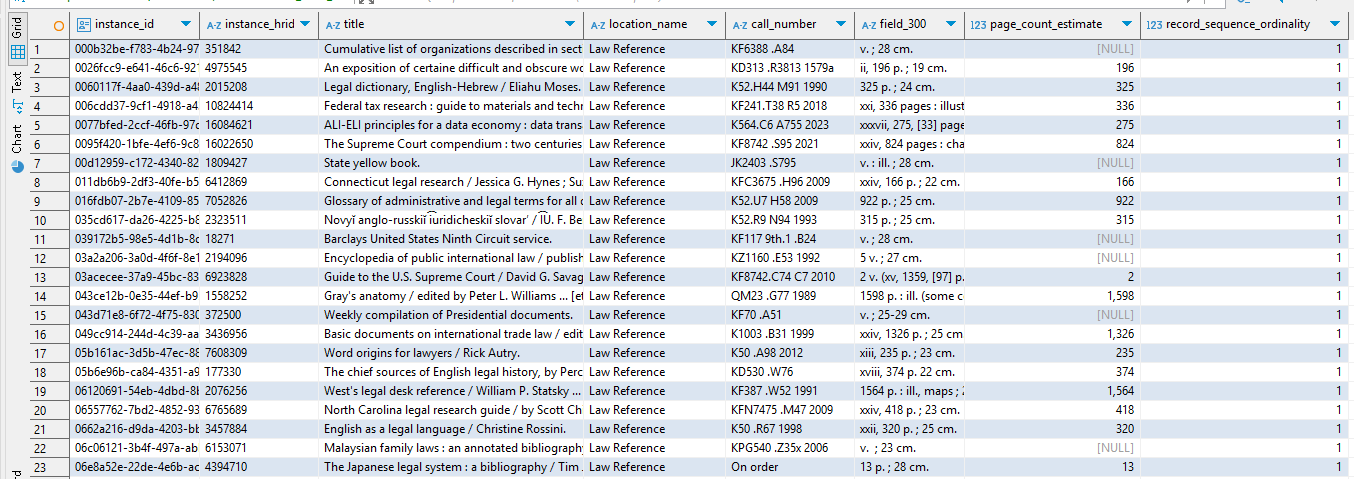
This method extracts the "physical descriptions" array from the instance record; records that do not have a physical descriptions array will NOT drop out, because the "left join lateral" function used in this query will keep all instance records in the results set, including those that do not have array values for physical descriptions. ***Note that it is generally best to AVOID using the marc__t table in queries, whenever possible, because of the ongoing problems with data accuracy (still true as of 3-23-26).***
As stated above, because the physical description field of the instance record is a text-entry field that has no enforced data entry format, the parsing statement will not yield highly accurate results. It works in cases where a page count number is followed by "p." or "pages" or "leaves" or "l." and when the first number in the description field (reading from left to right) is the actual number of pages or leaves, and not some other value.
WITH parameters AS
(SELECT
'law,ref' AS location_code_filter ---- enter a location code between the quote marks; if left blank, the query will get all locations except for 'serv,remo'
)
SELECT distinct
instance.id AS instance_id,
instance.jsonb#>>'{hrid}' AS instance_hrid,
instance.jsonb#>>'{title}' AS title,
location__t.name AS location_name,
holdings_record__t.call_number,
phys.jsonb#>>'{}' AS field_300,
CASE
WHEN substring (phys.jsonb#>>'{}','\d{1,4}') IS NOT NULL
AND (phys.jsonb#>>'{}' LIKE '%page%' OR phys.jsonb#>>'{}' LIKE '%p.%' OR phys.jsonb#>>'{}' LIKE '%leaves%' OR phys.jsonb#>>'{}' LIKE '% l.%')
THEN substring (phys.jsonb#>>'{}','\d{1,4}')::INT
ELSE NULL
END AS page_count_estimate,
phys.ordinality AS record_sequence_ordinality
FROM folio_inventory.instance
LEFT JOIN LATERAL jsonb_array_elements (jsonb_extract_path (instance.jsonb,'physicalDescriptions')) WITH ordinality AS phys (jsonb)
ON true
LEFT JOIN folio_inventory.holdings_record__t
ON instance.id = holdings_record__t.instance_id
LEFT JOIN folio_inventory.location__t
ON holdings_record__t.permanent_location_id = location__t.id
WHERE
CASE WHEN (SELECT location_code_filter FROM parameters) =''
THEN location__t.code != 'serv,remo'
ELSE location__t.code = (SELECT location_code_filter FROM parameters)
END
;
Result:
Physical Descriptions array example from the instance table: