THIS PROCEDURE IS UNDERGOING MAJOR REVISIONS AS OF 7/1/25, AND IS NOT YET FULLY UP TO DATE.
Scope: This procedure addresses the creation or revision of records for "Bound-With" materials, where two or more works, issued independently, were later bound, filmed, or housed together in a single unit. The titles or parts inside a bound-with can be related by elements like publisher, author, year, or subject, though sometimes the relationship isn't clear. Since the overall physical piece will have just 1 barcode, the "Bound-With" information must be entered accurately in the Holdings and Item records of each title that is bound (or filmed/contained) in the physical piece, to link them all correctly to that single barcode. Otherwise, staff and patrons may have trouble locating the physical resource. Processing bound-with resources can be challenging and time-consuming, so it is recommended that staff have thorough training or experience before working with them.
The "Bound-With" instructions for print titles assume that "with" notes will be specific to the copy in hand. "Filmed With" situations are more nebulous, and depend on whether the filming (or re-filming) is universal or copy-specific, or on whether the microfilm copy has been added to a print record. Catalogers should use judgment in determining how and when to record "filmed-with" information, based on the situation at hand.
Contact: Pedro Arroyo
Unit: Database Quality
Date last reviewed: 9/2/2025
Date of next review: October 2025
Basic Bound-With (Print Titles)
Item Records for second (or subsequent) titles in a Bound-with (i.e. "empty" item records)
Filmed With (Microfilm Titles)
Item Records Without Barcodes for Bound With and Filmed With at the Annex
I. Basic Bound-With (Print Titles):
The instructions in parts 1-4 of this section primarily cover the creation or maintenance of records for the most basic type of Bound-with resource, where each internal title is a single-part, printed monograph. Parts 5 and 6 cover cases where one or more titles in a bound-with is either an issue of a serial, or a volume in a multi-volume monograph.
LTS staff may also encounter other types of bound-with resources, however, such as Partially analyzed serials, retrospective conversion records, and Serial title-changes in bound volumes. These types of bound-with still come up regularly for maintenance, re-cataloging, or special projects, and their accuracy is just as essential to patron access, even if we no longer create new ones (as in the first 2 types). ( are there other types? Is there a type related to mono series? bold words can be links, either to content further down in the procedure, or in a separate document?).
1. Instance and Holdings records of first title ("parent" records):
A. Identify which title is FIRST in the physical volume. For that title:
- Locate or create a Holdings record and add the appropriate Holdings Type, location, and call number* information for that first title.
- If the first title is part of a multi-volume or serial, make sure it is represented in the Holdings Statement of the appropriate record (see also items 5 and 6 below for more on Holdings Statements, Enumerations, etc.)
- Add Oversize designation according to the dimensions of the overall volume covers, even if the first part is smaller than the outer cover, and would not be oversize itself. (**See also below)
- In the Holdings Notes section, add a note, with Note type: Note, identifying the NEXT (second) part/title in the resource. Use the format "Bound with: [author name (last,first)]. Title of second part". If the title is excessively long, enter enough of it to allow for a reasonable search (see examples below). NOTE: this Holdings note should be PUBLIC. Do NOT check the "staff only" box at the end of the note field.
- Save and close the Holdings record.
- Alternate Approaches: We may also encounter a Bound-with resource whose Holdings note indicates that the title is the first in a volume that has a certain spine title. The term "lettered" is used to note what the spine title is (see examples 3 and 4). This approach is often seen with Rare materials in the database. When creating new records for Bound-withs, LTS staff should follow step 1A above (as illustrated in the first 2 examples), but we should be aware of this second approach for "lettered" resources when correcting records.
B. OVERSIZE What if it starts with a v.1 that is not oversize by itself, but is inside Oversize covers, AND we also have v. 2-4, which are not oversize? Would they all be shelved in Oversize? Or would there be a Holdings note for v.1 saying it's shelved in Oversize? Would there be a separate Holdings for v.1 (Oversize), and for v. 2-4 (non Oversize)?
{Should we have a note somewhere about the Call numbers? Is that covered in a cataloging procedure? They should all be the same for the titles/parts in the resource (unless they're series-class, and the numbers at the end would be different)?, and call number is for first part, and applies to all later parts, correct? -Separate Holdings for single issues/volumes of a serial/multi-vol. so it would share the same (main/first) call #? We should NOT add sequence numbers to the Call numbers, correct? (even though we may run into them?)) See also section below (Child records).
EXAMPLES:




2. Item Record for the first/parent title
A. Create an item record, attached to the Holdings for the first title in the resource, as outlined above:
- Enter the barcode number in the Barcode field.
- This single item record will represent the entire physical piece, so be sure to record the proper enumeration and/or chronology for the bound volume in the item record ONLY if it appears on the spine, or on a title page referring to the ENTIRE bound-with resource. If the first part/title IS ITSELF an individual volume or issue of a serial or multi-volume (but the overall resource lacks spine or t.p. enumeration), the parent enumeration field will be left BLANK (see also sections 5 and 6 below). <Discussed w. Pam, confirm w. CWM Will also take census of call number variations among BW materials.
3. Instance and Holdings Records for second (and subsequent) titles in a Bound-with resource ("child records")
A. After creating or correcting the "parent" records in the resource as outlined above, identify the subsequent titles or works in the physical volume. For each one:
- Locate, import, or create a matching Instance record, adding administrative notes or statistical codes as applicable, and Save.
- For Single-part monographs, locate or create the corresponding Holdings record:
- Make sure the call number is the same as that of the parent record. (if the part is a serial issue, a separate Serial Holdings may need to be created for the issue contained in the bound-with, as it will have a different call number than the other issues. see also steps 5 and 6 below).
- As with the first title, assign an Oversize designation based on the physical resource, even if this second (or subsequent) part(s) in the resource are smaller than Oversize.
- Add a Holdings Note, with Note type: Note, saying "Bound with: [Author/title information of the FIRST resource in the volume]". This note should be public/not staff-only.
- Add another Holdings Note, but with Note Type: Bound with item data, and enter the barcode number from the piece in-hand (or copied from the Item record of the first title in the resource). This note should also be public/not staff-only. This is the ONLY place the barcode will be recorded for second and subsequent titles/parts in a bound-with resource. It will NOT be recorded in its Item record (see below).
- All of the titles/parts AFTER the first (parent) title should have some version of the 2 Holdings notes in steps c. and d. above (among any other notes specific to that title): one note referring back to the FIRST author & title in the resource, and one note citing the barcode on the piece as "Bound with item data".
- For bound-with items that were processed with the alternate scheme, second or subsequent titles in the resource will simply follow the sequence in which the title appears, e.g. "no. 3 in a volume lettered...", or "no. 4", etc. Sometimes the call numbers of the individual parts will also have numbers denoting their position in the resource, but new Bound-with records should not follow this convention. (give example?).
Examples:


4. Item Records for second (or subsequent) titles in a Bound-with (i.e. "empty" item records)
A. If the Holdings record has no Holdings Statement info for volumes, supplements, or indexes:
- Create a new item record
- Leave the barcode field BLANK.
- The Material Type field should be set to the same type as the first title in the item (e.g. Book, Map, Microform, etc.)
- Type "Bound with" in the Enumeration field of the record.
- If the item is part of a microfilm, microfiche, microcard, or some other film type, type "Filmed with" in the Enumeration field of the item record (see below).
- Save and Close the Item record.
5. Holdings and Item records of Second (and Subsequent) parts of Bound-with materials, when those parts are individual parts/issues of multi-volume monographs or Serials:
Holdings Notes:
A. If the second or subsequent part of a bound-with resource is part of a serial or multi-volume set, add that part's volume/issue number (or other identifying information) with the barcode in the Holdings Note (with note type "Bound With Item Data", as outlined in Section 3.A.2.d above). This is to show which part or parts of the title represented by that holdings record are included in the "bound with" resource.
Examples:
In the following example, the second (or subsequent) part in a bound-with resource is v. 4 of a monographic or serial title. The Holdings for that monograph or serial has this "Bound with Item Data" Holdings note:
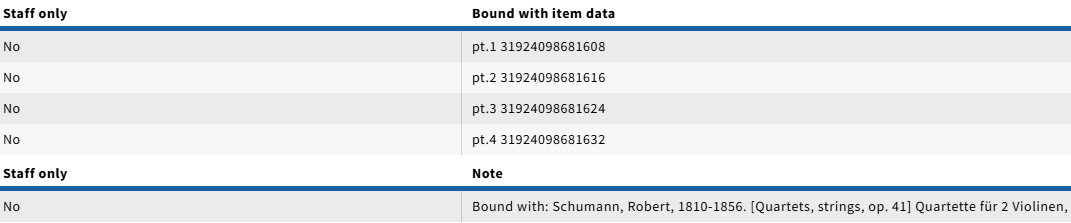
In this next example, the individual parts for the instruments of a work of classical music by Mendelssohn are bound separately in different bound-with resources, with the first part in each bound-with resource being by Schumann:

In general, use the same captioning used in the holdings for the serial or multi-part holdings string ("vol.", "pt.", "no."). If necessary, a note pertaining to the physical arrangement can also be added, as in the above example.
This technique can also be used to link holdings for analyzed portions of serials to the serial record when a separate item record is not required or desired for the monographic records for the analyzed pieces. < From the original procedure. Does it need fleshing out? Examples? Has it changed? It seems like Partially Analyzed Serials DO get empty item records for the monographic records? See Instance 1117089 (lacking "also cataloged as part..." note) as it relates to Instance 2013888, but there are also many counterexamples. Would this be where we might insert a link to partially analyzed serial explanation page? See also below notes.
6. Item Records for second or subsequent titles with Holdings Statements/Enumeration/Chronology:
A. After entering the volume information with the "parent" barcode in the Holdings note, we similarly add the enumeration/chronology information in the corresponding "empty" Item record:
- Create the Item record following steps 4.A.1.a-e above
- For Volume or Part statements, add the appropriate volume/part information to the Enumeration field, AFTER the "Bound With:" note.
Examples: If the Holdings Note says "v.1 31924XXXXXX...", we would enter it as "Bound with: v.1"in the Enumeration field of the corresponding "empty" Item record. Other captions can be entered as appropriate to match, so if part of a bound-with is a "pt.4" of a given serial or multi-vol, the Item Enumeration field in its "empty" item record would say "Bound with: pt.4".- NOTE: The phrasing can look confusing here, but in these examples, the Enumeration field note is showing that the title is inside a Bound-With resource (noun), and that it is v.1 (or pt.2, etc.) of its title. It is NOT meant to show that the part is bound with v.1 (or bound with pt.2, etc.) as a verb phrase, because this part is v.1, or pt. 2.
- If there are only dates in the Holdings Statement (e.g. 1999 or 1829), the date corresponding to the part in the bound-with should be entered in the Chronology field of the empty Item record. The "Bound with:" note, including the colon, should still be in the Enumeration field, of empty item record, without anything after it.
- If the Holdings Statement has BOTH both volume and date information (e.g. "Bd.6 (1946)"), then the volume information should go after the "Bound with:" note in the Enumeration field (e.g. "Bound with:Bd.6"), and the date would go in the Chronology field, without the parentheses.
- If the Holdings Statement has Supplement or Index data, these would also transfer to the Enumeration and Chronology fields of the Item record. For example: If there is Holdings statement with "no.1-2", and a Statement for the supplement "1929", the volume caption data would be entered as "Bound with:no.1-2" in the Enumeration field, and the supplement data would appear as, "includes supplement 1929" in the Chronology field.
- If the Holding Statement shows dates ONLY, e.g. "1986", and the Statement for Supplements shows "1986:Dec.", the "Bound with:" note still goes in the Enumeration field of the Item record, by itself, and the Chronology field will show as "1986 (includes supplement 1986:Dec.)"
6. If there are multiple Holdings Statements for volumes, supplements and/or indexes, check whether the data appears correctly in the public catalog, and consult with appropriate staff as applicable.
II. Filmed-With (Microfilm Titles):
1. Identify which title is first on the microfilm reel, either with a viewer, or from the Instance Notes, Holdings Notes (type: Reproduction), or from a call number search. If it is not clear which is the first title on the reel (e.g from damage, lack of a title page, unrecognizable language, etc.), choose one of the titles as the "primary" title. For that title:
- Create an item record, if one is not already attached to the proper Holdings. Since this single item record will represent the entire physical reel, be sure to record the proper enumeration and chronology for the whole reel (if applicable) in the item record, NOT for the first title itself.
2. Identify the other titles on the microfilm reel. For each title:
a. Do not create item records. Delete (or relink) any that are already attached to target Holdings records. ← Is this because Annex will add them, or do they not get any item records at all?
b. To the holdings record add:
A Holdings Note (note type: Bound with item data) with the barcode of first title item record. ]; normally, 876 (for a basic bibliographic unit) would be used, but 877or 878 should be used if the material is a supplement or index. <From previous version of procedure. Does the Holdings Note/Bound with Item data change at all for supplements or indexes?
3. If one or more of the subsequent titles on the microfilm reel are not monographic, single-part materials, additional information may need to be added to the 87X information. For a single serial volume or issue, or a part of a multi-part title filmed with other unrelated materials, volume information should be recorded in the 87X $3 to indicate which part or parts of the title represented by that holdings record are included on the "filmed with" reel. In general, use the same format for the $3 information that has been used in the holdings for the serial or multi-part holdings string. If necessary, a note pertaining to the filmed arrangement can be added to the 87X field in a$z.
Ex.: 876 ## $3 v.3:no.1 (1855:Jan.) $p 31924084331675
Ex.: 876 ## $3 score + 3 parts $p 31924084331889 $z Each of the 4 pieces (score, violin, viola, violoncello) of the Mendelssohn have been filmed with its equivalent in the Weber.
For retrospective conversion records: If Cornell has cataloged one or more titles but has not cataloged all titles that have been bound together (subsequent to publication) in a single physical volume, select the first cataloged title as your primary title (Note: it may not be the first title in the volume), add a holdings record to this instance, and to all the other cataloged titles in the volume, with appropriate ‘bound with’ and "Bound with item data" notes. Ignore all the uncataloged titles in the volume. In addition, add the following staff note in the holdings record for the primary title:

However, if Cornell has not cataloged any titles that have been bound together subsequent to publication in a single physical volume, create a instance and holdings record for the first title in the volume. Add the following staff note in the holdings:

4. For retrospective conversion only: If Cornell has cataloged one or more titles (but has also not cataloged one or more titles) that have been filmed together in a single physical reel, select the first cataloged title as your primary title (Note: it may not be the first volume on the reel), add a MFHD to this, and to all the other cataloged titles in the volume, with appropriate ‘bound with’ notes and 876s. Ignore all the uncataloged titles on the reel. In addition, add the following staff note in the MFHD for the primary title:
Ex.: 852 ... $x Some titles on physical reel will not be cataloged.
However, if Cornell has not cataloged any titles that have been filmed together on a single physical reel, create a bib record and MFHD for the first title in the volume. Add the following staff note in the MFHD:
Ex.: 852 ... $x Other titles on physical reel will not be cataloged.
Item Records for second (or subsequent) titles in a Bound-with (i.e. "empty" item records)
If the Holdings record has no Holdings Statement info for volumes, supplements, or indexes: This crossed-out section now used above for "basic" instructions. Nos. 2 and below will be added to "enum/chron"Create a new item recordLeave the barcode field BLANK (no barcode)The Material Type field should be set to the same type as the first title in the item (e.g. Book, Map, Microform, etc.)Type "Bound with" in the Enumeration field of the record.If the item is part of a microfilm, microfiche, microcard, or some other film type, type "Filmed with" in the Enumeration field of the item record.
If the Holdings record has volume and/or date information in the Holdings Statement, it will be noted in the appropriate Enumeration and/or Chronology fields of the "empty" Item record:Create the Item record following steps "a" through "e" aboveFor Volume or Part statements, add the appropriate volume/part information (from the Holdings Statement) to the Enumeration field, AFTER the "Bound With:" note.
Examples: If the Holdings Statement says "v.1", we would enter it as "Bound with: v.1"in the Enumeration field. Other captions would appear the same way, so for a Holdings statement that says "pt.2" the Item Enumeration field would say "Bound with: pt.2", etc. NOTE: The phrasing can look confusing here, but in these examples, the Enumeration note is showing that the title is a Bound-With resource (noun), and that it is v.1 (or pt.2, etc.). It is NOT meant to show that the title is bound with v.1 (or bound with pt.2, etc.) as a verb phrase, because it IS v.1, or pt. 2, etc.If there are only dates in the Holdings Statement (e.g. 1999 or 1829), they should be entered in the Chronology field of the empty Item record. The "Bound with:" note, including the colon, should still be in the Enumeration field, of empty item record, without anything after it.If the Holdings Statement has BOTH both volume and date information (e.g. "Bd.6 (1946)"), then the volume information should go after the "Bound with:" note in the Enumeration field (e.g. "Bound with:Bd.6"), and the date would go in the Chronology field, without the parentheses.
NOTE: If the Bound with Item Data in the Holdings note contains the same or similar data as the Holdings Statement, use the information in the Bound With Item Data note when creating the empty item record.
If the Holdings Statement has Supplement or Index data, these would also transfer to the Enumeration and Chronology fields of the Item record. For example: If there is Holdings statement with "no.1-2", and a Statement for the supplement "1929", the volume caption data would be entered as "Bound with:no.1-2" in the Enumeration field, and the supplement data would appear as, "includes supplement 1929" in the Chronology field.If the Holding Statement shows dates ONLY, e.g. "1986", and the Statement for Supplements shows "1986:Dec.", the "Bound with:" note still goes in the Enumeration field of the Item record, by itself, and the Chronology field will show as "1986 (includes supplement 1986:Dec.)"
If there are multiple Holdings Statements for volumes, supplements and/or indexes, make sure that the data appears correctly in the public catalog, and consult with appropriate staff as applicable.
a. Create an "empty" item record (no barcode). See below for more information about what to record or not record in these items.
Annex Exception for creating Item Records Without Barcodes for Bound With and Filmed With materials:
LTS Staff should OMIT step of creating "empty" Item Records without barcodes for the second and subsequent titles in a Bound-With designated for the ANNEX:
- After the Bound with item data is entered in the Holdings notes for the second and subsequent titles, and the “parent” record (with the item that contains the barcode) is accessioned at the Annex, Automation staff will receive an email of a report generated by a scheduled job detailing the mismatch of locations between the “parent” and the other holdings with the barcode in the Holdings Note/Bound with Item Data.
- Automation staff will use this report to execute a script to flip the Holdings containing the Bound With Item Data to match the “parent” Holdings location, and create the corresponding items (without barcodes) with an enumeration of “Bound with:" or “Filmed with:” If the Bound With Item Data note also contains the enumeration of the volume or reel in which that title is contained, then that is appended to the enumeration of the “empty” item record. “Empty” items should only be created after the parent holding has been accessioned at the Annex. Otherwise this causes problems for staff there.
Empty item record creation
- If the MFHD has no 86X fields and there is no subfield 3 in the 876 field, create an empty item record, (no barcode), and only place "Bound with" in the enum portion of the empty item record if MFHD is a serial or a book. If the item is in a form of microfilm, microfiche, microcard, or some other form of film type, place "Filmed with" in the enum portion of the empty item record. The item type should be same as the parent 876 field barcode.
- If the MFHD has a single 866 field with enum and/or chron data, that data has to be transferred over to the enum and/or chron portion of the empty item record accordingly.
Example: If the 866 field had some form of enumeration, such as v.1 or pt.2, that data would be placed in the enum section behind the note "Bound with: v.1" or "Bound with: pt.2". If there is only chronology data, such as 1999 or 1829, that data would be placed in the chron section of the empty item record. The "Bound with:" note, including the colon, is still placed in the enum section of empty item record. If the 866 field has both enumeration and chronology data, such as Bd.6 (1946), then the enumeration portion is placed behind the note "Bound with:Bd.6" in the enum section and the chronology portion is placed in chron section, without the parentheses.
NOTE: If the 876 field has a subfield 3 with the same or similar data as the 866 field, use the data in the 876 subfield 3 when creating the empty item record. - If the MFHD has an 866 field and a 867/868 field, with data representing a supplement and/or index, that data would be included in the enum or chron section accordingly.
Example: If there was an 866 field with data such as no.1-2 and a 867 field with 1929, the enumeration data would go behind note "Bound with:no.1-2" and the supplement data would be placed in the chron section as such, "includes supplement 1929". If the 866 field only had chronology data such as 1986 and the 867 had supplement data such as 1986:Dec., the "Bound with:" note is still placed in the enum section of the empty records and the chronology data placed in the chron section of the empty item record in this format: 1986 (includes supplement 1986:Dec.) - If the MFHD has multiple 86X fields, please consult Peter DelaCuadra prior to creating the empty item record, as the array of data may not fit within the parameters of the spacing in the enum/chron section of the empty item record.
Item Records Without Barcodes for Bound With and Filmed With at the Annex
- After the Holdings notes with the fields are created for the bound with holdings and the “parent” record with the item that contains the barcode is accessioned at the Annex, Batch Processing staff will receive an email of a report generated by a weekday- scheduled cron job detailing the mismatch of locations between the “parent” and the other holdings with the 876 barcode.
- Batch Processing staff will use this report to execute a script to flip the holdings with the 876 field to the “parent” MFHD’s location and create item without barcodes (“empty”) with an enumeration of “Bound with" or “Filmed with.” If the 876 field has a subfield 3 with the enumeration of the volume or reel in which that title is contained, then that is appended to the enumeration of the “empty” item record.
Ex. Boundwith:v.4-8
Note: “Empty” items should only be created after the parent holding has been accessioned. Otherwise this causes problems for staff at the Annex. - NO LONGER TRUE. Empty Item records are fine to send, as long as Holdings notes / bound-with data is accurate.
---------------------------
*Create separate document RE: partially analyzed serials, park it elsewhere, per Laura's suggestion.
b. In the case of a partially analyzed serial, use the enumeration from the piece itself, when appropriate (Is this reflected in one of the original examples below? Numbering gets very confusing very quickly (see also bib 444353).
(7/22) Different "types" of bound-with: (should we add sections for these in detail, and then further sub-divide the procedure accordingly, or just reference for now?)
- Partially analyzed serials (especially of the Mann type: all barcodes on serial record. see bib 117988 for an example)
- One or more of the final "previous title" (780) serial issues being bound with "succeeding title" (785) issues across a Serial title-change.
- Series analytics (see bib 2216393 for example)?
Drafts for the separate page of examples:
I. Serial Title Changes:
Many CUL serials are bound together in large collected volumes. When a serial changes its title, a new bibliographic record is made/imported for the new (succeeding) title (see also 780/785 fields MARC), and all issues published under that title are assigned to the Holdings record of the new (succeeding) title. Frequently, however, the final issue(s) published under the previous title have been bound together with the first issues of the new title. The same serial may change its title several times, and each Holdings may have a parent and/or a child Item record attached to it, indicating that issues of the previous titles were bound with issues of the succeeding titles.
For example: the serial "VISTA Volunteer" (Instance 1334440) changed its name to "VISTA" (Instance 1334441) for a year, and then back to "Vista Volunteer" (Instance 1334443). The later issues of the first title were bound with a volume of the middle title, which in turn had its later issues bound with the third title:
1. Vista Volunteer (Instance 133440):

Holdings:
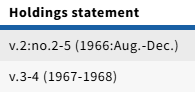 Holdings Notes: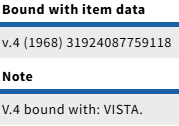
2. Vista (Instance 1334441, "middle title"):

Holdings:
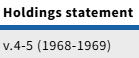 Holdings Notes: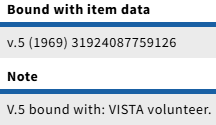
3. Vista Volunteer (Instance 1334443):

II. Partially Analyzed Serials:
Some serials have individual issues (or groups of issues) with their own distinct title. Those issues may have their own separate monographic records, cataloged in parallel with the serial, with the serial's title as the series (MARC field 490/830 ), and the distinct title as the main title of the monograph (MARC 245 field). The presence of these monographic records means that the serial has been 'partially analyzed', and their purpose is to widen the field of searchable terms for the content, which may not be adequately described by the serial record alone. This increases accessibility to patrons, who may be searching by an specific title or author, not realizing that a work was published as part of a journal.
LTS no longer creates new records for partially analyzed serials at selector request, but staff should be familiar with past processing methods, as maintenance issues still arise regularly. Partially analyzed serials may not always be bound together physically, like other bound-with material (although they can be), but the records share many properties with "true" bound-with material, as we're still cataloging one title on two different bibliographic and holdings records, which need to be linked together by single barcode.
A. Basic properties:
- This section covers cases where each serial with a distinct title gets a parallel single-part monographic record:
- The piece in-hand should be cataloged on the main serial record, with appropriate inclusion in the Holdings Statements, and corresponding Item Record as applicable, including Barcode, enumeration, and chronology information.
- The Holdings of the serial record should have a staff-only Holdings Note that says "Partially Analyzed Serial"
- The piece in-hand should ALSO have a matching monographic Instance record, with the serial title as the series, and the distinct title as the main title, along with other available elements we'd expect for a cataloged monograph (contributors, publisher, date, subjects, etc.).
- In the Holdings of the monographic record:
- The Call Number should match the serial's call number AND copy number (if applicable), with the issue number at the end, similar to a series-class call number.
- There should be a public Holdings Note, with note type: note, saying "Also cataloged as part of serial [Title of serial]"
- There should be an additional public Holdings note, with note type: Bound with Item Data, and the barcode number used in the item record for the piece on the serial record.
B. Examples:
- The serial "North American Fauna" (Instance 117352) has a Mann, Annex copy 2 Holdings, with a note that says "Partially analyzed serial". This indicates that some issues of this serial have also been cataloged as monographs.

 Pamela Parish, last updated by Pedro Arroyo on Sep 23, 2025
21 minute read
Pamela Parish, last updated by Pedro Arroyo on Sep 23, 2025
21 minute read