*** This version of Confluence is for testing only and contains a copy of content from June 29th 2026. No changes will be preserved. ***

 Dee Zajac, last updated on Jun 10, 2024
6 minute read
Dee Zajac, last updated on Jun 10, 2024
6 minute read
Date Created: January 23, 2024
Last Updated: February 1, 2024
Criticality: High | Frequency: Other | Turnaround: Other |
Overview
Athletics Golf Pro Shop maintains an inventory in their store and their storage facility. Inventory is tracked in the Club Profit System and updated monthly by the Golf Head Pro. Inventory pricing updates are completed by the ticket office staff in the vivenu POS system. The inventory system and the vivenu POS system do not interface so sales must be manually updated in the Club Profit System to update inventory counts and value. A physical inventory count is completed at the end of the season and at the end of the fiscal year. Additional processes and controls for ordering, storage, and access are in place to protect inventory and to prevent opportunities for fraud or theft.
Key Parties/Contacts
Golf Head Pro: Responsible for placing orders, monitoring inventory levels and updating inventory counts in the Club Profit System each month as product is sold or physical inventory is completed. Reviews any pricing or delivery discrepancies and addresses with vendors. Provides pricing updates to the Ticket Office Staff for updating vivenu. Maintains security of storage facility where larger inventory items are stored.
Asst. Golf Professional: Receives product at the store, verifies item counts and pricing on orders. Identifies items for return to vendors (damaged, wrong item, etc.) and manages the return process. Places inventory on the selling floor. Performs inventory counts for semi-annual inventory.
Pro Shop Staff: Assist in completing inventory counts, records sales in the vivenu POS system. Monitors inventory on the sales floor.
Ticket Office Staff: Update selling prices in vivenu POS system as directed by Golf Head Pro.
Financial Transaction Center (FTC): Responsible for processing vendor invoices and credits timely and recording inventory adjustment entries.
Key Documents
System Access Needed:
Common Problems or Issues Encountered:
Step by Step Procedures
Ordering Product:
Annual Physical Inventory Count:
Shared Services Center (SSC):
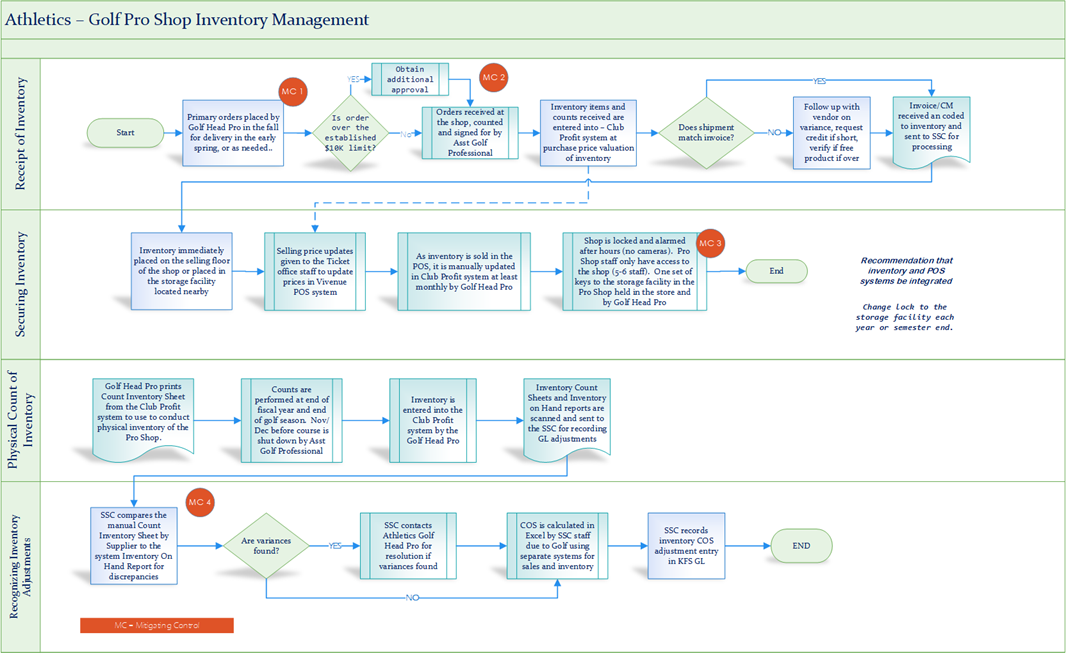
Step by Step Procedures: Ordering Product: 1. The Golf Head Pro places an order(s) for items in the fall for delivery in the spring. 2. If orders exceed establish buying limit of $10K, orders are directed to a secondary approver (Matt Baughan ; jmb72@cornell.edu [Buyer]; Jeff Hall; jwh33@cornell.edu [Primary Approver], Department GM). 3. When orders are delivered, the Asst. Golf Professional counts the items received to ensure accuracy of item SKU, pricing, and counts. 4. Golf Head Pro enters quantities received in the Club Profit System to update inventory on hand. 5. If PO does not match order as received, Asst. Golf Professional contacts vendor directly. to request an adjustment or credit memo. Credit invoices are sent to Golf Head Pro, and the credit is applied against the next invoice. If a credit is expected and it is not reflected on the next invoice, the Golf Head Pro contacts the vendor for a corrected invoice. 6. Vendor bills the Golf Pro Shop and submits invoice to the SSC for payment. 7. SSC team verifies 3-way match of vendor invoices to the receiving documents and PO in KFS and processes invoices for payment. Annual Physical Inventory Count: 1. Golf Head Pro prints the count inventory sheets from the Club Profit System to be used to conduct the physical inventory counts. 2. Asst. Golf Professional counts the physical inventory in the store and the storage location and updates the count inventory sheets. 3. Golf Head Pro updates the Club Profit System with inventory count amounts. 4. Variances are reported to Athletics finance team and recounts are done to verify differences and confirm an error was not made on the physical count. 5. Once final, the Golf Head Pro scans the inventory count sheets and the inventory on hand reports and sends to the SSC for recording any adjustments in the GL. Shared Services Center (SSC): 1. The SSC compares the manual count inventory sheets by supplier to the Inventory on Hand reports to check for discrepancies. 2. If variances are identified, the SSC contacts the Golf Head Pro for resolution. 3. COS is calculated in an Excel file by the SSC staff due to Golf having two separate systems for sales and inventory. 4. The SSC records the inventory adjustment to COS in the KFS general ledger.
|
Metrics
Cornell Finance Staff
Glossary Of Key Terms/Acronyms
Golf Pro Shop Process Flow Chart