You are viewing an old version of this page. View the current version.
Compare with Current
View Page History
« Previous
Version 7
Next »
1. What you need to know before setting up a DSN (Data Source Name) in your Coldfusion 10 environment:
- The Database OID entry. You can get this from your current DSN if you're already using Coldfusion, or contact the DBA group (dba-support@cornell.edu)
- Database credentials (username and password)
- Version of Oracle database (this helps with troubleshooting or providing support)
- If NOT using OID, then the server that your database lives on
2. CIT Hosting recommends customers use the OID connection string and the Oracle JDBC drivers with Coldfusion 10
- This differs from Coldfusion 9 due to the fact that Adobe does not officially support Oracle 12g database connections with their delivered Oracle drivers.
- Our initial testing does show the delivered Oracle drivers can work with Oracle 12g databases, however we have not fully exercised the drivers nor can we provide support if issues are found when connecting to a 12g database with the Adobe delivered drivers.
- Customers will need to download the Oracle driver for oracle.com (file name ojdbc7.jar for Java 1.7 support). We would recommend the ojdbc7.jar file for Oracle 12g databases since all hosted Oracle databases will be upgraded from 11.x to 12 in the coming months. Please contact dba-support@cornell.edu for more information on when you Oracle database will be upgraded.
3. Using Oracle JDBC with OID
- The Cornell Stack provides the ojdbc7.jar in the Coldfusion path for customers to use.
- To install a newer Oracle JDBC driver (i.e. Oracle 12g), you'll need to upload a "jar" file that contains the updated driver to your hosting environment. This can be done by downloading the driver from Oracle's website (odbc7.jar for Java 1.7) and uploading the file into your "jars" directory (next to your htdocs directory) via your webdav client. Once the file is uploaded you'll need to restart your Coldfusion instance using the Hosting Dashboard
- When creating your DSN for the Oracle JDBC driver you will need to specify the "Other" Data Source when configuring Coldfusion via CFADMIN
- In CFADMIN, go to Data & Services then click on Data Sources
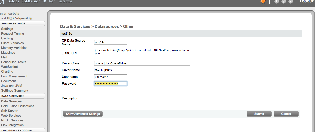
- You do not need to specify more than one OID server, ldap://oid.cit.cornell.edu is a loadbalanced service and will handle the failover for those databases configured in a RAC environment.
4. Using Macromedia with OID
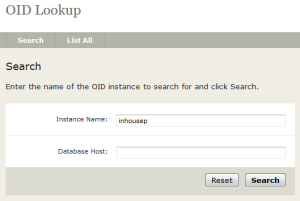
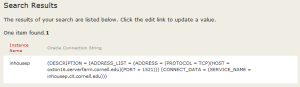
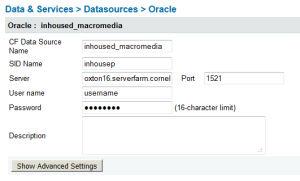
If you choose to use the built-in Oracle driver you will need to use the Oid Lookup tool to retrieve the servername of the backend database. Please note that if the backend database moves you will need to update your connection information!
NOTE: This is not the recommended driver to use if your Oracle databases are version 12g. CIT Database Group prefers all customers to use the Oracle ojdbc7.jar file mentioned above.

 Ryann A. Levo, last updated on May 29, 2014
3 minute read
Ryann A. Levo, last updated on May 29, 2014
3 minute read
