You are viewing an old version of this page. View the current version.
Compare with Current
View Page History
« Previous
Version 7
Next »
Using the MySQL server installed on the Cornell Stack
The Cornell Stack now offers customers access to their own installation of MySQL. This differs from previous LAMP offerings at Cornell, where the MySQL server was on a shared server, with limited access for customers.
Setting up a database on the Cornell Stack
- When you request your new Cornell Stack VM be sure to include that you want MySQL installed as well.
- Once you receive your new VM information from Webservices, you'll need to log into the Hosting Dashboard, click on the Servers button, and find the new VM (will be named like "webhost###.serverfarm.cornell.edu).
- Click on the VM name which will take you to the VM status page. About halfway down you should see a link for "Database Admin Page" - if you do not, please contact webservices@cornell.edu to open a ticket to get the MySQL access enabled.
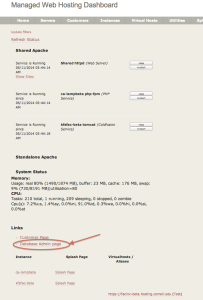
- The next screen should allow you to click the link "Create Database". Take note that the VM name is listed at the top so you know what VM and what MySQL server this will occur on.
- The Create Database link will allow you to:
- Create a database name - no more the 16 characters
- It will also automatically create a user for you
- After you click "Create" button, the screen will come back with the following information:
- Database Name: <what you entered previously>
- Database Host: localhost
- Database User: <default user created for you>
- Database password: <password created for you>
- You can now go to phpMyAdmin from your Instance Splash page and login to the MySQL server and use your new database.
NOTE: If you currently use the shared server from CIT (known as lampdbprod.cit.cornell.edu or mustang01.serverfarm.cornell.edu), customers are requested to move your database info from the shared server to your own MySQL instance (either on a Cornell Stack VM or a customer-provided MySQL server).
Database backups
The MySQL database server performs a nightly mysqldump for backup purposes. These dump files are then backed up to tape by the TSM Backup that runs on each VM. If you find you need to go back to a previous MySQL backup dump file, please contact webservices@cornell.edu and provide the following info:
- VM Name the mysql server is running on (webhost###.serverfarm.cornell.edu)
- Date of the backup you need
- Any additional info (table names, etc) that will be helpful or needed. DO NOT send database credentials via email to webservices! Webservices will contact you if the username/password is needed.
Root access to MySQL
Some customers may find they need to have root privileges to the MySQL server. Please submit this request to webservices@cornell.edu and someone will get back to you for more information.

 Ryann A. Levo, last updated on May 15, 2014
2 minute read
Ryann A. Levo, last updated on May 15, 2014
2 minute read
