*** This version of Confluence is for testing only and contains a copy of content from June 29th 2026. No changes will be preserved. ***

...
m - Monograph/Item
s – Serial
Example code to extract information from the 06 and 07 data from the marc table in Metadb:
SELECT substring(sm."content", 7, 2) AS "format_code"
FROM srs_marctab
WHERE field ='000'
NOTE: We need to select the correct value in the column labeled 'field', because the 'content' column contains values for all the data elements of the selected field.
...
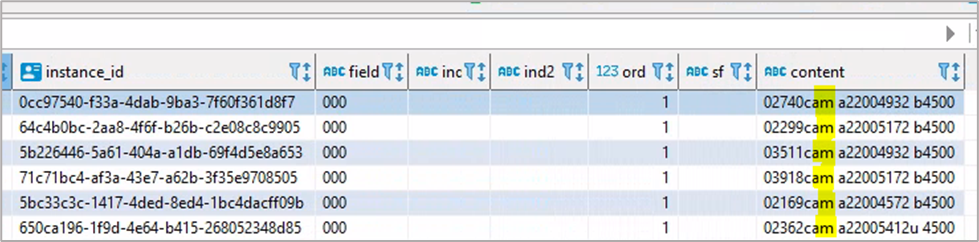
The code above specifies that we are starting at the 7th space in the contents column, and we are selecting two spaces: the 7th and the 8th.
In the screenshot of the srs.marctab marc table below, the 7th and 8th characters are highlighted in the ‘content’ field. The ‘a’ in the 7th space shows that the resource is language material (from the 06 fieldcharacter) and the ‘m’ in the 8th space shows that the resource is a monograph/item (from the 07 character).
Example code to extract information from the 06 and 07 data from the marc table in Metadb:
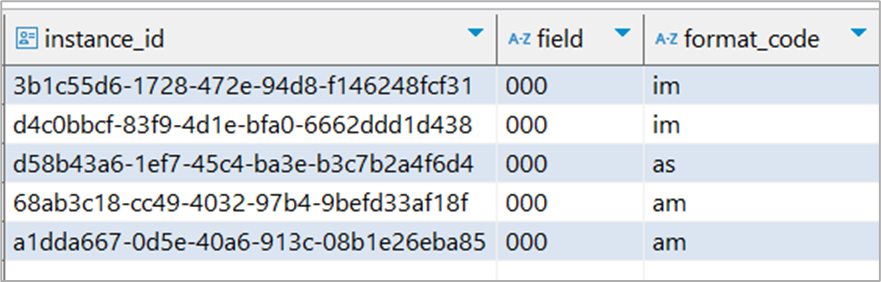
SELECT instance_id, field, substring(sm."content", 7, 2) AS "format_code"
FROM folio_source_record.marc__t AS sm
WHERE field ='000';
The results table below show that rows 1 and 2 are monographs (07=m) which are non-musical sound recordings (06=i).
...
(In library terms, a monograph refers to any non-serial publication including but not limited to books, reports, and audio-visual materials.) The remaining rows can be classified in a smilar manner using the 06 and 07 charcters of tyhe 000 leader field.
...
Other Control Fields - 00X (001, 003, 005, 006, 007, 008)
...
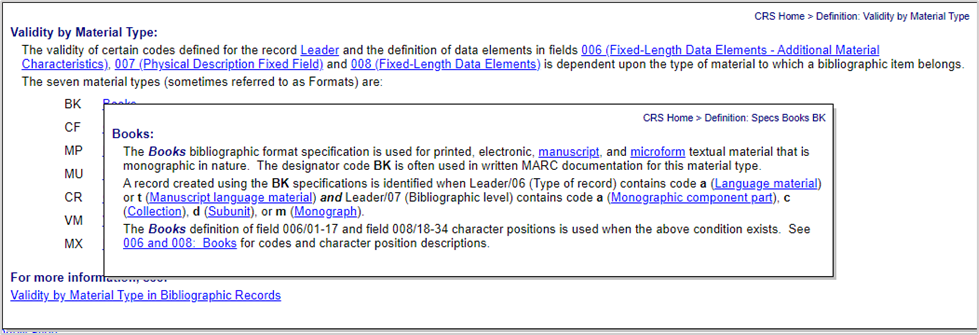
A record is determined to be a book if it meets the following criteria in the 000 leader field: (character 6 = a or t) AND (char 7 = a, c, d, or m). If this takes place, then in the 008 field, a record is created using the BK definition. In no place does it say ‘BK’. That’s not a possible code. See this documentation for details. Once the cataloger enters the requisite configuration in the leader 000 field, when they go to the 008 field, they will receive options only for possible book details (see screen shot below from the Cataloger's Reference Shelf documentation).
Example: the screenshot below contains