*** This version of Confluence is for testing only and contains a copy of content from June 29th 2026. No changes will be preserved. ***

...
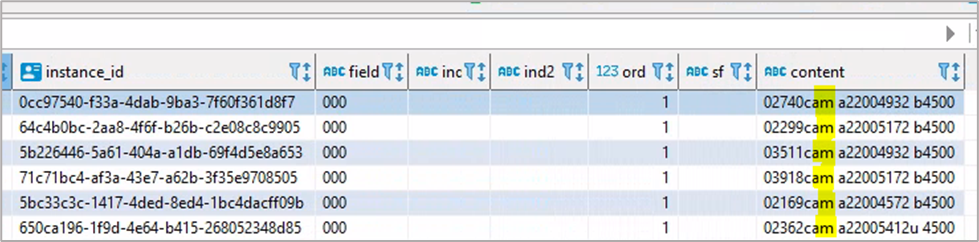
In the screenshot of the srs.marctab table below, the 7th and 8th characters are highlighted in the ‘content’ field. The ‘a’ in the 7th space shows that the resource is language material (from the 06 field) and the ‘m’ in the 8th space shows that the resource is a monograph/item (from the 07 field).
Other Control Fields - 00X (001, 003, 005, 006, 007, 008)
These fields also have no indicators or subfield codes. The first three are not often relevant for query writers.
NOTE: Information is somewhat randomly contained in the numeric order of the fields. For example, field 006 contains information that cannot fit into 008.
Fixed Field 008 - Bibliographic Details
The 008 field contains information about the physical form of the resource, such as form of material, language, etc. Some characters are common for all materials, and others differ based on material. For example, characters 7-10 and 11-14 indicate date1 and date2 respectively, for all materials. However, characters 8-21 indicate type of illustration for books, and characters 18-19 indicate form of composition for music.
There are seven possible material configurations: Books (BK), Computer Files (CF), Maps (MP), Music (MU), Continuing Resources (CR), Visual Materials (VM), and Mixed Materials (MX).
It is important to know that material configurations in the 008 field are determined by the system and not by the cataloger, depending on cataloger entries for the 000 leader field.
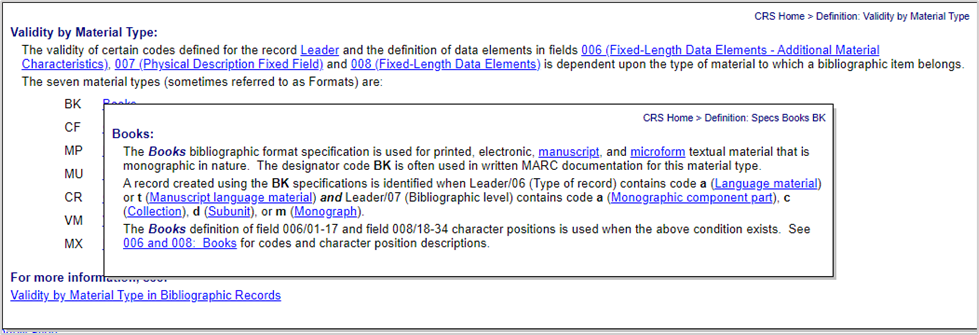
A record is determined to be a book if it meets the following criteria in the 000 leader field: (character 6 = a or t) AND (char 7 = a, c, d, or m). If this takes place, then in the 008 field, a record is created using the BK definition. In no place does it say ‘BK’. That’s not a possible code. See this documentation for details. Once the cataloger enters the requisite configuration in the leader 000 field, when they go to the 008 field, they will receive options only for possible book details (see screen shot below from the Cataloger's Reference Shelf documentation).