*** This version of Confluence is for testing only and contains a copy of content from June 29th 2026. No changes will be preserved. ***

...
For general queries, we usually need to extract data from a few fields only. These fields are described below. The rest of the fields include record length, coding scheme, etc., which are usually not of interest in materials-related queries.
These fields have no subfields, and therefore no indicators which are associated with subfields. All information is indicated according to fixed character designations .(example with code below),
The 000 field can contain upto eight data elements, where each is defined by its position in the data field. The two main elements of interest are 06 (type of record), and 07 (bibliographic level). Each is only one character.
06 - Type of record
a - Language material
c - Notated music
d - Manuscript notated music
e - Cartographic material
f - Manuscript cartographic material
g - Projected medium
i - Nonmusical sound recording
j - Musical sound recording
k - Two-dimensional nonprojectable graphic
m - Computer file
o - Kit
p - Mixed materials
r - Three-dimensional artifact or naturally occurring object
t - Manuscript language material
07 - Bibliographic level
a - Monographic component part
b - Serial component part
c - Collection
d – Subunit
i - Integrating resource
m - Monograph/Item
s – Serial
Example code to extract information from the 06 and 07 data from the marc table in Metadb:
SELECT substring(sm."content", 7, 2) AS "format_code"
FROM srs_marctab
WHERE field ='000'
NOTE: We need to select the correct value in the column labeled 'field', because the 'content' column contains values for all the data elements of the selected field.
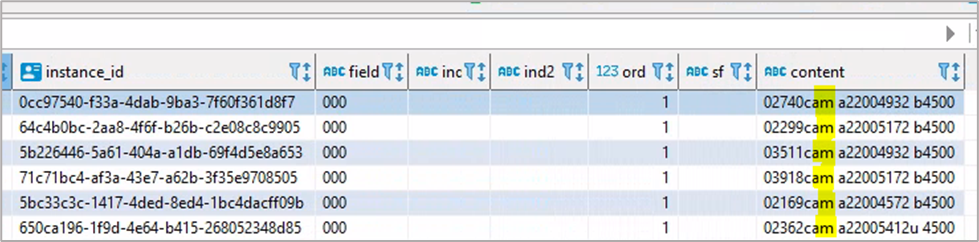
It is important to note that the ‘content’ field in the table begins with a 0, which is not included in the character count. So the 7th space indicates the 06 character, and the 8th space is for the 07 character.
The code above specifies that we are starting at the 7th space in the contents column, and we are selecting two spaces: the 7th and the 8th.
In the screenshot of the srs.marctab table below, the 7th and 8th characters are highlighted in the ‘content’ field. The ‘a’ in the 7th space shows that the resource is language material (from the 06 field) and the ‘m’ in the 8th space shows that the resource is a monograph/item (from the 07 field).