*** This version of Confluence is for testing only and contains a copy of content from June 29th 2026. No changes will be preserved. ***

...
SELECT
     al.id as audit_loan_id,
     jsonb_extract_path_text (al.jsonb, 'loan', 'status', 'name') AS loan_status__name,
     jsonb_extract_path_text (al.jsonb, 'loan', 'metadata', 'updatedByUserId') AS loan_updated_by_user_id
FROM
     folio_circulation.audit_loan AS al
...
-- 1. Embedded in text objects
In the previous examples, the elements being extracted were "text objects" within the table's JSON array, and were denoted by curly brackets { }. In this next example, we need to extract multiple values from an "array" object (denoted by square brackets [ ] ) that is embedded in a hierarchy of text elements. This calls for nested json extract statements, a strucure very similar to what we used in Access with nested "GetField" and "GetXXXBLOB" functions.
...
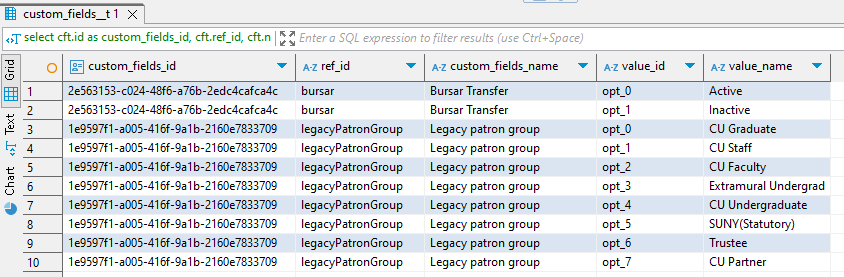
Then you would add a line in the Select stanza to show the ordinality:
values.ordinality AScustom_fields_ordinality
RESULT:
...
Sometimes you want to extract an array that is at the top-most hierarchical level of a table – that is, it is not embedded within any other object. An example of this is "departments" element in the folio_users.users table:
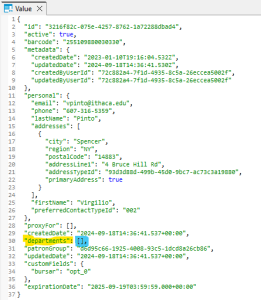
Because "departments" is an array, you still have to extract it with a cross join statement, as in the previous example. Then you need to display the array elements using the "shortcut" method in the Select stanza.
...