Date Created:    April 22, 2024     Last Updated: June 1, 2026

Overview

The Department of Athletics and Physical Education strives to provide opportunities for the well-being of students, faculty, staff, and the community. They offer a diverse variety of fitness and outdoor education, recreational services and wellness opportunities through Cornell Outdoor Education, Cornell Fitness Centers, Wellness and Recreational Services.  These groups use RecTrac for processing billing for memberships, climbing wall passes, shoe rentals and certifications.

Bursar billing is fed from RecTrac to the bursar system for memberships, day passes, etc. purchased by students on-line for Cornell Fitness Centers, Rec Services and Cornell Outdoor Education (COE). Students can also pay on-line with a credit card or at the point-of-sale device, check or credit card for memberships, day passes, or COE climbing passes. Staff can also purchase wellness or fitness center memberships with check, credit card (phone or at POS device), payroll deduction (spreadsheet provided to payroll of enrollees), CPHL - Cornell Plan for Healthy Living (waived) or request a scholarship. The SSC reconciles revenue from each system to the general ledger to ensure revenue is recorded accurately in the financial statements for the month/semester that the income is earned.

Criticality High

Frequency Daily

Turnaround Next Day

Student:  The student pays for a membership either through the bursar or with a credit card on-line.  Students can also pay in person at a POS device with cash, check or credit card.

Fitness Center Staff:  professional staff are responsible for processing transactions in RecTrac and ensuring that transactions feed over to the bursar system without error/failure. Research transactions that fail to load to the bursar. Staff also operate a POS device to accept credit card payments and are responsible for completing PCI training annually (and upon hire).

Cornell Outdoor Education (COE) Staff: staff are responsible for processing transactions in RecTrac and ensuring that transactions feed over to the bursar system without error/failure.  Staff also operate a POS device and are responsible for completing PCI training annually (and upon hire).

Unit Finance Staff: CFC Office Manager performs daily batch close outs and confirms totals.  Verifies any internal billing has been sent to the SSC for processing and confirms income is distributed correctly.

SSIT: Assist with new passcodes, set up of automated reports and bursar issues. Pull extract file for sending billing to the bursar on a weekly basis.

Shared Services Center (SSC): Reconcile deposit, bursar and credit card transactions to the GL clearing accounts and revenue. Process revenue entries to the GL to recognize revenue earned. Issues identified must be brought to the attention of the unit so they can be addressed appropriately and corrected.

  • Reports on accounts receivable balances
  • Membership applications
  • Cash, checks or credit card payments
  • Payroll deduction agreements
  • RecTrac transactions
  • Kuali Financial System GL transactions
  • Bursar System
  • RecTrac
  • Bursar
  • Kuali Financial System (KFS)
  • OAS Reporting Dashboard (KDW)
  1. Student status, if student becomes unregistered or goes on leave, bursar may reject the transaction.
  2. Transactions failing to feed to the Bursar
  3. Delayed notification of student registration status

RecTrac Income

Certain income for the Cornell Fitness Centers, Wellness Program, Rec Services, and Cornell Outdoor Education will be processed through the web-based RecTrac system.  One MID is set up specifically for RecTrac applying credit card revenue into clearing account, R033201 (WebTrac Revenue).  RecTrac is used for memberships, climbing wall shoe rentals, fitness classes, certifications.  The following fields are populated in RecTrac to determine where the revenue is applied: 

  • Passcode = Group Fitness Certifications, Memberships, Shoe Rental, Day Pass, etc
  • Short Description = payment method (credit card, Bursar, Check, etc)
  • Description = Fitness Centers, Climbing Wall, etc
  • Cost Center = Account Number

Within the system, the payment options are credit card, bursar billing and check (less frequent).  Checks received are deposited into the appropriate account.  Bursar transactions are exported and loaded into the Student and Campus Life Billing Audit tool and fed through to the Bursar, applied to student Bursar accounts and recorded in the General Ledger as revenue. 

Wellness:

For staff wishing to purchase wellness memberships can pay with check or with credit card.  Credit card payments are either taken over the phone or they can stop in and pay in person at POS device. For check payments, the customer mails in payment or they can stop in the office to present them. 

For members signing up with payroll deduction, Recreational Services sends the payroll office an excel sheet for hourly and salary employees’ enrollments.

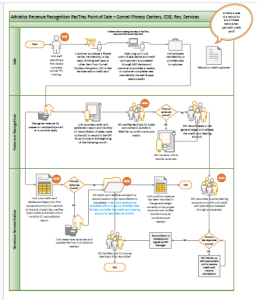
Cornell Fitness Center POS Purchase Process:

Students have the option to be billed through the bursar by year or semester. Once membership is signed, students can only get out of the agreement if they leave the university, go on leave (with letter from college), study abroad or on a case-by-case basis for exceptional issues.

  1. Student completes membership form to join the Fitness Center
  2. Professional office staff check information by reviewing student ID card in RecTrac (if student meets the requirements, they will be able to join, if not, they will not appear in RecTrac and the staff will not be able to add them). 
  3. Student information is entered into RecTrac to create a charge for the membership.
  4. Staff identify method of payment student wants to use – Bursar or CC

If Bursar is opted, the charge is entered into RecTrac.

  1. SSIT pulls a file weekly of all Bursar billed transactions to submit to the Bursar and charge the student’s account.
  2. Bursar may reject certain transactions, in which case, Fitness Center staff follow up and resolve.
  3. Bursar charges accepted flow through to the GL revenue line for Fitness Centers.

If CC – Staff match name on card to name on membership form. 

  1. Staff process sale through CC mid machine with the customer’s card.  
  2. Staff print a merchant receipt and provide the customer a receipt copy as well. 
  3. Credit Card receipts are kept in a folder with the membership forms and held until the end of the day.
  4. Staff run a settlement report from the credit card machine at the end of day. 
  5. Settlement report is verified to credit card receipts to ensure all tie out.
  6. All credit card receipts are stored in secure cabinet at the end of the day. 
  7. Staff add the settlement report transactions to the monthly CC reconciliation report and tied out. Settlement report is sent to the SSC at the beginning of the next month.

RecTrac Reconciliation  

Income flowing through the RecTrac system will be reconciled according to the following procedures: 

  1. A&PE CFC Office Manager (weekly) 
    1. Close of each day - confirm batch totals equal cash, check, and credit card receipts. 
    2. Research, document, and make necessary changes/notes in the RecTrac system.  
    3. Confirm Bursar billing revenue agrees with KFS general ledger. 
    4. Confirm internal billing information has been forwarded to SSC for processing.
    5. Confirm income is accurately reflected within each class/membership. 
    6. Research, document, and make necessary changes/notes in the RecTrac system. 
    7. Forward information on any discrepancies to the SSC 
  2. A&PE CFC Office Manager (monthly) 
    1. Review transactions to confirm income has been credited to the correct accounts. 
    2. Research and correct any discrepancies. 
  3. SSC (monthly)  
    1. Receive automated email from RecTrac with online credit card activity (WebTrac) 
      • Pivot data to reflect account numbers and income totals hitting the clearing account.
      • Review Card Connect and compare credit card income to RecTrac system. 
      • Process edoc to record RecTrac income in KFS appropriately.

      b. Receive automated email from RecTrac with all other income activity (cash, checks, bursar, etc.). 

      • Pivot data to reflect account numbers and income totals hitting each revenue source 
      • Compare cash/check totals to AD edoc. 
      • Compare Bursar totals to Bursar report from IT and Bursar activity in KFS. 
      • Compare credit card totals to Card Connect report and climbing wall activity in clearing account.

     c. Process edoc to record RecTrac income in KFS appropriately for climbing wall credit card activity (if necessary)

    d. Follow up with the appropriate unit(s) regarding any income discrepancies.

Key Risks

Key Controls

Transactions not fed to Bursar from originating system.

1.       Reconciliations are done monthly to verify all billed transactions in RecTrac reconcile to the bursar transactions and the KFS GL total for the month.

2.       Variances are researched by unit professional staff, and reversals, credits or corrections are made as needed.

Billing Errors: Mistakes in invoicing, such as incorrect pricing, wrong item, etc. can lead to disputes with customer. Billing errors may result from manual data entry or inadequate review processes.

1.       If errors are made in billing to the Bursar, they may be either rejected and then need to be resolved by the staff, or partial or full credit may be applied.

Data Security and Privacy: Handling sensitive customer information, such as payment details and personal data, exposes the university to risks of data breaches, identity theft, and PCI regulatory non-compliance.

1.       Staff with access to credit card data are required to complete PCI training when hired and annually thereafter.


Revenue not reconciled to the GL: Reconciliation of subsidiary systems to the general ledger is a fundamental control.

1.       Processes are in place for the unit and the SSC to ensure revenue is reconciled every month.

Financial records misstated:  Income results could be understated if transactions are not processed fully through to the GL.

1.       Revenue reconciliations for RecTrac are done monthly.

2.       Financial statements are reviewed to budget by unit staff.


  • Student enrollment
  • Fitness Center Membership Trends
  • Wellness Membership Trends
  • Budget vs actual results
  • CFC – Cornell Fitness Centers
  • COE – Cornell Outdoor Education
  • CPHL – Cornell Plan for Healthy Living – employee health plan that allows staff to sign up for free fitness center memberships.
  • GL – General Ledger
  • KFS – Kuali Financial System, Cornell’s financial transaction processing system.
  • OAS – Oracle Analytics Server, financial reporting tool (formerly known as OBIEE)
  • RecTrac – system used by Cornell Fitness Centers, Rec Services, COE
  • SSC – Shared Services Center that processes financial transactions for Athletics


  • No labels