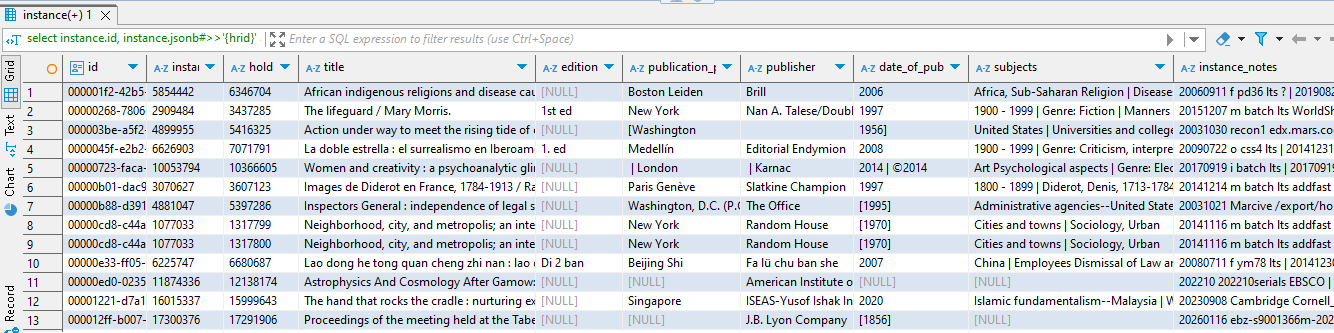
The following jsonb extract expressions will be used to get values from the json data array of a table.
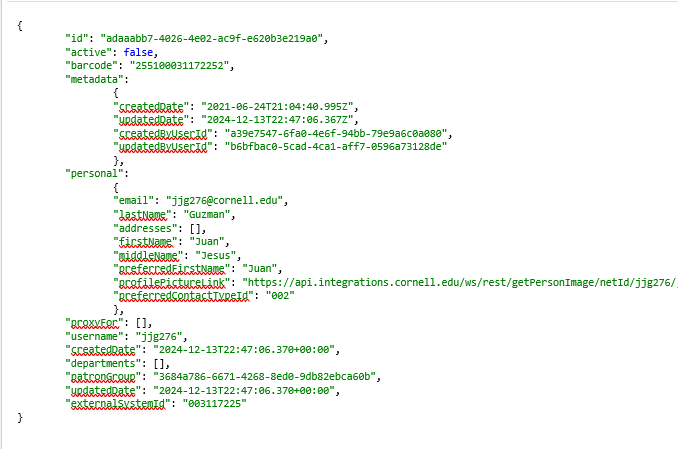
Example: In the data array of the folio_users.user table (screenshot below), the field 'active' (a boolean value showing patron status) is a "first level" hierarchical field. Other first-level fields include: id, barcode, metadata, personal, proxyFor, username, createdDate, departments, patronGroup, updatedDate and externalSystemId.
You will see that some of the first-level fields have subordinate data in second-levels fields ("metadata" and "personal" have subordinate fields). The following query will get the data out of first-level fields, when those fields don't have subordinate fields:
SELECT
users.id AS user_id,
jsonb_extract_path_text (users.jsonb, 'active')::boolean AS patron_status – "active" is a boolean value (true or false)
FROM folio_users.users
The following expression will also get the value for "active":
SELECT
users.id AS user_id,
users.jsonb #>> '{active}" AS patron_status
FROM folio_users.users
In the example below, 'lastName' and 'firstName' are both "second-level" fields found under "personal."
SELECT
users.id AS user_id,
jsonb_extract_path_text (users.jsonb, 'personal', 'lastName') AS user_last_name,
jsonb_extract_path_text (users.jsonb, 'personal', 'firstName') AS user_first_name
FROM
folio_users.users
The following expression will also get "lastName" and "firstName":
SELECT
users.id AS user_id,
users.jsonb #>> '{personal, lastName}' AS user_last_name
users.jsonb #>> '{personal, firstName}' AS user_first_name
FROM
folio_users.users
Some tables, such as the folio_circulation.audit_loan table, have third-level data fields that are comprised of text objects (they can also have array objects, but that is covered in the next section – note: array objects can appear at any level within the json data). The json statement for extracting third-level text fields is exactly the same as for first- and second-level data fields, except there are three fields listed in the parentheses, instead of just one or two.
In this example, "name" and "updatedByUserId" are third-level fields.
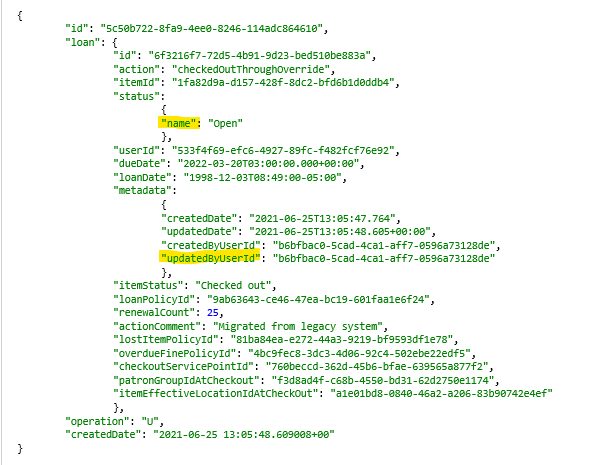
This is the code to extract them. Note that the fields listed within the parentheses must be in the same hierarchical order as they appear in the json data.
SELECT
audit_loan.id AS audit_loan_id,
jsonb_extract_path_text (audit_loan.jsonb, 'loan', 'status', 'name') AS loan_status_name,
jsonb_extract_path_text (audit_loan.jsonb, 'loan', 'metadata', 'updatedByUserId') AS loan_updated_by_user_id
FROM
folio_circulation.audit_loan
The following expression will also get the third-level values:
SELECT
audit_loan.id AS audit_loan_id,
audit_loan.jsonb #>> '{loan, status, name}' AS loan_status__name,
audit_loan.jsonb #>> '{loan, metadata, updatedByUserId}' AS loan_updated_by_user_id
FROM
folio_circulation.audit_loan
-- 1. Arrays embedded in text objects
In the previous examples, the elements being extracted were "text objects" within the table's JSON array, and were denoted by curly brackets { }. In this next example, we need to extract multiple values from an "array" object (denoted by square brackets [ ] ) that is embedded in a hierarchy of text elements. This calls for nested json extract statements, a structure very similar to what we used in Access with nested "GetField" and "GetXXXBLOB" functions.
When extracting arrays embedded in text objects, it's usually best to use a "cross join lateral" statement in the FROM stanza. This cross join creates a "json object" that can then be further extracted in the Select stanza. Warning: the records retrieved through a cross join will only be those that have the array elements you're looking for; records without those elements will drop out. See "Alternative to using cross joins" (that captures all the records) at end of this page.
It's also possible to NOT use a cross join at all, but to nest the json extract statements in one long expression in the Select stanza. However, you lose the ability to include the ordinality of the values extracted. See Summary at the end of this page ("Three ways to extract arrays").
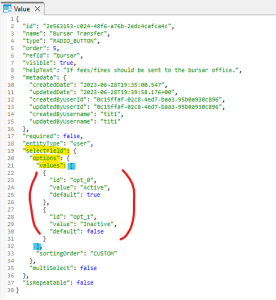
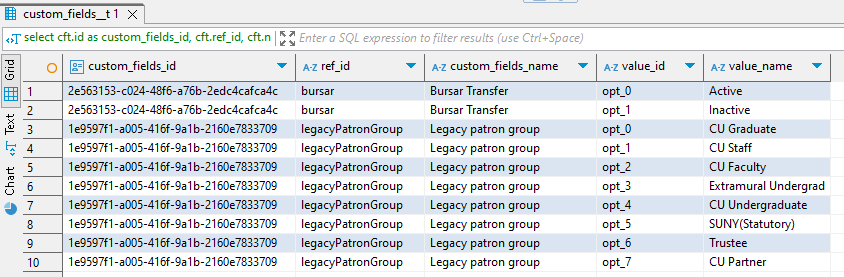
The example below uses the folio_users.custom_fields table, which has an embedded array called "values" containg three fields: "id","value" and "default". The "Values"array is embedded within two preceding text objects:
Here is what the custom_fields jsonb data array looks like:
The code to do that is:
SELECT
cft.id AS custom_fields_id,
cft.ref_id,
cft.name AS custom_fields_name,
jsonb_extract_path_text (values.jsonb,'id') AS value_id, ----- this extracts the "id" element from the values object that we created in the cross join below
jsonb_extract_path_text (values.jsonb,'value') AS value_name ----- this extracts the "value" element from the values object that we created in the cross join below
------ NOTE: the two json extract statements above can be replaced by a shorthand formula, using the "#>>" operator:
values.jsonb #>> '{id}'
values.jsonb #>> '{value}'
FROM folio_users.custom_fields AS cf
CROSS JOIN LATERAL jsonb_array_elements (jsonb_extract_path (cf.jsonb, 'selectField', 'options', 'values')) AS values (jsonb)
----- "jsonb_array_elements" works on the 'values' array object at the end of the parentheses; we use this extract expression because "values" is an array
----- "jsonb_extract_path" looks for the path of elements to follow in order to get to the values array – the elements listed must be in the same hierarchical order as they appear in the table
----- the entire cross join statement produces a jsonb object which I named "values" (note: what you name this object is totally arbitrary - you could call it "stuff" if you felt like it – "stuff (jsonb)")
LEFT JOIN folio_users.custom_fields__t AS cft
ON jsonb_extract_path_text (cf.jsonb,'id')::UUID = cft.id
------ the custom_fields__t table has the custom fields id, the ref_id and the custom fields name (joining to this table is not required – I just wanted to include those fields in the results)
ORDER BY name, jsonb_extract_path_text (values.jsonb,'id'), jsonb_extract_path_text (values.jsonb,'value')
RESULT:
Sometimes you want to extract an array that is at the top-most hierarchical level of a table – that is, it is not embedded within any other object. An example of this is "departments" element in the folio_users.users table:
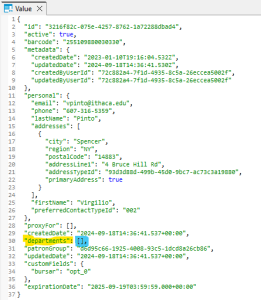
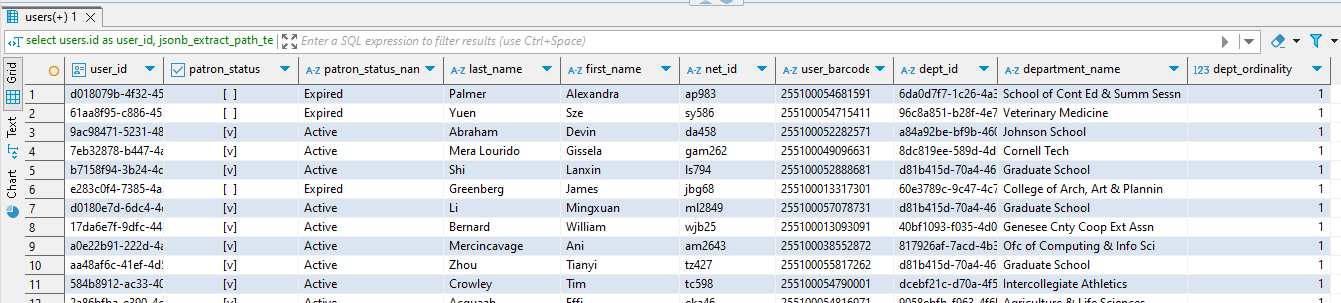
Because "departments" is an array, you still have to extract it with a cross join statement, as in the previous example. In the code below, I am using the shorthand method to extract the various elements:
RESULT:
This illustrates three methods for extracting an embedded array from the folio_users.custom_fields table (example)
-- 1. No cross join -- just use triple-nested json extract statements in the Select clause
SELECT
cft.id AS custom_fields_id,
cft.ref_id,
cft.name AS custom_fields_name,
jsonb_extract_path_text (jsonb_array_elements (jsonb_extract_path (cf.jsonb, 'selectField', 'options', 'values')),'id') AS value_id,
jsonb_extract_path_text (jsonb_array_elements (jsonb_extract_path (cf.jsonb, 'selectField', 'options', 'values')),'value') AS value_name
FROM folio_users.custom_fields AS cf
LEFT JOIN folio_users.custom_fields__t AS cft
ON jsonb_extract_path_text (cf.jsonb,'id')::UUID= cft.id
ORDER BY name, value_id, value_name
;
-- 2. Use a cross join and put the result in a single-level json extract statement in the Select clause
SELECT
cft.id AS custom_fields_id,
cft.ref_id,
cft.name AS custom_fields_name,
jsonb_extract_path_text (values.jsonb,'id') AS value_id,
jsonb_extract_path_text (values.jsonb,'value') AS value_name
FROM folio_users.custom_fields AS cf
CROSS JOIN LATERAL
jsonb_array_elements (jsonb_extract_path (cf.jsonb, 'selectField', 'options', 'values'))
AS values (jsonb)
LEFT JOIN folio_users.custom_fields__t AS cft
ON jsonb_extract_path_text (cf.jsonb,'id') :: UUID= cft.id
ORDER BY name, jsonb_extract_path_text (values.jsonb,'id'), jsonb_extract_path_text (values.jsonb,'value')
;
-- 3. Use a cross join but use the shortcut method in the Select clause to get the values in the array
SELECT
cft.id AS custom_fields_id,
cft.ref_id,
cft.name AS custom_fields_name,
values.jsonb #>> '{id}' AS value_id,
values.jsonb #>> '{value}' AS value_name
FROM folio_users.custom_fields AS cf
CROSS JOIN LATERAL
jsonb_array_elements (jsonb_extract_path (cf.jsonb, 'selectField', 'options', 'values'))
AS values (jsonb)
LEFT JOIN folio_users.custom_fields__t AS cft
ON jsonb_extract_path_text (cf.jsonb,'id') :: UUID= cft.id
ORDER BY name, jsonb_extract_path_text (values.jsonb,'id'), jsonb_extract_path_text (values.jsonb,'value')
---- can also use: ORDER BY name, values.jsonb #>> '{id}', values.jsonb #>> '{value}'
Cross join lateral queries will return only those records that have all the array elements you are trying to find. It's possible to use multiple cross join statements in the FROM stanza to get multiple array values (for example, subjects, contributors and languages from the instance table) - but the results will show only those records that have ALL the array elements specified in the cross joins.
If you want to find records that have any or all of the particular array fields, AND show all the records that don't have any of those array fields, the better plan is to do a 2-part query.
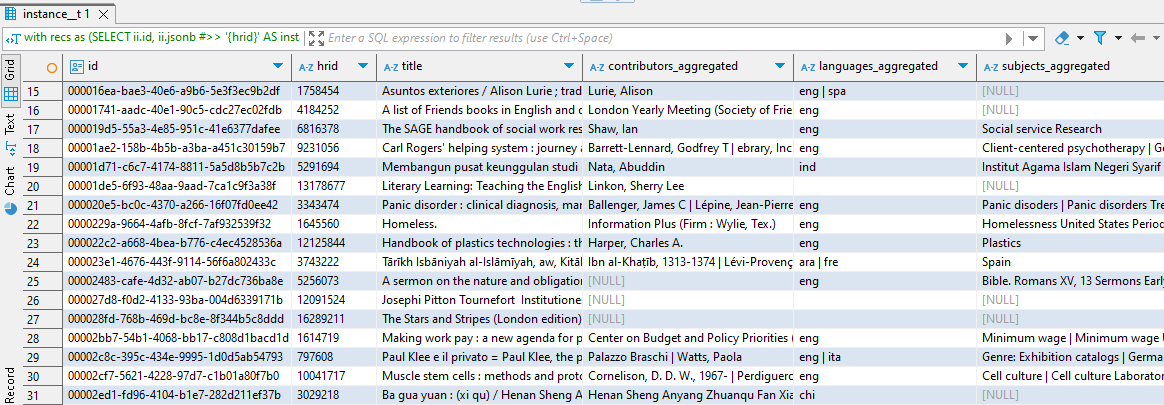
In this example, we're finding three array elements from the folio_inventory.instance table: contributors, languages, and subjects, then joining the result to a complete set of instance records.
WITH recs AS ----- Get the array elements for contributors, languages and subjects using nested jsonb extract statements in the Select clause
(SELECT
ii.id,
ii.jsonb #>> '{hrid}' AS instance_hrid, ---- first level text extract
ii.jsonb #>> '{title}' AS title, ---- first level text extract
jsonb_extract_path_text (jsonb_array_elements (jsonb_extract_path (ii.jsonb, 'contributors')),'name') AS contributors, -- contributors array extract (second-level extract)
(jsonb_array_elements (jsonb_extract_path (ii.jsonb,'languages'))) #>>'{}' as languages, ----- languages array extract (top-level extract) – note the empty curly brackets
jsonb_extract_path_text (jsonb_array_elements (jsonb_extract_path (ii.jsonb, 'subjects')),'value') as subjects ----- subject array extract (second-level extract)
FROM folio_inventory.instance AS ii
)
SELECT ------- Get all the records from the instance__t table; left join the results of the first query that got the array elements
instance__t.id,
instance__t.hrid,
instance__t.title,
string_agg (distinct recs.contributors,' | ') as contributors_aggregated,
string_agg (distinct recs.languages,' | ') as languages_aggregated,
string_agg (distinct recs.subjects,' | ') as subjects_aggregated
FROM folio_inventory.instance__t
LEFT JOIN recs
ON instance__t.id = recs.id
GROUP BY
instance__t.id,
instance__t.hrid,
instance__t.title
;
;
RESULT:
select
instance.id,
instance.jsonb#>>'{hrid}' as instance_hrid,
holdings_record__t.hrid as holdings_hrid,
instance.jsonb#>>'{title}' as title,
string_agg (distinct editns.jsonb#>>'{}',' | ') as editions,
string_agg (distinct pub.jsonb#>>'{place}',' | ') as publication_place,
string_agg (distinct pub.jsonb#>>'{publisher}',' | ') as publisher,
string_agg (distinct pub.jsonb#>>'{dateOfPublication}',' | ') as date_of_publication,
string_agg (distinct subj.jsonb#>>'{value}',' | ') as subjects,
string_agg (distinct notesext.jsonb#>>'{note}',' | ') as instance_notes
from folio_inventory.instance
left join lateral jsonb_array_elements (jsonb_extract_path (instance.jsonb,'editions')) as editns (jsonb)
on true
left join lateral jsonb_array_elements (jsonb_extract_path (instance.jsonb,'subjects')) as subj (jsonb)
on true
left join lateral jsonb_array_elements (jsonb_extract_path (instance.jsonb,'notes')) as notesext (jsonb)
on true
left join lateral jsonb_array_elements (jsonb_extract_path (instance.jsonb,'publication')) as pub (jsonb)
on true
left join folio_inventory.holdings_record__t
on instance.id = holdings_record__t.instance_id
group by
instance.id,
instance.jsonb#>>'{hrid}',
holdings_record__t.hrid,
instance.jsonb#>>'{title}'
;
RESULT: