For URL, use the UNIX URIs below:
Printer Name | UNIX SMB URI | Accessible by |
|---|---|---|
Printer Name | UNIX SMB URI | Accessible by |
| Cad Room | smb://win2.net-print.cornell.edu/cnf-cad-1c | CNF Users & Staff |
| Togging | smb://win2.net-print.cornell.edu/cnf-togging-2c | CNF Users & Staff |
| Visitor Office | smb://win2.net-print.cornell.edu/cnf-gradoffice | Staff & Users with Visitor Office Access |
| Konica | smb://win2.net-print.cornell.edu/cnf-konica-color | CNF Staff Only |
| LJ4700 | smb://win2.net-print.cornell.edu/cnf-prnt250lj | CNF Users during normal CNF office business hours (CNF Staff anytime) |
| Office 262 | smb://win2.net-print.cornell.edu/cnf-prnt262 | CNF Staff Only |
Follow the instructions on the "Print with Net-Print for Mac" IT@Cornell page.
If prompted for your username when printing, format your NetID/GuestID as follows: cornell\<GuestID> OR cornell\<NetID>
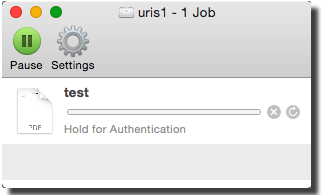
If your job is not printing and the print queue is showing a status of "Hold for Authentication", this usually means that you incorrectly entered your username/password and saved that incorrectly entered username/password in the Mac KeyChain.