e
NMR uses SFS shares to enable researchers to copy files from instrument computers (Windows and Linux) to their own computers (Windows, MacOS. Any Linux?!) |
GC Mate's account is a single user account, <AS-CHM-GCMate>.
Behavior desired on GCMate computer (Windows):
Account |
Who |
Comments |
NMR Root Folder |
Group Folder |
User Folder |
|---|---|---|---|---|---|
AS-CHM-NMR-ADM |
Acct - NMR Special Admin |
See "AS-CHM-NMR-ShareAdmin" group account. |
n/a |
n/a |
n/a |
AS-CHM-NMR-ShareAdmin |
Group - NMR machine admin accounts. |
Oliver never got the AMC88-ADM account to work. (The NMR-ADM account worked fine.) Why is one working, but not the other? |
Modify |
Modify |
Modify |
AS-CHM-NMR-ShareGroup |
Groups - Research Group members |
|
Ideal: List folders, gaining access only to their group's folder. But don't do if increases by too much the complexity of admin'ing share or de-bugging share issues. (Inheritance issues.) |
Modify |
Modify |
AS-Chemistry-IT |
Group - Chemistry IT |
Q: Best if not use our normal NetID-based AD account, and reserve those accounts as a "normal" user? |
Full |
Full |
Full |
AS-CHM-NMR-ShareInstAccts |
Acct - Instrument Account |
Currently OK, but not ideal: Although a file can't be copied or opened, it can be replaced with an identically named file. |
Folders, sub-folders and files: Write only |
Write only |
Write only |
AS-CHM-NMR-ShareInstAccts |
Acct - Instrument Account |
Currently OK, but not ideal: Although a new folder can be created, it can't be named by the user. Only "New Folder" (or "New Folder (2)", etc.) get created. |
Folder and sub-folders: List folder contents |
List folder contents |
List folder contents |
AS-CHM-NMR-SharePublic |
Group - Researchers without an account |
For ad hoc users to pick up their data (read-only; no write/ delete). Must have their NetID credentials, but that's it. They don't have to be added to an AD group, etc. |
See this section for "AS-CHM-NMR-ShareGroup", above. |
Read & execute |
Read & execute |
Account |
Purpose |
|---|---|
AS-CHM-NMRINST1 |
Test account. To be used as a test instrument account to write to the SFS drive from Linux. |
AS-CHM-ChemITsfs |
A user testing account for ChemIT staff since their non-DOC accounts have too many privileges in SFS-land. |
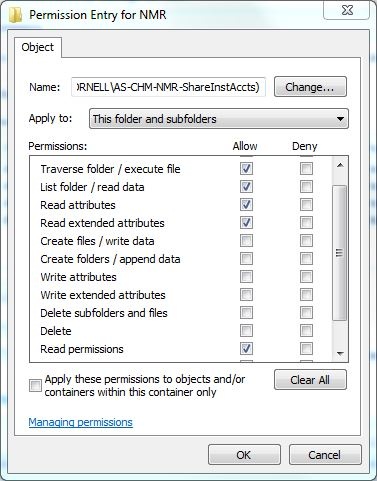
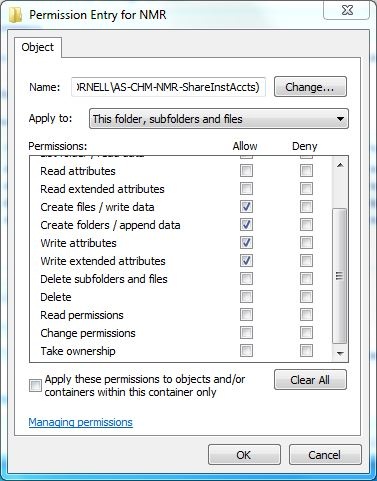
Oliver set these permission for AS-CHM-NMR-ShareInstAccts to get the almost-perfect permissions on the GCMate computer:
Allow:
Setting the above permission in turn creates two entries for AS-CHM-NMR-ShareInstAccts under the Advanced security settings. Click on the links to get a screen-shot of the detailed permissions:
Note: The detailed permission settings are created when one just selects "List folder contents" and "Write". Fortunately one doesn't have to hand-select these detailed (Advanced) permissions, and they are simply documented here as an FYI.