Welcome to the Cornell Stack!
This page is designed to walk you through some of the features and areas of your Cornell Stack VM and space.
Suggestions are always appreciated, so please let us know if there is material that is unclear, could be improved, or additions that we should make to this page. Thank you!
Getting Started
Permits and Access Control
Instance Permits
By default, your new Cornell Stack instance(s) will come with a permit of the form cit.lamp.<*instance name>.* or an Active Directory "permit" group in the form on cit-lamp*-<instance name>*, unless you provide one. The initial membership of this permit will be the primary contact, the secondary contact, and all additional authorized users listed on the signup form. Additionally, the primary and secondary contacts for the instance will also have the update privilege to update membership to the permit via the ActiveRoles Server interface at https://admgmt.activedirectory.cornell.edu/permits/default.aspx (Internet Explorer required). Instructions for using the interface can be found at http://www.cit.cornell.edu/services/active_directory/howto/videos/manage_legacy_permits/index.cfm
Hosting Dashboard and Instance Splash page
- Once your Hosting Virtual Machine (VM) has been created and instance(s) set up, you can access information and the VM from the Hosting Dashboard via https://dashboard.hosting.cornell.edu. This is a one stop shop to controlling services on your VM (yes you can stop and start your instances), as well as finding specific information about your instance(s). The Hosting Dashboard should list all VM's you have access to based on the AD Group or Permit that's been assigned to them.
- Now you've logged into the Hosting Dashboard, you find the VM that you were assigned, if you click on that VM name (should look like webhost###.serverfarm.cornell.edu), the dashboard takes you to the Status page of that VM. This shows you what services are running, and this is where you can stop/start/restart/configtest Apache and/or Coldfusion.
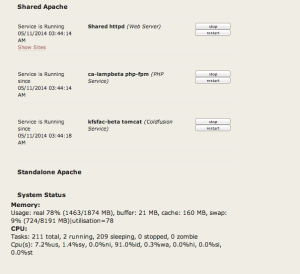
- At the bottom of the Status Page there are "Quick" links to the instances created on the VM. These are links to the Splash page of each instance(s) and any virtual hosts that have been configured for those instances.

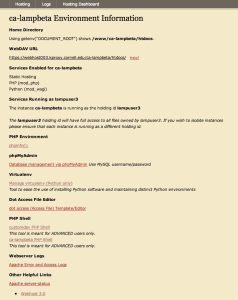
- Instance Splash Pages contain important information for that specific instance. Remember, virtual machines could be running several instances, and each instance could be serving out different websites, and potentially running different software (some with coldfusion, some not). Splash page shows you (these will vary depending on what you request to have activated on each instance):
- The Instance name
- Tabs to the Hosting pages, Logs, and Status page (service control)
- Path to the Home directory/document_root that Apache is configured for
- Webdav URL to use to upload your files
- Services enabled for this instance
- The holdingID running the instance (very important for separation of services/access permissions: see here for more information)
- Dot "." access file editor: used to modify .htaccess and .wdaccess files
- PHPShell - provides Shell-like access to the VM (there are limitations)
- Links to log files
- Apache server status
Webdav access
The Cornell Stack continues to support Webdav access to upload/modify/delete the files for your website/application. The access URL previously used for Hosting services in Coldfusion 9 and LAMP2 are no longer used here. The webdav url is specific to the VM your instance(s) lives on.
- Log into your Splash page on your VM to find the correct URL string to enter into your chosen Webdav client. It should look similar to this: "https://webhost000.kproxy.cornell.edu/<instance-name>/htdocs" where:
- Replace "webhost000" with the VM name you were given when Webservices created the VM/instances for you.
- "<instance-name>" - is the specific instance you want to modify on the above VM - can be found on the Hosting Dashboard or Splash page
The Webdav client you use is entirely up to you, but it must support HTTPS/Secure Connections. CIT does not have a recommended Webdav client, but the ones we have success with are:
- CyberDuck (Mac and Windows)
- Dreamweaver
- Mac "Connect to Server" option
- More information can be found here
Directory Layout (file locations)
Depending on what services you are running, once you've successfully connected with your webdav client, you should see something similar to the following:
Coldfusion instances
<instance-name> |
|
|
htdocs |
The root/Home for your application |
|
jars |
Directory for customer to upload/install new/additional jar files, like database drivers or custom built jars |
|
server10 |
Coldfusion instance settings and configurations. Tread lightly here - modifications in this area could break the Coldfusion install |
|
confs |
Customer created/modified apache configuration files (apache include files) |
"LAMP" instances
<instance-name> |
|
|
htdocs |
The root/Home for your application or website |
|
confs |
Customer created/modified apache configuration files (apache include files) |
A note on layouts
Roughly speaking, a hostname like yoursite.cit.cornell.edu will point to a folder on the filesystem, so that visitors of http://yoursite.cit.cornell.edu will see the contents of that folder.
One way to layout is to use subfolders to organize your site, rather than to put all of your pages in the base /htdocs directory. Your splash page will show information like:
Home Directory
Using getenv("DOCUMENT_ROOT") shows /infra/lamp/cust/lampuser1/htdocs.
Organizing your site into folders like...
htdocs |
|
yoursite1 |
|
|
index.php |
|
|
stuff.jpg |
|
yoursite2 |
|
|
index.php |
|
|
yoursite2.php |
|
|
morestuff.jpg |
|
yoursite3 |
and so forth allows to have multiple sites "living" in the same instance with virtualhosts configured to use slightly different document_roots (http://yoursite1.cit.cornell.edu points to htdocs/yoursite1/; http://yoursite2.cit.cornell.edu points to htdocs/yoursite2/; and so on).
However, you are of course free to organize your site in the best way possible for you. The new Cornell Stack also allows for multiple LAMP like instances in a Shared-Apache configuration. Please see {Small sites or apps|https://confluence.cornell.edu/x/kgz_DQ] as an example. To find out more on the Shared Apache, please see Introduction to CIT Hosting Services Cornell Stack#shared
Git/Mercurial files - EXPERIMENTAL
If you requested to have git or mercurial installed and setup on your VM and instance, you will see additional subdirectories like "repos", "git", or "hg". For more information on version control options and setup, please see GIT Info or Mercurial Info.
 HoldingID - what is this?
The Cornell Stack allows mulitple holding ID's to permit and restrict access across applications living on the same VM. This is ideal for those customers who may want to host multiple instances on one VM but provide more isolation between the applications. Utilizing and changing the holdingIDs and file permissions should be reserved for experienced web developers and those knowledgable in Linux file permissions.
- The "lamp" user should be viewed as an administrative account and can access all files on the filesystem
- "lampuser##" users are specific to each instance, unless otherwise requested.
- PHPShell access is how customers can use command-line access to move around in the environment, and change permissions as needed.
- Please see Holding IDs - runas for more information.
More Information available within our Web Hosting Guides. We will update and add information to this area as the Cornell Stack evolves, or if customers request more information on specific topics.