 .
.
|
Author: John Singleton, Cornell University Problem Specification |
For the mesh we will generate a mapped face mesh with 200 elements. The horizontal edges will have 10 divisions and the vertical edges will have 20 divisions.
In order to start Mechanical (Double Click) Model, .
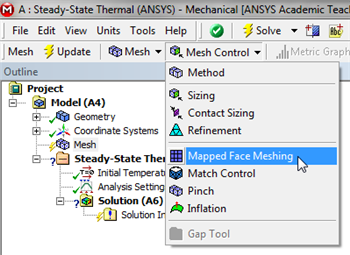
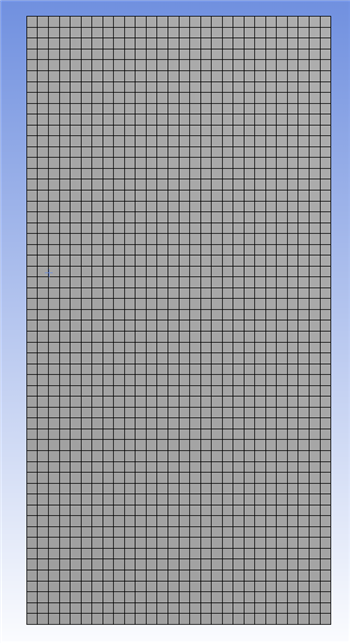
For this simulation we will use a mapped face mesh. A mapped face mesh is that a mesh that can be mapped to a rectangular domain. The domain for this simulation is already rectangular, thus mapped faced meshing will yield a rectangular grid mesh. In order to implement the mapped face meshing, first (Click) Mesh,  . Next, (Click) Mesh Control > Mapped Face Meshing, as shown below.
https://confluence.cornell.edu/download/attachments/146918513/MFM_Full.png |
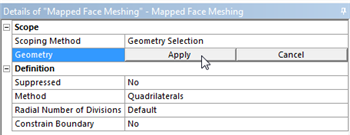
 ,then click on the rectangle. Once the rectangle has been selected (Click) Apply in the "Details of Mapped Face Meshing" table as shown below.
https://confluence.cornell.edu/download/attachments/146918513/DMFM_Full.png |
 , in order to generate the mesh. You should obtain the following mesh.
https://confluence.cornell.edu/download/attachments/146918513/GenMesh_Full.png |
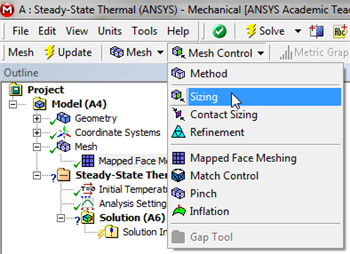
At this point the number of divisions along the sides of the rectangle will be specified. We will us 20 divisions along the vertical sides and 10 divisions along the horizontal sides. We will work with the horizontal side first. In order to implement the edge sizing, first (Click) Mesh, . Next, (Click) Mesh Control > Sizing, as shown below.
https://confluence.cornell.edu/download/attachments/146918513/InsSizing_Full.png |
 . Then click on the bottom edge of the rectangle and (Click) Apply in the "Details of Sizing" table as shown below.
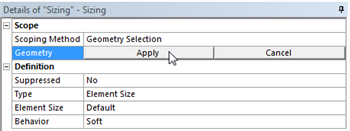
https://confluence.cornell.edu/download/attachments/146918513/DetSizing_Full.png |
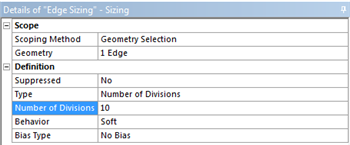
https://confluence.cornell.edu/download/attachments/146918513/detdet_full.png |
, in order to generate the new mesh. You should then obtain the following mesh.
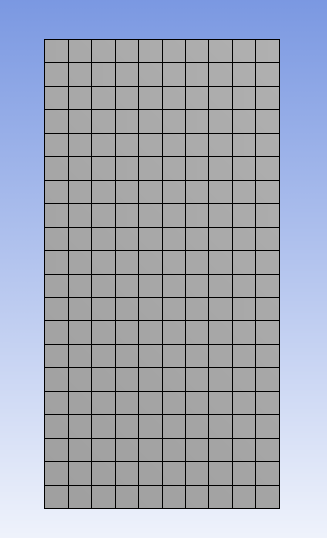
This completes the meshing process for this simulation.
Save the project now. Do not close Mechanical.
Go to Step 4: Setup (Physics)
See and rate the complete Learning Module
Go to all ANSYS Learning Modules