|
Author: John Singleton, Cornell University Problem Specification |
In this section several outputs will be specified before we have ANSYS solve.
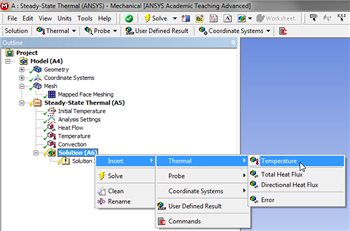
To specify the temperature as an output (Right Click) Solution > Insert > Thermal > Temperature, as shown below.
https://confluence.cornell.edu/download/attachments/146918518/InsTempRes_Full.png |
In order to have ANSYS solve for the Total Heat Flux, (Right Click) Solution > Insert > Thermal > Total Heat Flux, as shown below.
https://confluence.cornell.edu/download/attachments/146918518/InsTotHeatFlux_Full.png |
In order to have ANSYS solve for the Directional Heat Flux, (Right Click) Solution > Insert > Thermal > Directional Heat Flux, as shown below.
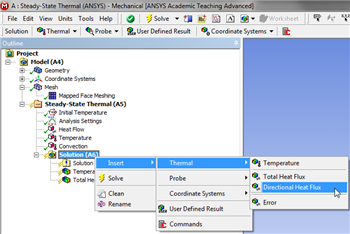
https://confluence.cornell.edu/download/attachments/146918518/InsDirectHeatFlux_Full.png |
In order to have ANSYS solve for the previously defined results (Click) Solve,  .
.