You are viewing an old version of this page. View the current version.
Compare with Current
View Page History
Version 1
Next »
Sizing
- The right size for the right spot: If an image is only used as a story image (but not a hero), size it accordingly at a width of 840 px, 72dpi, with a 75 quality, and a 0.1 blur.
- If your featured image is also going to be a hero on the news homepage, upload a 2000px wide image, still at 72dpi, with a 75 quality, and a 0.1 blur.
- Otherwise, upload an image with a width of 840px for your featured image.
- Favor landscape aspect ratios: 4:3, 3:2, 16:10, or 16:9.
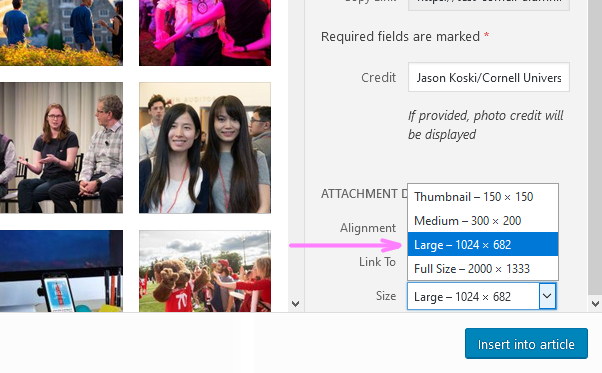
- Are you using an image already uploaded to the media library? If the image is larger than 840px in width, make sure to insert it as a large image and not a full-size image.
- For photos, use JPEG at 72 dpi, with a 75 quality, and a 0.1 blur.
- For typography-based images or visuals/infographics, consider PNG (experiment with optimization in Photoshop)
SEO
- Make sure that the SEO keyword is in the filename.
- Use dashes, not underscores, to separate words in the filename.
Testing
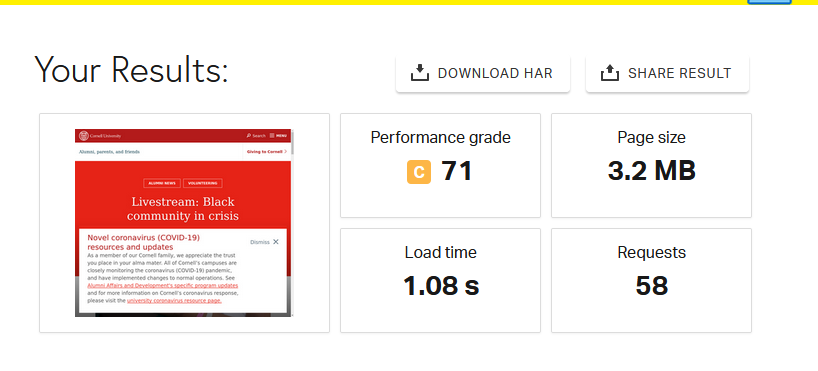 An example of Pingdom speed test results
- Keep an eye on the Page Size. We will eventually establish a baseline. For now, aim between 1.5 and 2.5 MB.
- This might mean fewer photographs.

 user-b646f on Jun 30, 2020
2 minute read
user-b646f on Jun 30, 2020
2 minute read