| Include Page |
|---|
| ANSYS Google Analytics |
|---|
| ANSYS Google Analytics |
|---|
|
| Include Page |
|---|
| Modal Analysis of a Satellite - Panel |
|---|
| Modal Analysis of a Satellite - Panel |
|---|
|
Numerical
Solution
In order to obtain modal shapes and their corresponding frequencies, we must insert a total deformation graphic for each mode we asked the solver to find in Analysis Settings. Do this by right clicking Solution > Insert > Deformation > Total.
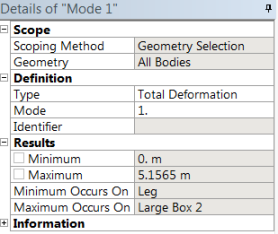
Right click on the newly created Total Deformation tab and rename it Mode 1. We must assign each total deformation to a specific mode. Do this by selecting Mode 1 and setting the Mode number under Definition to 1. Repeat this process for modes 2 through 5. The details window for Mode 1 deformation is pictured below.
Go to Step 6 - : Numerical Results
Go to all ANSYS Learning Modules
 Sign-up for free online course on ANSYS simulations!