*** This version of Confluence is for testing only and contains a copy of content from June 29th 2026. No changes will be preserved. ***

Tan | ts864@cornell.edu
Currently, the way services are deployed is basically running their Docker containers on AWS EC2 instances. Within each container, a Flask service is hosted using Gunicorn instead of native Flask to make the service more fault-tolerant.
...
| Environment | IP address | Domain | Port | Sample URL | Key pair file |
|---|---|---|---|---|---|
| Mobile (Online) Test | 54.163.4.203 |
(deprecated: on-test.diaper.cf) | 5001 | https://mobile-test.diaper-project.cfcom:5001/api/monitoring | DIAPER confidential > AWS EC2 key files > DIAPER-test-key |
| Dashboard (Offline) Test | 54.243.201.107 | dashboard-test.diaper-project.cfcom | 5000 | https://dashboard-test.diaper-project.cfcom:5000/env/ | |
| Mobile (Online) Production | 35.168.248.57 |
(deprecated: on-prod.diaper.cf) | 5001 | https://mobile-prod.diaper-project.cfcom:5001/api/monitoring | DIAPER confidential > AWS EC2 key files > DIAPER-production-key |
| Dashboard (Offline) Production | 3.228.124.129 | dashboard-prod.diaper-project.cfcom | 5000 | https://dashboard-prod.diaper-project.cfcom:5000/env/ |
The procedure for deploying is the same for all environments. First, download the key pair file corresponding to the instance and run
...
| Code Block |
|---|
ssh -i /path/to/DIAPER-*-key.pem ec2-user@<domain> |
See How to ssh into AWS / BioHPC if you're having trouble
Pull your Docker image and other relevant file from GitHub. Instead of your own git account and password, the username is diapertestemail@gmail.com , and the password is the token in the login secrets.
Once pulled, navigate to the folder containing docker-compose files and run the corresponding command as explained below:
...
Now you can log out and the service will continue running on the EC2 instance.
...
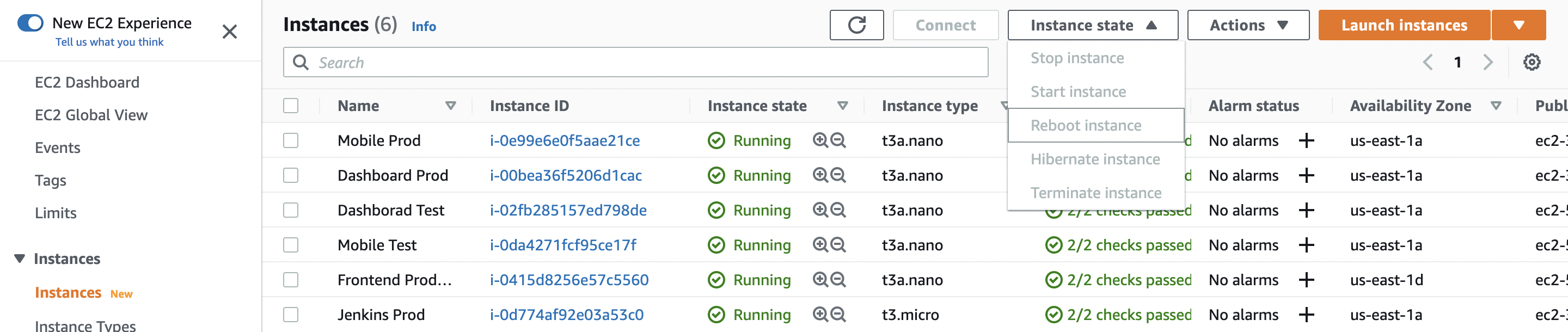
2. If the problem persists, connect to the relevant server and run the deployment script:
| Code Block |
|---|
// For test environments.
./deploy.sh -n "Your Name" -m "Reason for deployment" test

// For production environments.
./deploy.sh -n "Your Name" -m "Reason for deployment" prod |
The particular issue may be highlighted during the execution of the above command.
If you are experiencing timeout when connecting to the BioHPC database, it' probably because the EC2 instance isn't connected to Cornell's VPN. Check whether the VPN is connected with
...
and enter necessary information as prompted.
