*** This version of Confluence is for testing only and contains a copy of content from June 29th 2026. No changes will be preserved. ***

...
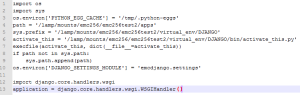
Next you'll want to upload your Django application. You can decide what path works best for you. A suggested name would be a folder called "wsgi_apps". You'll need to create a ".wsgi" that will be used by mod_wsgi. Note that the following example does not follow Django's best practice of placing the ".wsgi" file in a sub-folder called "apache".
The last step is to modify a VirtualHost include file to specify the correct settings for use with mod_wsgi. The following example makes the Django application available under "/django/" , maps media assets to "/static/admin", and makes requests to the "/django/admin/" URL require CU WebAuth.

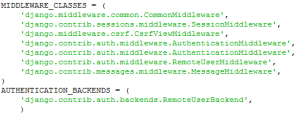
Using Django 1.3 you can configure your application to use CU WebAuth by specifying in your settings.py file (Django documentation):