*** This version of Confluence is for testing only and contains a copy of content from June 29th 2026. No changes will be preserved. ***

PROCESSING INVOICES REMOTELY
The temporary guidelines below should be followed for processing invoices remotely:
...
See the example below:
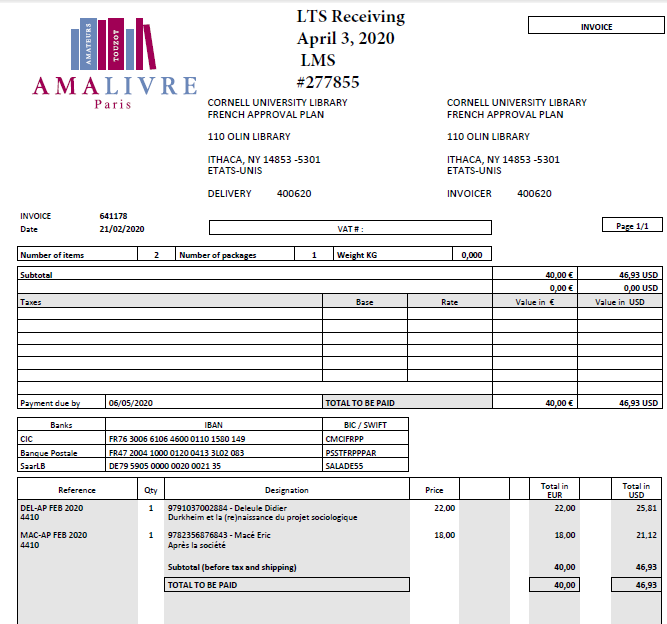
After saving, attach the form along with the invoice and send to libacct@cornell.edu with the vendor name in the Subject line along with “Invoice” and the invoice number. For example “Amazon Invoice# 12345”.
Accounting has set up a shared folder for LTS & Finance & Budget – FBO-LTS (X:\FBO-LTS).
Within the shared drive, there are 4 folders:
Please submit the invoices in the following format:
If you’re paying an e-resource invoice that requires approval by Liisa or Jesse, you should send - submit the invoice along with a copy of their email approving the invoice and send that as well.
payment as:
For those of us with pcards, Library Accounting has informed us that we are allowed to bring them home. When making a pcard payment, we should follow the same guidelines. Using the receipt typically sent by email, save it and attach the completed form. In the subject line, you should indicate that it was paid using pcard (ex. EBSCO Invoice# 1234 – paid with pcard). When prompted by central accounting to upload the receipt into the Pcard Portal, be sure to attach the form along with the receipt.
