*** This version of Confluence is for testing only and contains a copy of content from June 29th 2026. No changes will be preserved. ***

Scope: An overview of the online tool used for creating new sequential shelflist numbers for audiovisual materials and microforms. (Replaces CLAMSS)
Contact:
...
...
May 2026
Date of next review: November
...
2026
Call numbers for all microforms, sound recordings and
...
video recordings in locations that require accession numbers will be assigned by using the
...
FOLIO "generate call number" function, following the steps as outlined below:
Access the online program at http://lstools.library.cornell.edu/mysql/clamms.cgi
Click on the Shelflist (CLAMSS) button.
Choose Type of microform or multimedia from drop down menu.
Select Videodisc for DVD or blu-ray format and assign next available DVD number.
From Location drop down menu, choose appropriate library location.
To add a number:
Click on Add Microforms Holding or Add Multimedia Holding button as appropriate. This brings you to the next screen allowing you to assign the next sequential accession number for the desired location. Use number that follows the number in the Last Used area. Please try not to skip numbers.
Filling in the first and second boxes of the assignment screen is mandatory. Use the box labelled New Notes as appropriate.
Click on Submit.
To delete a number:
...
In the FOLIO Holdings record, select the Call number type "Other scheme." Then click on "Generate call number" which appears beneath the Call number entry box.
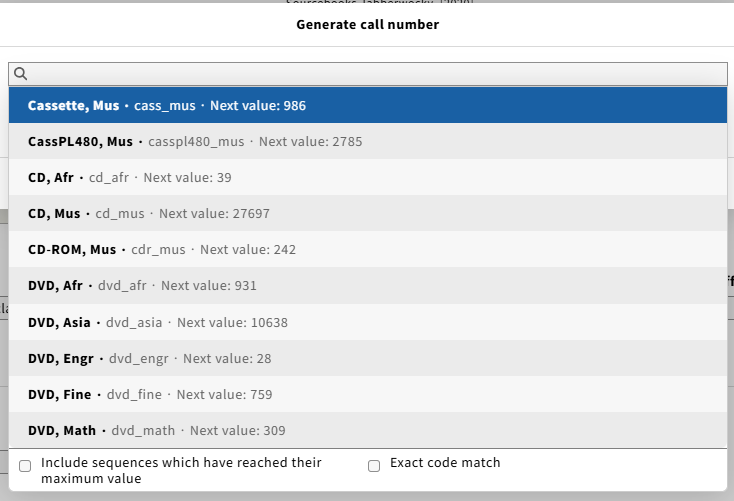
This opens a list of defined sequences based on material type and location.
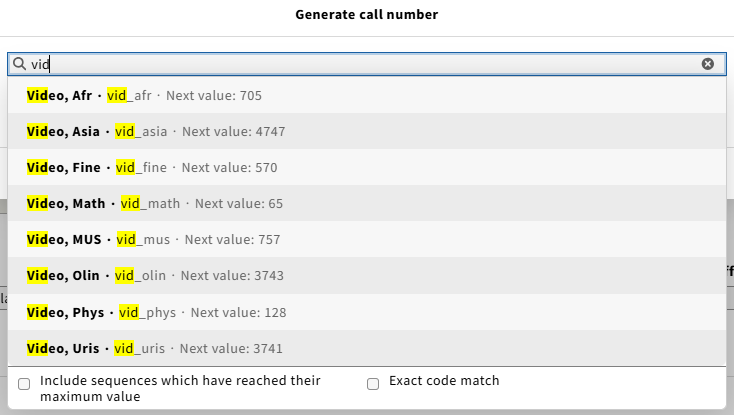
Select the appropriate material type and location.
You may need to type the beginning of either the location or the material type to find the sequence you need. See illustrations.
The Call number generator will select the next number in the appropriate sequence and add it, along with any other standard text for that material type and location. Once the number is assigned, the field can still be edited, so be careful not to change the number.
Make sure that the permanent location and the location you have chosen for the call number generation match.
If a number is erroneously assigned, reach out to a cataloging supervisor.
For more information about this function, see Inventory: Call number generator and settings.