*** This version of Confluence is for testing only and contains a copy of content from June 29th 2026. No changes will be preserved. ***

...
Unit: Receiving and Documents
Date last updated: 0911/1318/20242025
Date of next review: September 20252026
...
United States Depository
United Nations Depository
European Union Depository
Mailing List Documents
Receiving Government Documents (LTS Procedure #71)Orders
...
A. U.S. DEPOSITORY ***AS OF JANUARY 1, 2025 WE WILL ONLY RECEIVE ESSENTIAL TITLES SELECTED FROM A EMAIL NOTIFICATION IN PRINT. ALL DEPOSITORY PUBLICATIONS ARE NOW ELECTRONIC ONLY. IF THEY ARE RECEIVED FOLLOW THE GUIDELINES BELOW***
1. Our U.S. Depository Library number (LIB#) is 0388.
...
B. United Nations Depository ***AS OF MARCH 2020 WE REQUESTED TO CANCEL ALL UN DEPOSITORY PUBLICATIONS IN PRINT (ALL ARE AVAILABLE ELECTRONICALLY)*** IF SOMETHING SHOULD SHOW UP FOLLOW THE GUIDELINES BELOW.
1. Our U.N. Depository Library number is DL-6.
...
3. Serial volumes which come on standing orders with invoices are paid and checked in on receipt. Create a FOLIO invoice record. Pay the invoice, adding the POLs (the title or titles) to the FOLIO invoice record, inputting any required information and saving the invoice. Pay Postage (Fund 999) under "Adjustments" unless you are paying an invoice with only one title and then you pay the invoice total on the book fund on the POL.
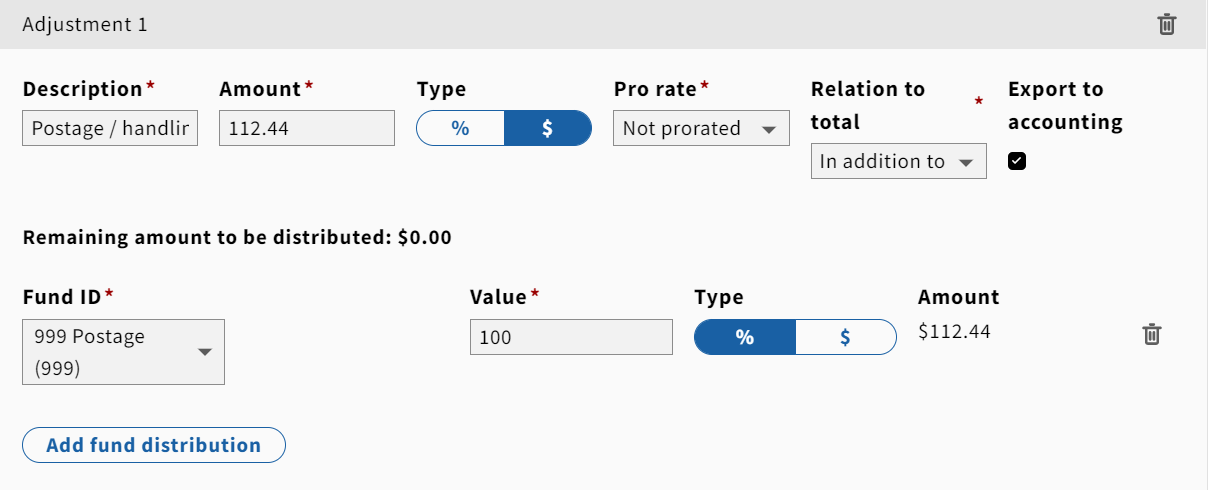
4. Monographs with invoices have been ordered in FOLIO with a purchase order. Search FOLIO and locate the order record. Create a FOLIO invoice record. Add the POL or POLs and receive the title to the FOLIO invoice, input any fields required and save the invoice. Put a library flyer in the book and fastcat as appropriate.
...
