*** This version of Confluence is for testing only and contains a copy of content from June 29th 2026. No changes will be preserved. ***

...
Unit: Receiving and Documents
Date last updated: 0911/0818/20232025
Date of next review: September 20242026
...
United States Depository
United Nations Depository
European Union Depository
Mailing List Documents
Receiving Orders
...
A. U.S. DEPOSITORY ***AS OF JANUARY 1, 2025 WE WILL ONLY RECEIVE ESSENTIAL TITLES SELECTED FROM A EMAIL NOTIFICATION IN PRINT. ALL DEPOSITORY PUBLICATIONS ARE NOW ELECTRONIC ONLY. IF THEY ARE RECEIVED FOLLOW THE GUIDELINES BELOW***
1. Our U.S. Depository Library number (LIB#) is 0388.
...
7. Claims. If an item number has not been checked on the shipping list, and if it does not appear on the "non-selections" Item Lister list, then you may need to send a depository claim for this publication. First, look beside the Item no. on the shipping list to see if either a "+" or "%" symbol appears. These items have not been sent to our library at this time and should not be claimed. Be sure to check through your mail to see that you have not overlooked the publication during check-in. If this is an item number which we should have received but did not, and it has not been rain-checked or shipped short, then you should send a depository claim. Sending a claim for an item on a GPO-issued shipping list: Use the Web Claim form on the FDLP Access Desktop and submit the claim to GPO electronically at httphttps:www//ask.fdlpgpo.gov/webclaimform /s/contact-center-claims-form Print a copy of the Web Claim form as submitted and file in the GPO Depository Claims folder. Sending a claim for an item on a microfiche shipping list: With a ruler draw a box around the item or items not received. Write in the information at the bottom of the shipping list, including our depository library #, SL # and address. With a pen sign the documents librarian's name and again fill in our library number. Fax or mail the original complete shipping list (all pages) to the microfiche contractor at the address on the shipping list. File one of the shipping list copies in the file marked "Claims on GPO Deposit". Receiving a claim: A paper shipping box may include a paper or electronic item which you have previously claimed. Generally, the item will have the original claim form which you submitted attached to it. Stamp the item, pencil check it on the original list that is now filed and write the item number. Pull the shipping list copy from the GPO Claim folder and discard. Microfiche claims are mailed to us in an envelope. The strip which you had written on, including the shipping list #, is attached to the microfiche but the rest of the shipping list is not returned. Pull the claim from the GPO Claim folder and check the item on the claim copy which you filed in the shipping list file.
...
B. United Nations Depository ***AS OF MARCH 2020 WE REQUESTED TO CANCEL ALL UN DEPOSITORY PUBLICATIONS IN PRINT (ALL ARE AVAILABLE ELECTRONICALLY)*** IF SOMETHING SHOULD SHOW UP FOLLOW THE GUIDELINES BELOW.
1. Our U.N. Depository Library number is DL-6.
...
3. Serial volumes which come on standing orders with invoices are paid and checked in on receipt. Create a FOLIO invoice record. Pay the invoice, adding the POLs (the title or titles) to the FOLIO invoice record, inputting any required information and saving the invoice. Pay Postage (Fund 999) under "Adjustments" unless you are paying an invoice with only one title and then you pay the invoice total on the book fund on the POL.
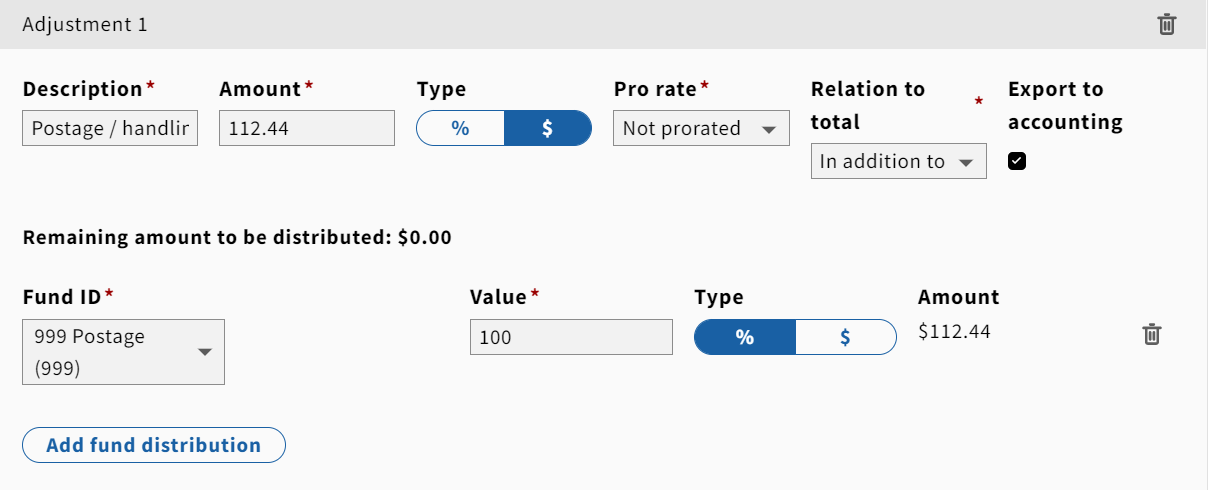
4. Monographs with invoices have been ordered in FOLIO with a purchase order. Search FOLIO and locate the order record. Create a FOLIO invoice record. Add the POL or POLs and receive the title to the FOLIO invoice, input any fields required and save the invoice. Put a library flyer in the book and fastcat as appropriate.
...
