...
Finding information about your Instance
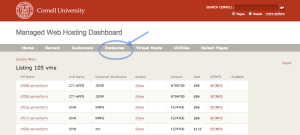
The Hosting Dashboard https://dashboard.hosting.cornell.edu Image Removed contains all the information you need about your instance. Once you log in, click on the Instances tab to see a listing of all the instances you have access to (they could live on 1 VM or different VMs).
...
- Adding new Software should not cause a problem on already existing web servers, however depending on what you've changed, the web server may get restarted.
- To enable Python (mod_wsgi) select "python", for Ruby (mod_passenger) select "ruby".
- If you need to run legacy CGI applications select "mod_cgi".
- There are also additional PHP modules that are available including APC (caching) and imagick (image processing).
- If you don't see a software option, contact webservices@cornell.edu with your request
- Disabling all software will leave you with an instance that is suitable for static web hosting (low memory footprint, no executable files).
- Custom php.ini - In general it is best to make configuration changes to PHP via ".htaccess" files. if you are not familiar with setting up your own php.ini (NOT RECOMMENDED), and have not placed one in the appropriate customer area, your site could go down with this change.
- Making this change will cause php to look to a path that is under your webdav area (confs/php.ini, confs/php.d).
- Holding ID - please see https://confluence.cornell.edu/x/qIRNDwImage Removed for more detailed information.
- LD_Preload is enabled by default and is recommended to stay enabled.
Once Update is clicked, it may take up to 15 minutes for the changes to populate your VM and configurations.

