*** This version of Confluence is for testing only and contains a copy of content from June 29th 2026. No changes will be preserved. ***

...
WebDAV is a file-transfer protocol, similar to FTP in that it is used to upload/download/modify files collaboratively on the internet. It is the access method of choice for the CIT-IS hosting environments (LAMP, Coldfusion, etc), because it allows users to use their CUWebLogin credentials to get access to their accounts, while still keeping file ownership and permissions on the server side consistent, so multiple users can safely share access to and collaborate on the same site.
The two popular options for using WebDAV in Windows XP are the Microsoft built-in DAV client, and WebDrive, a commercial offering with a lot of neat features. You can also use Dreamweaver and a free tool, Bitkinex.
...
Use Vista? Are you following these directions only to get a whole lot of "The folder you specified does not appear to be valid"? If so, try this hotfix to enable web folder support on Vista (Microsoft.com hotfix). Alternatively, try mapping to a drive letter instead of a web folder. Still experiencing issues? Please drop webservices-l a note.
...
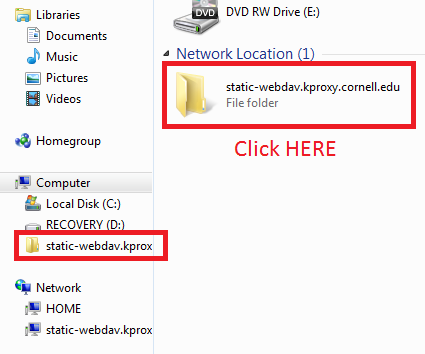
You can now open your DAV share just like it was any other Windows folder from your My Network Places screen. You can now drag and drop files to your website account via DAV and interact with it as if it were a folder on your local machine. The first time you log in, you may be re-prompted for your NetID and password - just enter them again.
WebDAV sessions are good for 8 hours (they are your CU Web Login session). Exiting all Windows Explorer windows will end your current session.