...
...
Step 3: Mesh
Open the Model
Right click on model,  Image Removed, in the Workbench window then click on "Edit..." as shown below.
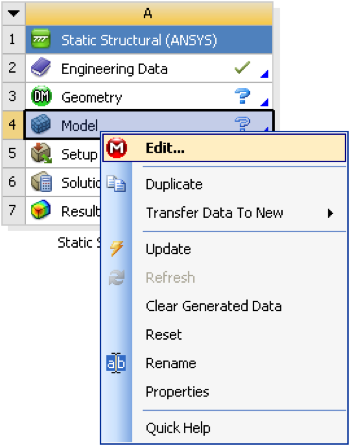 Image Removed
Expand "Model (A4)",  Image Removed , if it is not already expanded. Then, click once on mesh,
  Image Removed.
Specify the Element Size
...
| Include Page |
|---|
| ANSYS Google Analytics |
|---|
| ANSYS Google Analytics |
|---|
|
Mesh
Create Mesh
| HTML |
|---|
<iframe width="560" height="315" src="https://www.youtube.com/embed/m1USh43x9bA" frameborder="0" allowfullscreen></iframe> |
Degrees of Freedom
| HTML |
|---|
<iframe width="560" height="315" src="https://www.youtube.com/embed/iLNX1GRKhDU" frameborder="0" allowfullscreen></iframe> |
Go to Step 4: Setup (Physics)See and rate the complete Learning ModulePhysics Setup
Go to all ANSYS Learning Modules
 Sign-up for free online course on ANSYS simulations!