| Include Page |
|---|
| SIMULATION: FLUENT Google AnalyticsSIMULATION: |
|---|
| FLUENT Google Analytics |
|---|
|
| Include Page |
|---|
| SIMULATION: Unsteady Flow Past a Cylinder - PanelSIMULATION: |
|---|
| Unsteady Flow Past a Cylinder - Panel |
|---|
|
...
To start-up, open your completed "Steady Flow Past a Cylinder" project file. (If using the completed version in the zip file above, extract the files and open "Cylinder.wbpj".)
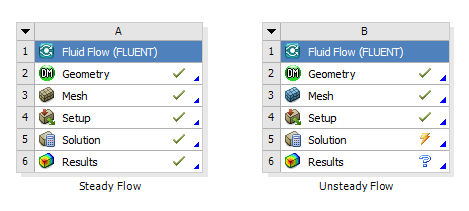
Right-click on Fluid Flow (FLUENT) and then click Duplicate. Enter "Unsteady Flow" in the highlighted field to rename it. Your Project Schematic should now appear as below.
Go to Step 2: Geometry
Go to all FLUENT Learning Modules
 Sign-up for free online course on ANSYS simulations!