...
Unit: Acquisitions, Ordering
Date last reviewedupdated: 04 03/0103/20212026
Date of next review: March 2023
Verifying the Instance Record
Creating the Purchase Order
2027
...
| Anchor |
|---|
A | A | Verifying the Instance Record
...
- A 300 field with a volume designation.
- A 245 with a main title to cover all of the pieces (The pieces themselves may have their own unique titles, which may appear in a 505 field).
- A 260 or 264 field with a hyphen at the end of the date.
- Multiple date designation in the 008 fixed field.
...
- After FOLIO instance record is created and updated as it should be create a purchase order as below.
...
Creating the Purchase Order
...
- Change Receiving Workflow to:
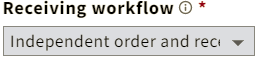
- Enter proper beginning volume and future volume(s) in the 'Instructions to Vendor' field
Example: Order for vol. 2 and continuationcontinue until cancelled.
- Physical unit price should be set at $0; Quantity physical "1".
- Add fund distribution
- Add location; Quantity physical "1".
- Create inventory as appropriate
- Material type "Book"
- Save & open order.
- Add a note in the notes field on the holdings record: MULTI-VOL. ORDERED (with date ordered) *** ADD VOLUMES AS THEY ARRIVE"
- Check the "Must acknowledge receiving note" box

