PLEASE NOTE THAT THIS PROCEDURE IS STILL UNDERGOING REVISION AS OF FEBRUARY 2026.
Scope: This procedure provides the context and the steps for LTS staff to transfer transferring items from central-campus collections to the corresponding Rare collections at the Annex. Often called "medium rare" or "R2" transfers, these are low-use, but historically significant resources that are sent to be housed at the Annex, but retain the stricter non-circulating policy (i.e. reading room access only), which grants patrons access only in the reading room.
Contact: Pedro Arroyo
Unit: Database Quality
Date last updated: February 18, 2026 April 2026
Date of next review: February April 2027
...
Overview
Material Eligible for Rare Annex
Processing Locations
Procedure
Physical Examination of the Book
Editing the Voyager RecordFOLIO Records
Special Cases
Mulitivolumes Multivolumes
Charged Checked-out or Missing Volumes
Bound With
Sending A Book To Conservation
Book Returned from Conservation
Slavery or Nathan Location
Provenances (Former Owners) Provenances from Cornell's founding collections
...
OVERVIEW
Research universities carry significant responsibilities for preserving the printed heritage under their care. Cornell University Library takes this responsibility seriously, and is committed to providing adequate protection and security for all its historic materials. As appropriate, library units should inventory their general collections to identify materials appropriate for transfer to a special collections facility. Cornell Library's Annex facility also provides units with a secure housing option for low-use items of long-term historical value, or for items that are at risk of theft or damage on the open shelves. Such items may be assigned to the Rare Annex location (rmc,anx), from which they will circulate only to a secure, observed reading room on the central Cornell campus.
A. Material Eligible for Rare Annex
At Cornell, all items printed before 1865 1876 must be provided with secure, climate-controlled storage and monitored reading room access. In addition, materials printed after 1850 and before through 1930 should be evaluated for significant artifactual, historical, or market characteristics and assigned to a location best suited to ensure long term preservation and use. All items 1864 1875 and earlier are re-processed automatically for Rare Annex (with needed record updates as described below). Items from 18651876-1869 1930 are reviewed by RMC staff for Rare Annex; any items not NOT selected for Rare Annex will be processed for the Circulating Annex . Items from 1870-1930 are reviewed by RMC staff for Rare Annex; it not selected for Rare Annex, then the appropriate Olin/Uris selector reviews for central campus or circulating Annex. Full criteria for Cornell University Library's transfer guidelines are available on the staff web at Policy on Transfer of General Collection Material to Special Collections. (<--This link is not working/old Collection Dev. staffweb)
...
location corresponding to its original location, unless the selector for that collection feels it's necessary to keep it in a central campus location.
...
B. Processing Locations
Currently, transfer of material identified as rare from central campus to the Library Annex has been approved for the following libraries:
...
Requests from other unit libraries to send rare material to the Library Annex should be submitted to the appropriate contact in Library Technical Services. DBQ staff will, in turn, contact representatives from RMC, the Library Annex, the LTS Automation Team, Digitization and Conservation Services, and, if necessary, the FOLIO Upgrade Team to set up circulation, programmatic and workflow aspects of executing the transfers.
...
PROCEDURE
A. Physical Examination of the Book
- Determine the binding type from among the following materials:
- Full, 3/4, or 1/2 leather over marbled boards
- Library buckram
- Publisher's cloth
- Pictorial publisher's cloth
- Library pamphlet
- Spine and/or upper cover gilt
- Determine the provenance by looking at the front and back pages and inside covers of the book for these indicators:
- Bookplate(s)
- Stamp(s)
- Signature(s)
- Inscription(s)
- Determine whether the book was donated to CUL by a specific person or group (as distinguished from provenance, which focuses on previous ownership/custody)
- If the book item lacks a barcode, refer to the instructions on barcoding for Rare Annex transfers below.
- If the book item is part of a a multivolume set, refer to the "Multivolume" instructions in the Special Cases section below
- Check the book for continuous pagination. If it is not continuous, and the book is a If the item is a bound-with, refer to the "Bound-with" instructions in the Special Cases section below
- If the book item requires repair, refer to the instructions for "Sending a book to Conservation" in the Special Cases section below
B. Editing the FOLIO Records
1. Display the Instance record by scanning or entering the barcode of the book from the Item search (this ensures matching item records in the case of multiple copies).
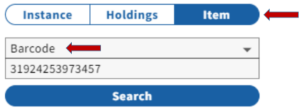 Image Removed
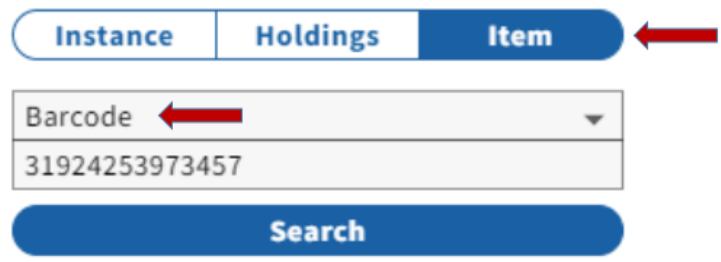 Image Added
Note: If the barcode yields no result, search the catalog by keyword, title, or other search term to find the record.
- If there is a record in FOLIO, and the book in-hand is a duplicate copy (not in FOLIO), follow the guidelines for added copies/locations, as well as the steps below.
- If there is a record, but this book had been withdrawn or declared missing, follow the instructions for reinstatements and add a new Item record if necessary.
- If there is a record with a Holdings that clearly matches the copy in-hand, but the book lacks a barcode, refer to the instructions on barcoding for Rare Annex transfers below. attach the barcode as described in step 6 below. Do not attach a barcode to the book itself if it doesn't have one.
- If there is no Instance recordIf there is no Instance record, or if the information is confusing or conflicting, give the book to the DBQ supervisor for cataloging and/or barcoding.
2. Update the MARC record:
- To record provenance:
- Add a 700 1_ (or 710 2_) field with the using the Name heading copied from 100/110 field of authority record, (if there is no authority record, follow the instructions for a gift below). if available.
- Add a comma and a subfield "e" at the end of the 7XX, with a note on their relationship with the book:
- $e former owner. as indicated by a bookplate or stamp
- $e signer. to indicate that the person signed the book.
- $e inscriber. to indicate that the person inscribed the book to someone (and if recipient's name is provided, they may also get a 700 field as former owner.
- Add a subfield "5" to the end of the field, followed by "NIC" (the specific code for CUL), to show to show that the information is specific to our copy.
Examples: 700 1__$a White, Andrew Dickson,$d1832-1918,$e former owner signer. $5 NIC
710 2__$a American Textile History Museum, $e former owner. $5 NIC
- If provenance includes the phrase "From the Income of a bequest made by__", then no provenance note is added to the bib record.Add $dNIC at end of the 040 field if you have added any new 700 or 710 fields to the MARC record.
- Add an Administrative Note to the Instance record, showing a post-cataloging maintenance transaction (e.g. date:20230925 ttype:mpost userid:pca1 ploc:lts). (The NOTE: the LTS macro for this is ,,mc. Consult with the DBQ supervisor if you do not have this macro).
...
- Add a Holdings Administrative note with the transaction code for transfers, including piece-count and the original location code (e.g. date:20250225 ttype:t userid:pca1 ploc:lts pcs:1 orig:olin) (The NOTE the LTS keyboard macro for this transaction code is ,,t. If this macro is not on your computer, consult with the DBQ supervisor).
- Update the Permanent Location field as follows:
- Change olin, uris,or rmc,ice to rmc,anx
- Change ech, sasa, asia, or was to ech,ranx, sasa,ranx, asia,ranx or was,ranx
- Add a public Holdings Note (note type: note) with description of the book's binding type.
- Add a NON-public Holdings note (note type: note) with the appropriate transfer note (e.g. "transferred to Annex from Olin 2/25/26 pca1", or simply "transfer from olin 2/25/26 pca1")
Examples:
- If you have recorded provenance, add it to the public Holdings note with , before the binding information. Evidence of ownership (e.g. bookplate, signature, inscription) should appear in parentheses after the owner's name , using the format "Provenance: Name (evidence of ownership)" (e.g. Provenance: Andrew Dickson White (bookplate). Multiple former owners can
- Evidence of ownership can include a bookplate, stamp, signature, inscription. or other traces.
- Multiple former owners can also be reflected, depending on
what evidence has been left on - the evidence in the book (see examples below).
- If the work was inscribed by the author, note this specifically by including "inscribed by the author" within the parentheses.
- If the work has a gift letter, postcard, or other item tipped in, include this information with its location after the binding type (e.g. Gift letter tipped in front).
...
- Donors of the material to the library collection are distinguished from provenance by having a separate Holdings Note with Note Type: Source of Acquisition. Use the format "Gift of: (donor name)". If the donor prefers to remain remain anonymous, make sure to click the staff only box at the end of the note field.
- Note: Past workflows involved tracing donors with 541 fields in the MARC record, and provenance notes are often combined with donor notes. Because of confusion caused by patrons searching the donors as authors, however, and to accommodate the donors who wish to remain anonymous, LTS staff no longer add a 541 field, and should create the separate "Source of LTS staff will no longer add a 541 field, and should create the separate "Source of Acquisition" note in the Holdings record, separately from the provenance note(s), in part so that we can make them staff-only if the donor prefers to remain anonymous.
Example:

5. Update the Item record
- Change these fields to the following, as applicable:
- Perm Loc.: RMC Annex, Echols Rare Annex, South Asia Rare Annex or Wason Rare Annex.
- Item Type: Non-circulating
- If the item is in a preservation box or has loose items such as newspaper clippings inside the cover, count the pieces (INCLUDING including the box) and enter the number in the Number of Pieces field.
- If no item record has yet been created, create one and affix the barcode to the first leaf of the bookthe item as shown in step 6 below, and create an item record.
- Place the item on the Annex book truck in the Physical Processing area.
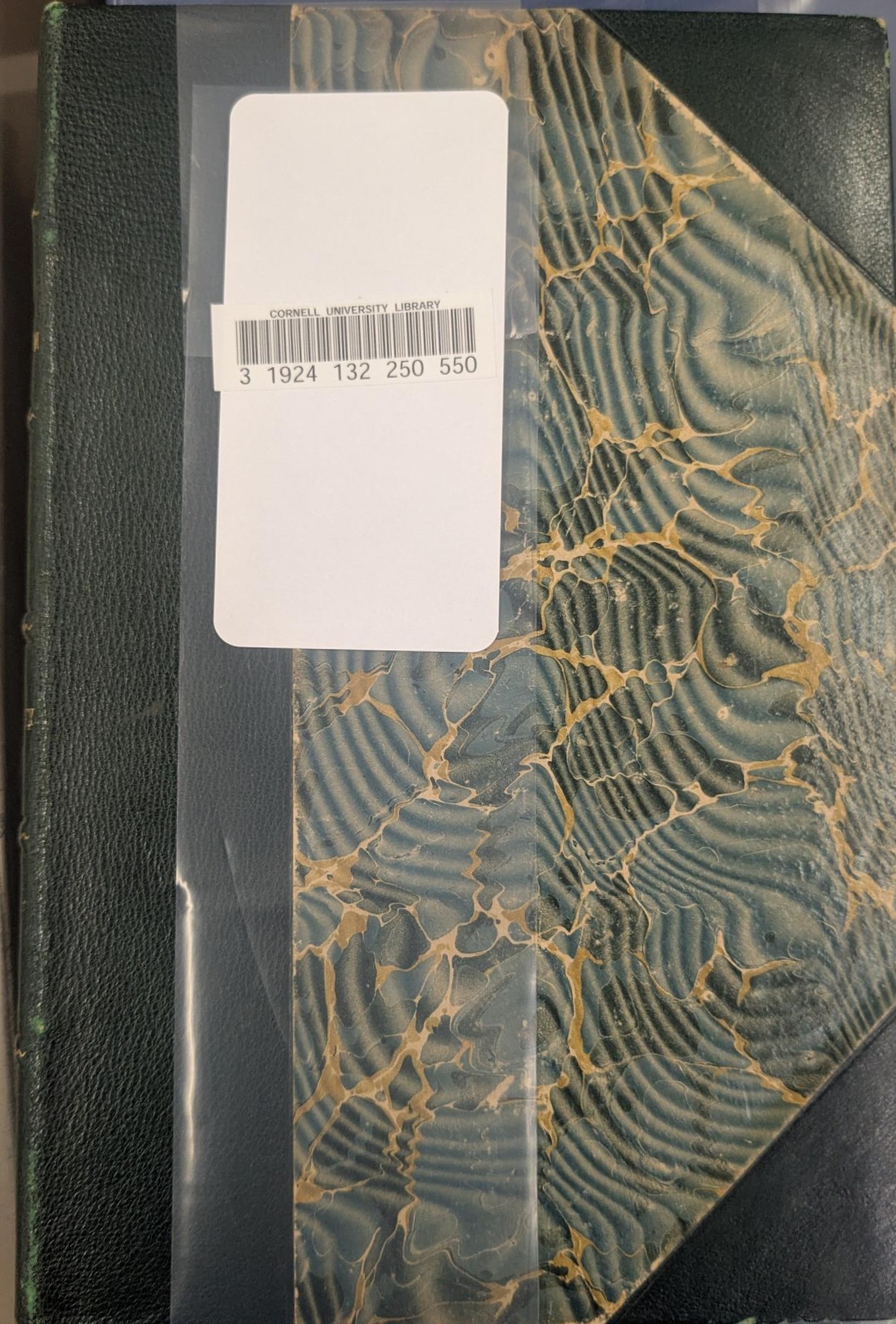
6. Adding a Barcode to a transfer book: if a book that is being transferred to a Rare Annex collection lacks a barcode, wrap a mylar strip vertically around the cover with the spine on the LEFT (usually the front cover). Let the ends of the mylar overlap slightly, without any tension on the cover, but flush enough so that it will stay in place, without sliding off easily. Attach the 2 ends of the strip with an AVERY 5963 label, which is 2"x 4", and will cover a generous area over the plastic strip. Attach the barcode to the label.
Example:
...
SPECIAL CASES
A. Mulitivolumes
...
2. In the Holdings record, check the Holdings Statement to make sure you have all available volumes of the work:
- If volumes are charged checked-out, follow the instructions for charged checked-out volumes below
- If you do not have all available itemsvolumes, check the stacks for missing volumesothers.
- If you cannot locate items in the stacks (and they are NOT chargednot checked-out), follow the procedures for missing volumes below (whether or not they have the Item Status "missing").
- Add a Holdings administrative note with the transaction code for transfers, including the number of pieces being transferred (pcs:), and the originating location code (orig:) that it's being transferred from.
Example: date:20231225 ttype:t userid:pca1 ploc:lts pcs:3 orig:olin
3. Holdings Notes: follow the instructions for noting provenance, binding, and/or donor information as 3. Holdings Notes: follow the instructions for noting provenance, binding, and/or donor information, as described above, but provide volume-specific information as available, and combine the respective Holdings notes as necessary, for example:
- If the different volumes in the set show different donor information, then the corresponding Holdings note (type: Source of acquisition) can say say something like: "v.1-2: Gift of Andrew Dickson White, v.3-5:Gift of Henry Sage."
Similarly, If if the volumes are bound in different materials, note this by listing the materials separately in the corresponding Holdings Note (type: note).
Example: v.1-2,4 bound in library buckram; v.3,5-6 bound in 1/2 leather over marbled boards, spine gilt.
- The As with single-part monographs above, the provenance can also be combined with the binding note in the same Holdings note (but NOT with the Gift note, which has a different note type!):
Example:  Image Modified
4. Open and update the item Item records for each individual volume as shown in the instructions described above, changing the Location Permanent location and Loan Type fields for each volume as appropriate.
B. Charged Checked-out or Missing Volumes
...
Holdings Records:
1. If the number of checked-out or missing volumes is very few compared to the number of volumes being transferred (if not, see step 2 below):
- Update the Holdings for the volumes in hand, as described above
- In the (staff-only)
...
- Holdings note that cites the transfer, note which volumes are charged or missing: (e
...
...
- . v.1-2, 4 transferred to Annex, v.3
...
...
...
- Add a Staff-only Item Note stating whether the volume is missing or charged, and to send to DBQ for R2 processing when found or returned.
- EXAMPLES: v.3 missing, if found, send to DBQ for R2 transfer 2/14/26 pca1. or v.4 charged. Please send to DBQ when returned by patron 2/16/26 pca1
- Add a staff-only Check-in Note saying "Cataloging Review" and the date.
Example:
 Image Added
2. If the number of checked-out or missing volumes is too excessive for a simple transfer, it MAY be necessary to do one or more of the following, but consult with the DBQ, RMC, and/or Cataloging supervisor beforehand:
- Recall the checked-out material, as it should now be non-circulating.
- Withdraw the missing volumes, and transfer the remaining ones, if appropriate.
- Create a separate Holdings for the Rare/Annex material that is being transferred, while waiting to deal with charged/missing items in the original Holdings. This would necessitate additional changes in the Holdings statements of both of the affected Holdings,
- The best of the above options depends on the specific circumstances of the set being transferred.
Item Records:
1. For volumes which are missing or charged, do NOT change the Permanent location or Loan type fields, as you would for the volumes in-hand. Instead, follow these steps:
- Add a Staff-only Check-in Note stating the following:
- "Cataloging Review [Date]-
- At the end of the above note, specify the volumes status, where to send it, and why:
- NOTE: The "Cataloging Review" designation refers to a shelf where circulation staff are instructed to put books that come up for maintenance by LTS. The Check-In Note brings up an alert when the barcode is read, so the note is less likely to be missed than if it were put in the regular Item Notes.
Examples:  Image Added
 Image Added
- When the book is returned or found, remove the check-in notes in the item record.
- If any missing volumes don't come back, eventually they will be given the status "Long missing", and be withdrawn from the collection.
...
C. Bound-With
1. If the piece in-hand is a bound-with item:
- Open the records for all included titles by performing a call
...
- number search, or by searching the Item barcode in
...
- an Item search (to find the first title) AND in a "Holdings Notes" search (to get the subsequent titles).
- Follow the above instructions for updating the instance and holdings records of ALL titles included in the bound-with.
...
- Update the Permanent Location and Loan Type fields in the single item record that represents all of the bound parts.
D. Sending A Book To Conservation
- Follow the instructions for FOLIO updates for the Instance recordHoldings records as described above.
- In the holdings record. Add a Holdings Note (note type: note), saying saying sent to Conservation [date] as part of the transfer note, noting the volume number if necessary
- In the I tem Item record, add an Item Note an Check-in Note saying "Catalog Review - Return to DBQ staff for R2 - [date] [ initials]"date] [ initials]"
- Take the item to the Physical Processing unit's routing shelf for Conservation, or send it directly to them on the LTS "OUT" shelf. In either case, make sure the item is flyered for RMC,ANX, and include any appropriate notes
E. Book Returned from Conservation
- Remove the Holdings and Item notes referring to sending/returning the book from Conservation.
- If the book is now in an mm MM caseis present:
- Add this the case to the Number of pieces count field in the item Item record.
- Write If the barcode number on the spine of the box (no call # is necessary)
...
- book has a barcode, create a duplicate barcode and attach it to the MM case.
- If the book does NOT have a barcode, follow the instructions in step 6 of the "Editing the FOLIO" records section above, and then create a duplicate barcode for the outside of the MM case.
If "Slavery" or "Nathan" appears as part of the call number written inside the book, the location should be changed to Rare (in pencil) in the book.
...
F. Provenances from Cornell's founding collections:
Items with bookplates of the following people should be retained whenever possible, and their records should be modified to indicate former ownership when encountered.
- Anthon, Charles, 1797-1867.
- Berkowitz, H. Chonon, (Hyman Chonon), 1895-1945.
- Bird, Samuel B.
- Bopp, Franz, 1791-1867.
- Faust, Albert Bernhardt, 1870-1951.
- Fiske, Willard, 1831-1904.
- Hart, J. M. (James Morgan), 1839-1916.
- Loewy, Benno, 1854-1919.
- Scaife, James Verner.
- Perry, William Stevens, 1832-1898.
- Smith, Goldwin, 1823-1910.
- Smith, Herbert H. (Herbert Huntington), 1851-1919.
- Smith, Preserved, 1880-1941.
- Sparks, Jared, 1789-1866.
- Stanton, Theodore, 1851-1925.
- Straight, Willard Dickerman, 1880-1918.
- White, Andrew Dickson, 1832-1918.
- Wynne, Lewis Bingley.
- Zarncke, Friedrich, 1825-1891.
...



