...
...
1. Pre-Analysis and Start-Up
Open ANSYS Workbench
...
| Include Page |
|---|
| 2D Steady Conduction - Panel |
|---|
| 2D Steady Conduction - Panel |
|---|
|
 Image Added
Problem Overview
| HTML |
|---|
<iframe width="640" height="360" src="https://www.youtube.com/embed/Lj8Wk5tHxMI" frameborder="0" allowfullscreen></iframe> |
Check your Understanding
Select true or false:
If the Biot number is increased, less heat will be exchanged between the block and the fluid bathing the right face.
Mathematical Model
| HTML |
|---|
<iframe width="640" height="360" src="https://www.youtube.com/embed/51-MjBfrdyQ" frameborder="0" allowfullscreen></iframe> |
Discretization
| HTML |
|---|
<iframe width="640" height="360" src="https://www.youtube.com/embed/P4FF_x8nxcE" frameborder="0" allowfullscreen></iframe> |
How to Find Nodal Temperatures
| HTML |
|---|
<iframe width="640" height="360" src="https://www.youtube.com/embed/6o0r6wdX1Ds" frameborder="0" allowfullscreen></iframe> |
How to Derive Algebraic Equations
| HTML |
|---|
<iframe width="640" height="360" src="https://www.youtube.com/embed/xQ7VZCmuAao" frameborder="0" allowfullscreen></iframe> |
How to Reduce the Numerical Error
| HTML |
|---|
<iframe width="640" height="360" src="https://www.youtube.com/embed/Q5zrbHg6ZzQ" frameborder="0" allowfullscreen></iframe> |
Hand Calculations
| HTML |
|---|
<iframe width="640" height="360" src="https://www.youtube.com/embed/mcp04FAHwQk" frameborder="0" allowfullscreen></iframe> |
Go to Step 2: Geometry
Go to all ANSYS Learning Modules
Steady-State Thermal Analysis System
The problem at hand is a steady state thermal problem, thus the steady-state thermal analysis system will be used. Click on Steady-State Thermal(ANSYS) as shown in the image below.
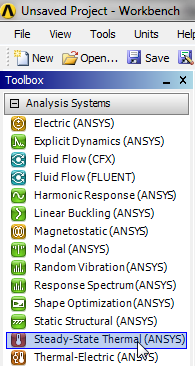 Image Removed
Continue to hold down the left mouse button and drag Steady-State Thermal (ANSYS) into the Project Schematic area. You will then see a green rectangle appear as shown below.
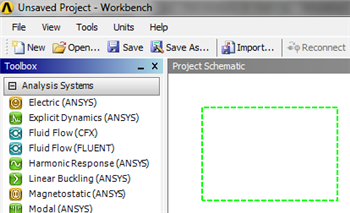 Image Removed
Drag Steady-State Thermal (ANSYS) to the green box which will then turn red and contain text saying "Create standalone system".
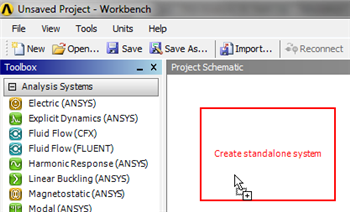 Image Removed
Now, release the left mouse button to create the standalone system. Your Project Schematic window should look comparable to the image below.
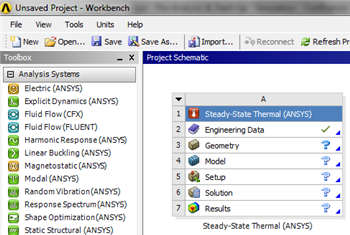 Image Removed
Lastly, rename the system to "2D Steady Conduction", as shown below.
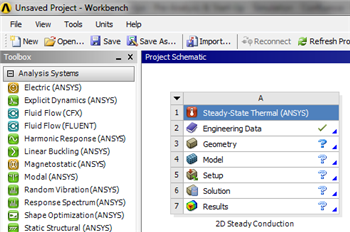 Image Removed
 Sign-up for free online course on ANSYS simulations!