*** This version of Confluence is for testing only and contains a copy of content from June 29th 2026. No changes will be preserved. ***

Scope: This document outlines the process that Library Technical Services (LTS) serials receiving staff follow when receiving an issue or a volume of a serial title. This procedure does not apply to RMC serials.
Contact: Paul Heckathorn Joanna Cerro
Unit: Serials Management
Date last reviewed: 2024.08.08
Date of next review: 2025 Sept. 092026
...
...
Mark nsp on the upper left corner of the front page. Place on the Newspapers-Maps/Microforms LTS distribution shelf for Acquisitions Services.
...
Titles for JGSM/Hotel: Latest issues held in:
-Write ILR and call# on sticker,insert note/flyer to indicate latest issues held in Management
Library, Sage Hall, or Nestle Library.-JGSM current periodicals should go directly to Sage Hall rather than to ILR first (as of Oct. 2021).
-Hotel current periodicals should go directly ILR for redistribution.
Titles for the Rare & Manuscript Collections:
-Check-in. Do not mark. Send directly to the Rare & Manuscript Collections in a campus envelope
...
Spiral bound titles for all locations:
-Follow the same procedure as for the hard cover titles.
...
CD-ROM processing (for CD's included with book when the book is being barcoded):
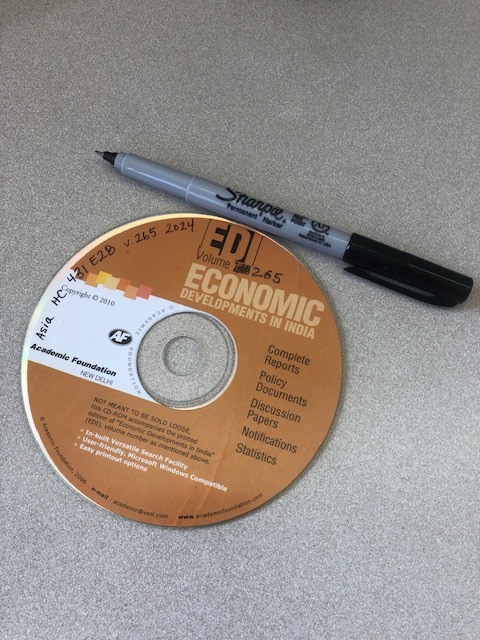
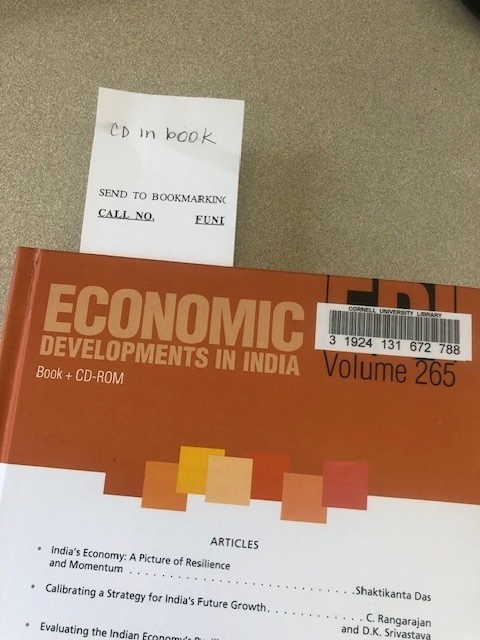
| View file | ||||
|---|---|---|---|---|
|
