*** This version of Confluence is for testing only and contains a copy of content from June 29th 2026. No changes will be preserved. ***
Scope: These procedures detail how to configure MarcEdit so that URIs can be added to bibliographic records. If MarcEdit is not properly configured it will not add URIs to subject headings.
Contacts: Mary Campany
Unit: Metadata Design and Operations
Date last updated: June 2023
Date of next review: June 2024
Configuration:
- After installing MarcEdit, find the configuration folder.
- It may be under C:\Users\YOUR NETID\AppData\Roaming\marcedit75\configs
- Open the XML file titled “linked_data_profile”
- If your computer asks you what you’d like to use to open this file, “Notepad” is fine.
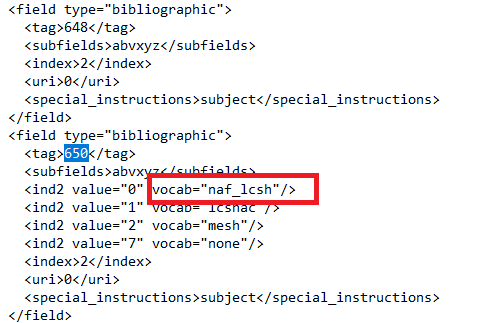
- Do a Ctrl+F search for 650 and change the section below from “lcsh” to “naf_lcsh).
- There are TWO instances of 650 in the configuration file. Only change the first instance that looks like the screenshot below!
...
