Scope: After processing the
Contacts: Mary Campany
Unit: Metadata Design and Operations
Date last updated:
...
May 2026
Date of next review:
...
May 2027
- Open the spreadsheet in Box using the "Open", then "Microsoft Excel Online" buttons.
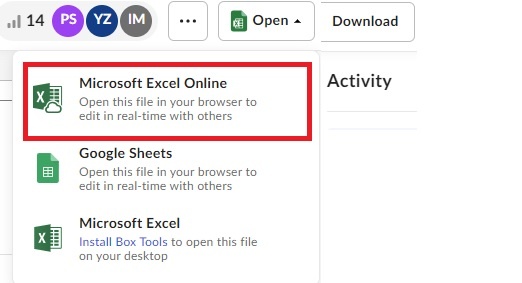 Image Added
- (Authorities librarian only)
...
- Highlight the first two columns of the spreadsheet, “Completed” and “changeCategory”. Select the “Filter” button from the “Editing” section in the top ribbon.
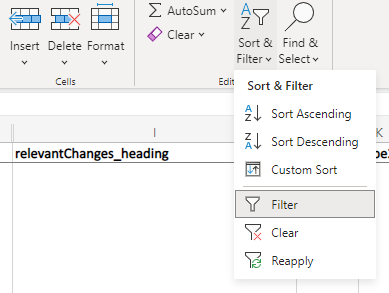 Image Modified
- Filter the “changeCategory” to show only “New” or “Update”. While the process for the two types are very similar, it is slightly easier to deal with one type at a time, since each type is prone to different issues.
- (Catalogers only) Click the "Filter" button on the "completed" column. The "completed" column is the column on the far left of the spreadsheet.
 Image Added
- (Catalogers only) Select your name from the dropdown list. There should be a small check in the box next to your name.
 Image Added
Skip all rows that have a value higher than 10 in the “instanceCount” column. These should be batch edited. If there is a row with the same name that is a different type (eg, name and subject), those should be saved for batch edit because the same bib record can show up in results for multiple types.Click the link in the “blacklightLink” column.
- Open the relevant authority record in OCLC using the value in the “id” column.
- Click the link in the “blacklightLink” column.
- Determine if the entity in the bibliographic records shown in Blacklight match the entity described in the authority record. (Often, further research will be required.)
- If the entity matches the one described in the authority record or the librarian has found another entity that matches the item, update the bib record accordingly.
- Don't forget to use the ,,mc macro in the administrative note to mark that you did maintenance on this bib!
- Regardless of whether a match was found or not, update the “completed” column with one of the values listed below. Explanations of values are included in parentheses.
- Done (All bib records associated with this row have been updated, and the Blacklight search result page will display as empty.)Auto (This change ONLY adds a death date to the old heading. These will be updated in batch once the infrastructure exists to do so.)
- Diacritic (The change could not be saved because the new heading was the same as the old heading except for a change in diacritic that Folio considers identical to the old one.)
- Vendor (The record comes from a vendor and either cannot be saved because it lacks an 008 OR is so sparse that the librarian has good reason to believe that their change will be overwritten when a new version of the record is loaded in.)
- Skip (An appropriate authority record was not found for all items listed in the Blacklight search results. Even if matches were found for most items, if even one bib record remains the row should be marked as a skip)
- Stays (The heading has changed back to the old version of the heading, or a geographic subdivision has been falsely matched with the authorized access point. The bib records stay as they are because they are already correct.)
- Batch (There are more than 10 bibs attached to this heading, and all of them refer to the same entity.)
- RMC/Kheel/Aspace (These records need to be updated in Archivespace. Changes made in Folio will be overwritten the next time the Aspace record is saved. Mark these as "RMC" for now (10/22/2024), because we are still negotiating access to archivespace)
- Box will save for you automatically, so once the "completed" column is updated please move on to the next name on your list.

