*** This version of Confluence is for testing only and contains a copy of content from June 29th 2026. No changes will be preserved. ***

| Wiki Markup |
|---|
h1. General Program |
...
Inputs Needed to Call the Sedimentation Tank Slope Function
...
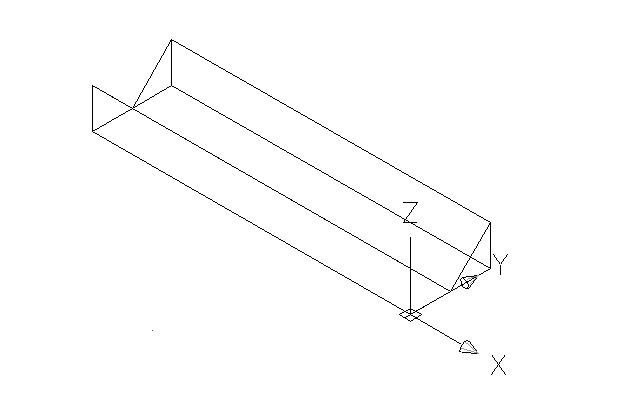
Information {float:left|border=2px solid black} !sed slope.JPG! {float} h3. Input Definitions h5. Inputs Needed to Call the Sedimentation Tank Slopes Function origin - a 3 by 1 matrix with x,y,z positions corresponding to the point where the pipe will be drawn |
...
tank{~}dim~ \- a 3 by 1 matrix with x,y,z positions specifying the inside dimensions of the sedimentation tank |
...
angle - angle specifying the slope of the sedimentation tank walls |
...
Notes
Inputs Defined within the Slope Function
origin =
p2 =
tanklength = tankdim0
slopewidth = tankdim1/2
slopeheight = (tankdim1/2)/tan(ϕ)
zoomwin- zooms on a window space directly around where the slope is to be drawn (as shown above - actual window size relative to slope that is to be drawn).
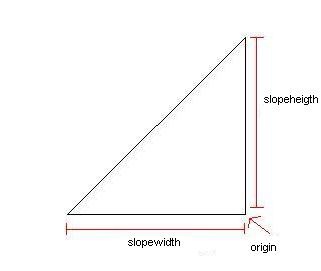
pline1 - creates a two-dimensional triangle.
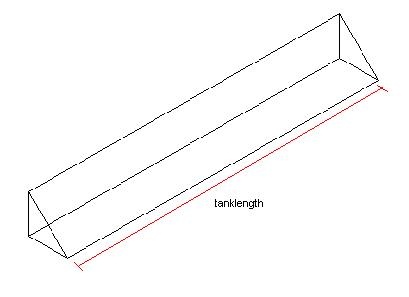
Note: picture about has been rotated to show extrution.
extrude1 - extrudes the triangle creating a three-dimensional wedge.
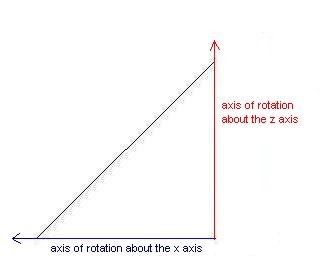
rotate3d1 - rotates the wedge 90 degrees around the x axis.
rotate3d2 - rotates the wedge 270 degrees around the z axis. The wedge is now aligned with the lower right hand corner of the sedimentation tank.
...
h5. Inputs Defined within the Sedimentation Tank Slopes Function

origin =
* x : origin{~}0~
* y : origin{~}1~
* z : origin{~}2~

p2 =
* x : origin{~}0~
* y : origin{~}1~ + tank.dim{~}1~/2
* z : origin{~}2~

tank{~}length~ = tank.dim{~}0~

slope{~}width~ = tank.dim{~}1~/2

slope{~}height~ = (tank.dim{~}1~*tan(angle))/2

win1 =
* x = origin{~}0~ - tank.dim{~}1~/2
* y = origin{~}1~
* z = origin{~}2~

win2 =
* x = origin{~}0~
* y = origin{~}1~ + (tank.dim{~}1~*tan(angle))/2
* z = origin{~}2~

*Note:* the slope function draws the sloped sides in one sedimentation tank. The sedtank function copies the one tank as many times as needed in the design.

h1. Technical Program Outline

*zoom{~}win{~}* \- zooms on a window space directly around where the slope is to be drawn (as shown above - actual window size relative to slope that is to be drawn).
zoom1 <-- zoom{~}win~(win1,win2)

{float:left|border=2px solid black}
!sel slope triangle.JPG!
Top View
{float}

*pline1* \- creates a two-dimensional triangle.
\\

{float:left|border=2px solid black}
!sed slope length.JPG!
Free Rotation used to show extrution
{float}

*extrude1* \- extrudes the triangle creating a three-dimensional wedge.

[!sel slope x axis.JPG!|AutoCAD Channel Program]

*rotate3d1* \- rotates the wedge 90 degrees around the x axis.

*rotate3d2* \- rotates the wedge 270 degrees around the z axis. The wedge is now aligned with the lower right hand corner of the sedimentation tank.

*mirror3d1* \- creates a mirror image of the wedge. |