...
- Determine the binding type from among the following materials:
- Full, 3/4, or 1/2 leather over marbled boards
- Library buckram
- Publisher's cloth
- Pictorial publisher's cloth
- Library pamphlet
- Spine and/or upper cover gilt
- Determine the provenance and/or donor by looking inside the front and back of the book for these indicators:
- Bookplate(s)
- Stamp(s)
- Signature(s)
- Inscription(s)
- If the book is part of a multivolume set, refer to the "Multivolume" instructions in the Special Cases section below
- Check the book for continuous pagination. If it is not continuous, and the book is a bound-with, refer to the "Bound-with" instructions in the Special Cases section below
- If the book requires repair, refer to the "Sending a book to Conservation" instructions in the Special Cases section below
B. Editing the FOLIO Records
1. Display the Instance record by scanning or entering the barcode of the book from the Item search (this ensures matching item records in the case of multiple copies).
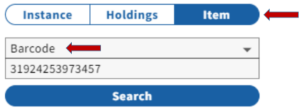
Note: If there is no barcode, OR if the barcode yields no result, search the catalog by keyword or title to find the record.
- Check the resulting Instance and Holdings information. If there is a record in FOLIO, and the book in-hand is a a duplicate copy, follow the guidelines for adding a barcode, and for added copies/locations and for adding barcodes.
- If there is a record, but this book had been withdrawn or declared missing,, follow the instructions for reinstatements and add a barcode new Item record, if necessary.
- If there is no Instance record, give the book to the DBQ supervisor for cataloging and barcoding.
2. Update the MARC record:
- To record provenance, add a 700 1_ (or 710 2_) field with the following information:
- Name heading copied from 100/110 field of authority record (if there is no authority record for the person, then follow the instructions for a gift)
- $4fmo to indicate bookplate or stamp
- $4sgn to indicate signature
- $4ins to indicate inscription
Example: 700 1__$a White, Andrew Dickson,$d1832-1918.$4fmo
- If provenance includes the phrase "From the Income of a bequest made by__", no provenance note is added to the bib record.
- To record a gift, add a 541 field with the following: Rare Annex copy #: (use original location copy#) Gift of __.
Example: 541__Rare Annex copy 1: Gift of Henry W. Sage. (withleading with leading indicators both BLANK).
- Add $dNIC at end of the 040 field if you have added any new 541 and/or 700/710 fields to the record.
3. Update the holdings record:
- Update the Permanent Location field as follows:
- Change olin, uris,or rmc,ice to rmc,anx
- Change ech, sasa, or was to ech,ranx, sasa,ranx or was,ranx
- Add a public Holdings Note (note type: note) with description of binding type.
- Add a NON-public Holdings note (note type: note) with the appropriate transfer note
...
- If you have recorded provenance, add it to the public Holdings note with the binding information, with the evidence . Evidence of ownership (e.g. bookplate, signature, inscription) should appear in parentheses (e.g. Provenance: Andrew Dickson White (bookplate). See also below for examples of more than one previous ownerMultiple former owners can also be reflected, depending on what evidence has been left on the book (see examples below).
- If the work was inscribed by the author, note this specifically by including inscribed by the author within the parentheses.
- If the work has a gift letter, postcard, or other personal material item tipped in, include this information with its location after the binding type (e.g. Gift letter tipped in front). (See final example below)
- EXAMPLES:
...
4. Update the Item record
- Change these fields to the following, as applicable:
- Perm Loc.: RMC Annex, Echols Rare Annex, South Asia Rare Annex or Wason Rare Annex
- Item Type:
...
- Non-circulating
- If the item is in a preservation box or has loose items such as newspaper clippings inside the cover, count the pieces (INCLUDING the box) and enter the number in the Number of Pieces field.
- If no item record has yet been created, create one and affix the barcode to the first leaf of the book
- Place the item on the Annex book truck in the Physical Processing area.
...
SPECIAL CASES
A. Mulitivolumes
- Open the Voyager record and examine the hierarchy Check the Holdings Statement to make sure you have all available volumes of the work
- If volumes are charged, follow the procedures for charged volumes below
- If you do not have all available items, check the stacks for missing volumes
- If you cannot locate items in the stacks (and they are not charged), follow the procedures for missing volumes below.
- Follow the instructions for Voyager FOLIO updates for the bibliographic recordInstance record (most likely a post-cataloging transaction, using ,,mc macro)
If volumes are gifts of varying individuals, note this by listing in the MARC record as shown above, adding the volumes donated by each individual Example: 541__Rare Annex copy 1: Gift of Andrew Dickson White (v.1-2); Gift of Henry Sage. (v.3-4).
- Follow the instructions for Voyager FOLIO updates for the holdings record
If volumes are bound in different materials, note this by listing the materials separately Example: $z v.1-2,4 bound in library buckram; v.3,5-6 bound in 1/2 leather over marbled boards, spine gilt.
- Open and update the item records for each individual volume of the work
...





