...
Unit: Database Quality
Date last reviewed: 7 9/232/2025
Date of next review: October 2025
...
- Locate, import, or create a matching Instance record.
- Edit the Instance with administrative notes and/or statistical codes appropriate to the transaction (inputting, maintenance, etc.).
- Save and close the Instance record.
- Locate or create a Holdings record and add the appropriate Holdings Type, location, and call number* information for that first title.
- If the first title is part of a multi-volume or serial, make sure it is represented in the Holdings Statement of the appropriate record (see below for more on Holdings Statements, Enumerations, etc.)
- Add Oversize designation for the dimensions of the overall volume covers, even if the first part is smaller than the outer cover, and would not be oversize on its own. (**See also special cases below) What if it starts with a v.1 that is not oversize by itself, but is inside Oversize covers, AND we also have v. 2-4, which are not oversize? Would they all be shelved in Oversize? Or would there be a Holdings note for v.1 saying it's shelved in Oversize? Would there be a separate Holdings for v.1 (Oversize), and for v. 2-4 (non Oversize)?
- In the Holdings Notes section, add a note, with Note type: Note, identifying the NEXT (second) part in the piece. Use the format "Bound with: [author name (last,first)]. Title of resource". Use last-name-first and a comma for the author, and if If the title is excessively long, enter enough of it to allow for a reasonable search search (see examples below). NOTE: the Holdings notes should be PUBLIC. Do NOT check the "staff only" box at the end of the note field.
- Save and close the Holdings record.
- Alternate Approaches: We may also encounter a Bound-with resource whose Holdings note indicates that the title is the first in a volume that has a certain spine title. The term "lettered" is used to note what the spine title is (see examples 3 and 4). This approach is often seen with Rare materials in the database. When creating new Bound-with records, LTS staff should follow step 4 above (as illustrated in the first 2 examples), but we should be aware of this second approach for "lettered" resources when maintaining or correcting records.
...
- Enter the barcode number in the Barcode field.
- This single item record will represent the entire physical volume, so be sure to record the proper enumeration and/or chronology for the bound volume in the item record ONLY if it appears on the spine or on a title page referring to the ENTIRE bound-with resource. If the first part/title IS ITSELF an individual volume or issue of a serial or multi-volume, the parent enumeration field will be left BLANK. <Discussed w. Pam, confirm w. CWM Will also take census of call number variations among BW materials.
3. Instance and Holdings Records for second (and subsequent)
...
titles in a Bound-with resource ("child records")
A. After creating or correcting the "parent" records in the resource as outlined above, identify the subsequent titles or parts works in the physical volume. For each one:
- Locate, import, or create a matching Instance record, adding administrative notes or statistical codes as applicable, and Save.
- For Single-part monographs, locate or create the corresponding Holdings record.:
- Make sure the call number is the same as that of the parent record.
- Assign As with the first title, assign an Oversize designation to the call number if the whole bound-with resource has Oversize dimensionsbased on the physical resource, even if the second (or subsequent) part(s) in the resource are smaller than Oversize.
- Add a Holdings Note, with Note type: Note, saying "Bound with [Author/title information of the FIRST resource in the volume]".
- Add a second another Holdings Note, but with the with Note Type: Bound with item data, and enter the barcode number from the piece in-hand , (or copied from the Item record of the first title in the resource). This is the ONLY place the barcode will be recorded for second and subsequent titles/parts in a bound-with resource. It will NOT be recorded in its Item record (see below).
- All of the titles/parts AFTER the first (parent) title should have some version of the 2 Holdings notes in steps c. and d. above (among any other notes specific to that title): one note referring back to the FIRST author & title in the resource, and one note citing the barcode on the piece as "Bound - with item data".
- For bound-with items that were processed with the alternate scheme, second or subsequent titles in the resource will simply follow the sequence in which the title appears, e.g. "no. 3 in a volume lettered...", or "no. 4", etc.
...
- Create a new item record
- Leave the barcode field BLANK (no barcode).
- The Material Type field should be set to the same type as the first title in the item (e.g. Book, Map, Microform, etc.) (←confirmed/discussed w. Pam).
- Type "Bound with" in the Enumeration field of the record.
- If the item is part of a microfilm, microfiche, microcard, or some other film type, type "Filmed with" in the Enumeration field of the item record (see below).
- Save and Close the Item record.
...
A. If the second or subsequent part of a bound-with resource is part of a serial or multi-volume set, add that part's volume/issue number (or other identifying information) with the barcode in the Holdings Note (with note type "Bound With Item Data", as outlined in Section 3.A.2.b d above). This is to show which part or parts of the title represented by that holdings record are included in the "bound with" piece.
...
However, if Cornell has not cataloged any titles that have been bound together subsequent to publication in a single physical volume, create a instance and holdings record for the first title in the volume. Add the following staff note in the holdings:

...
II.
...
Filmed-With (Microfilm Titles):
1. Identify which title is first on the microfilm reel, either with a viewer, or from the Instance Notes, Holdings Notes (type: Reproduction), or from a call number search. If it is not clear which is the first title title on the reelreel (e.g from damage, lack of a title page, unrecognizable language, etc.), choose one of the titles as the "primary" title.For that title: ← When would this be the case? Do we leave it in? YES - e.g. first title lacks title page, or bad image/damage, or obscure/unrecognizable language or dialect?
- Create an item record, if one is not already attached to the proper Holdings. Since this single item record will represent the entire physical reel, be sure to record the proper enumeration and chronology for the whole reel (if applicable) in the item record, NOT for the first title itself.
...
Many CUL serials are bound together in large collected volumes. When a serial changes its title, a new bibliographic record is made/imported for the new (succeeding) title (see also 780/785 fields MARC), and all issues published under that title are assigned to the Holdings record of the new (succeeding) title. Frequently, however, the final issue(s) published under the previous title have been bound together with the first issues of the new title. The same serial may change its title several times, and each Holdings may have a parent and/or a child Item record attached to it. , indicating that issues of the previous titles were bound with issues of the succeeding titles.
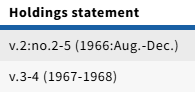
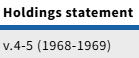
(For example: the serial "VISTA Volunteer" (Instance 1334440) changed its name to "VISTA" (Instance 1334441) for a year, and then back to "Vista Volunteer" (Instance 1334443). The later issues of the first title were bound with a volume of the middle title, which also in turn had its later issues bound with the third title:
1. Vista Volunteer (Instance 133440):

Holdings:
 Holdings Notes: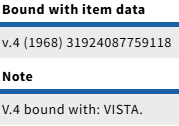
2. Vista (Instance 1334441, "middle title"):

Holdings:
 Holdings Notes: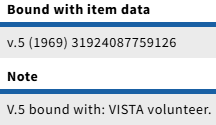
3. Vista Volunteer (Instance 1334443):
 Image Added

