...
*{Should we have a note somewhere about the Call numbers? Is that covered in a cataloging procedure? They should all be the same for the titles/parts in the resource, correct? (unless they're series-class (, and the numbers at the end would be different)? We should NOT add sequence numbers to the Call numbers, correct? (even though we may run into them?)) See also section 1a below (Child records).
EXAMPLES:
...
5. Holdings and Item records of Second (and Subsequent) parts of Bound-with materials, when those parts are individual components/issues of multi-volume monographs or Serials:
Holdings Notes:
A. If the second or subsequent part of a bound-with resource is part of a serial or multi-volume set, add that volumethat part's volume/issue number number (or other identifying information) with the barcode in the Holdings Note (with note type "Bound With Item Data", as outlined in Section 3.A.2.b above), . This is to show which part or parts of the title represented by that holdings record are included in the "bound with" piece.
Examples:
In the following example, the second (or subsequent) part in a bound-with resource is v. 4 of a monographic or serial title. The Holdings for that monograph or serial has this "Bound with Item Data" Holdings note:
 Image Modified
In this next example, the individual parts for the instruments of a work of classical music by Mendelssohn are bound separately in different bound-with resources, with the first part of each resource being by Schumann:
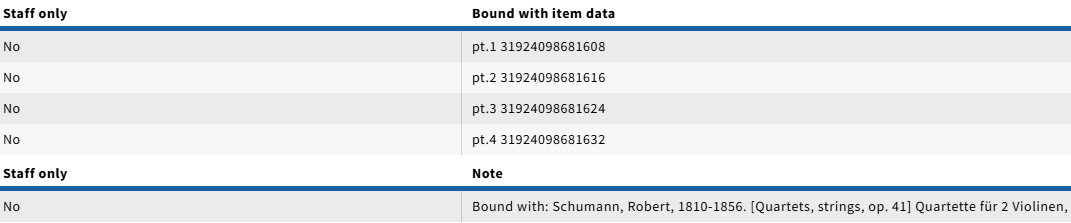 Image Modified

In general, use the same captioning used in the holdings for the serial or multi-part holdings string ("vol.", "pt.", "no."). If necessary, a note pertaining to the physical arrangement can also be added, as in the above example.
...
- If the Holding Statement shows dates ONLY, e.g. "1986", and the Statement for Supplements shows "1986:Dec.", the "Bound with:" note still goes in the Enumeration field of the Item record, by itself, and the Chronology field will show as "1986 (includes supplement 1986:Dec.)"
- If there are multiple Holdings Statements for volumes, supplements and/or indexes, check whether the data appears correctly in the public catalog, and consult with appropriate staff as applicable.
...
LTS Staff should OMIT step of creating "empty" Item Records without barcodes for the second and subsequent titles in a Bound-With designated for the ANNEX:
- After the Bound with item data is entered in the Holdings notes for the second and subsequent titles, and the “parent” record (with the item that contains the barcode) is accessioned at the Annex, Automation staff will receive an email of a report generated by a scheduled job detailing the mismatch of locations between the “parent” and the other holdings with the barcode in the Holdings Note/Bound with Item Data.
- Automation staff will use this report to execute a script to flip the Holdings containing the Bound With Item Data to match the “parent” Holdings location, and create the corresponding items (without barcodes) with an enumeration of “Bound with:" or “Filmed with:” If the Bound With Item Data note also contains the enumeration of the volume or reel in which that title is contained, then that is appended to the enumeration of the “empty” item record. “Empty” items should only be created after the parent holding has been accessioned. Otherwise this causes problems for staff at the Annexapplicable.
For retrospective conversion only: If Cornell has cataloged one or more titles but has not cataloged all titles that have been bound together subsequent to publication in a single physical volume, select the first cataloged title as your primary title (Note: it may not be the first title in the volume), add a holdings record to this instance, and to all the other cataloged titles in the volume, with appropriate ‘bound with’ and "Bound with item data" notes. Ignore all the uncataloged titles in the volume. In addition, add the following staff note in the holdings record for the primary title:
...
If the Holdings record has no Holdings Statement info for volumes, supplements, or indexes: This crossed-out section now used above for "basic" instructions. Nos. 2 and below will be added to "enum/chron"Create a new item recordLeave the barcode field BLANK (no barcode)The Material Type field should be set to the same type as the first title in the item (e.g. Book, Map, Microform, etc.)Type "Bound with" in the Enumeration field of the record.If the item is part of a microfilm, microfiche, microcard, or some other film type, type "Filmed with" in the Enumeration field of the item record.
If the Holdings record has volume and/or date information in the Holdings Statement, it will be noted in the appropriate Enumeration and/or Chronology fields of the "empty" Item record:Create the Item record following steps "a" through "e" aboveFor Volume or Part statements, add the appropriate volume/part information (from the Holdings Statement) to the Enumeration field, AFTER the "Bound With:" note.
Examples: If the Holdings Statement says "v.1", we would enter it as "Bound with: v.1"in the Enumeration field. Other captions would appear the same way, so for a Holdings statement that says "pt.2" the Item Enumeration field would say "Bound with: pt.2", etc. NOTE: The phrasing can look confusing here, but in these examples, the Enumeration note is showing that the title is a Bound-With resource (noun), and that it is v.1 (or pt.2, etc.). It is NOT meant to show that the title is bound with v.1 (or bound with pt.2, etc.) as a verb phrase, because it IS v.1, or pt. 2, etc.If there are only dates in the Holdings Statement (e.g. 1999 or 1829), they should be entered in the Chronology field of the empty Item record. The "Bound with:" note, including the colon, should still be in the Enumeration field, of empty item record, without anything after it.If the Holdings Statement has BOTH both volume and date information (e.g. "Bd.6 (1946)"), then the volume information should go after the "Bound with:" note in the Enumeration field (e.g. "Bound with:Bd.6"), and the date would go in the Chronology field, without the parentheses.
NOTE: If the Bound with Item Data in the Holdings note contains the same or similar data as the Holdings Statement, use the information in the Bound With Item Data note when creating the empty item record.
If the Holdings Statement has Supplement or Index data, these would also transfer to the Enumeration and Chronology fields of the Item record. For example: If there is Holdings statement with "no.1-2", and a Statement for the supplement "1929", the volume caption data would be entered as "Bound with:no.1-2" in the Enumeration field, and the supplement data would appear as, "includes supplement 1929" in the Chronology field.If the Holding Statement shows dates ONLY, e.g. "1986", and the Statement for Supplements shows "1986:Dec.", the "Bound with:" note still goes in the Enumeration field of the Item record, by itself, and the Chronology field will show as "1986 (includes supplement 1986:Dec.)"
If there are multiple Holdings Statements for volumes, supplements and/or indexes, make sure that the data appears correctly in the public catalog, and consult with appropriate staff as applicable.
a. Create an "empty" item record (no barcode). See below for more information about what to record or not record in these items.
Annex Exception for creating Item Records Without Barcodes for Bound With and Filmed With materials:
...
LTS Staff should OMIT step of creating "empty"
...
Item Records without barcodes for the second and subsequent titles in a Bound-With designated for the ANNEX:
- After the Bound with item data is entered in the Holdings notes for the second and subsequent titles, and the “parent” record (with the item that contains the barcode) is accessioned at the Annex, Automation staff will receive an email of a report generated by a scheduled job detailing the mismatch of locations between the “parent” and the other holdings with the barcode in the Holdings Note/Bound with Item Data.
- Automation staff will use this report to execute a script to flip the Holdings containing the Bound With Item Data to match the “parent” Holdings location, and create the corresponding items (without barcodes) with an enumeration of “Bound with:" or “Filmed with:” If the Bound With Item Data note also contains the enumeration of the volume or reel in which that title is contained, then that is appended to the enumeration of the “empty” item record. “Empty” items should only be created after the parent holding has been accessioned. Otherwise this causes problems for staff at the Annex.
...
- .
Empty item record creation
...

