...
I. Bound With (Print Titles):
1. Instance and Holdings records of first title/part ("parent" records):
A. Identify which title is first in the physical volume. For that title:
...
*{Should we have a note somewhere about the Call numbers? Is that covered in a cataloging procedure? They should all be the same for the titles in the resource, correct? unless they're series-class (and the numbers would be different)? We should NOT add sequence numbers to the Call numbers, correct? (even though we may run into them?)) See also section 1a below (Child records).
EXAMPLES:




2. Item Record for the first/parent title
A. Create an item record, attached to the Holdings for the first title in the resource, as outlined above:
- Enter the barcode number in the Barcode field.
- This single item record will represent the entire physical volume, so be sure to record the proper enumeration and/or chronology for the bound volume (if applicable) in the item record. ← From previous version: Re-word for clarity? is "Bound volume" referring to the individual enum/chron of the first part here, or does it refer to the enum/chron on the spine of the whole volume (for the "lettered" ones)? If the first part IS a volume 1 or 2 of a multi-vol., this is the enum that is reflected in the Item/parent/barcoded record, correct? (what if it's a volume, AND it's part of a "lettered" spine volume?)
3. Instance and Holdings Records for second (and subsequent) titles in a Bound-with resource ("child records")
A. After creating or correcting the "parent" records in the resource as outlined above, identify the subsequent titles or parts in the physical volume. For each one:
- Locate, import, or create a matching Instance record, adding administrative notes or statistical codes as applicable, and Save.
- Locate or create the corresponding Holdings record. As with the parent record, make sure that title/part/issue is represented in any Holdings Statements, Does the call number have to be the same as the first title/holdings? and no sequence numbers? (see above note) if the second title is smaller-than-oversize, but bound in an oversize item, should its call no. be oversize?
- Add a Note, with Note type: Note, saying "Bound with [Author/title information of the FIRST resource in the volume]".
- Add a second Holdings Note, but with the Note Type: Bound with item data, and enter the barcode number from the piece in-hand, or from the Item record of the first title in the resource. This is the ONLY place the barcode will be recorded for second and subsequent titles/parts in a bound-with resource.
- All of the titles/parts AFTER the first (parent) title should have some version of the 2 Holdings notes in steps b. and c. above (among any other notes specific to that title): one referring back to the FIRST title in the resource, and one citing the barcode on the piece as "Bound-with data".
- For bound-with items that were processed with the alternate scheme, second or subsequent titles in the resource will simply follow the sequence in which the title appears, e.g. "no. 3 in a volume lettered...", or "no. 4", etc.
Examples:


4. Item Records for second (or subsequent) titles in a Bound-with (i.e. "empty" item records)
A. If the Holdings record has no Holdings Statement info for volumes, supplements, or indexes:
- Create a new item record
- Leave the barcode field BLANK (no barcode)
- The Material Type field should be set to the same type as the first title in the item (e.g. Book, Map, Microform, etc.)<--REALLY?
- Type "Bound with" in the Enumeration field of the record.
- If the item is part of a microfilm, microfiche, microcard, or some other film type, type "Filmed with" in the Enumeration field of the item record (see below).
- Save and Close the Item record.
...
5. Holdings and Item records of Second (and Subsequent) parts of Bound-with materials, when those parts are individual components/issues of multi-volume monographs or Serials:
Holdings Notes:
If the second or subsequent part of a bound-with resource is part of a serial or multi-volume set, add that volume/issue number (or other identifying information) with the barcode in the Holdings Note (with note type "Bound With Item Data", as outlined in Section 3.A.2.b above), to show which part or parts of the title represented by that holdings record are included in the "bound with" piecepiece.
In the following example, the second (or subsequent) part in a bound-with resource is v. 4 of a monographic or serial title. The Holdings for that monograph or serial has this "Bound with Item Data" Holdings note:
...
In this next example, the individual parts for the instruments of a work of classical music by Mendelssohn are bound separately in different bound-with resources, with the first part of the each resource being by Schumann:
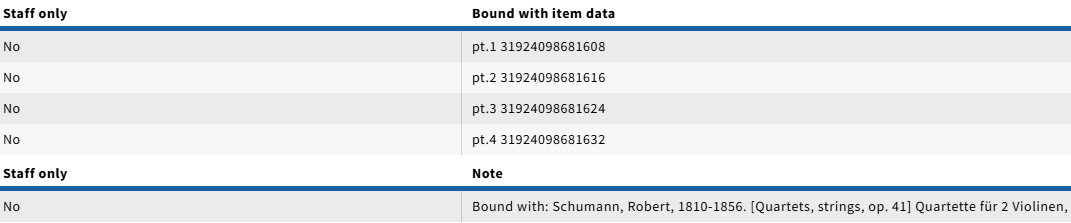

In general, use the same format for that information that has been captioning used in the holdings for the serial or multi-part holdings string ("vol.", "pt.", "no."). If necessary, a note pertaining to the physical arrangement can also be added, as in the above example.
This technique can also be used to link holdings for analyzed portions of serials to the serial record when a separate item record is not required or desired for the monographic records for the analyzed pieces.<Insert link to partially < From the original procedure. Does it need fleshing out? Examples? Would this be where we might insert a link to partially analyzed serial explanation herepage? See also below notes.
6. Item Records for second or subsequent titles with Holdings Statements/Enumeration/Chronology:
A. After entering the volume information with the "parent" barcode in the Holdings note, we similarly add the enumeration/chronology information in the corresponding "empty" Item record:
- Create the Item record following steps "a" through "e" 4.A.1.a-e above
- For Volume or Part statements, add the appropriate volume/part information to the Enumeration field, AFTER the "Bound With:" note.
Examples: If the Holdings Note says "v.1 31924XXXXXX...", we would enter it as "Bound with: v.1"in the Enumeration field of the corresponding "empty" Item record. Other captions would appear the same waycan be entered as appropriate to match, so for a if part of a bound-with that is a "pt.4" of a given Instanceserial or multi-vol, the Item Enumeration field would say in its "empty" item record would say "Bound with: pt.4", in the empty item record, etc. - NOTE: The phrasing can look confusing here, but in these examples, the Enumeration field note is showing that the title is inside a Bound-With resource (noun), and that it is v.1 (or pt.2, etc.) of its title. It is NOT meant to show that the part is bound with v.1 (or bound with pt.2, etc.) as a verb phrase, because this part is v.1, or pt. 2, etc.
- If there are only dates in the Holdings Statement (e.g. 1999 or 1829), the date corresponding to the part in the bound-with should be entered in the Chronology field of the empty Item record. The "Bound with:" note, including the colon, should still be in the Enumeration field, of empty item record, without anything after it.
- If the Holdings Statement has BOTH both volume and date information (e.g. "Bd.6 (1946)"), then the volume information should go after the "Bound with:" note in the Enumeration field (e.g. "Bound with:Bd.6"), and the date would go in the Chronology field, without the parentheses.
- If the Holdings Statement has Supplement or Index data, these would also transfer to the Enumeration and Chronology fields of the Item record. For example: If there is Holdings statement with "no.1-2", and a Statement for the supplement "1929", the volume caption data would be entered as "Bound with:no.1-2" in the Enumeration field, and the supplement data would appear as, "includes supplement 1929" in the Chronology field.
- If the Holding Statement shows dates ONLY, e.g. "1986", and the Statement for Supplements shows "1986:Dec.", the "Bound with:" note still goes in the Enumeration field of the Item record, by itself, and the Chronology field will show as "1986 (includes supplement 1986:Dec.)"
- If there are multiple Holdings Statements for volumes, supplements and/or indexes, check whether the data appears correctly in the public catalog, and consult with appropriate staff as applicable.
...

