*** This version of Confluence is for testing only and contains a copy of content from June 29th 2026. No changes will be preserved. ***

...
TABLE OF CONTENTS
| Table of Contents |
|---|
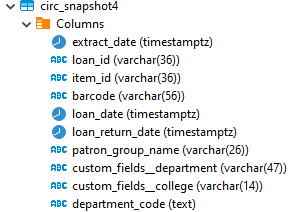
The first step in the process is to create the circsnapshot4.sql table in the LDP, which is where data updates will be appended and stored. Run the create_circsnapshot4.sql query to create the circsnapshot4 table in the local_core schema on the LDP. This query (run just once) finds all records in the loans_items table where the user_id is not null, and gets the demographics associated with that user via the user_users table and the users_departmnts_unpacked table. This makes the a starting table that is updated by the update_circsnapshot4 query daily automatically.
...
Here is a screenshot of the local_core.circsnapshot4 table in the LDP.
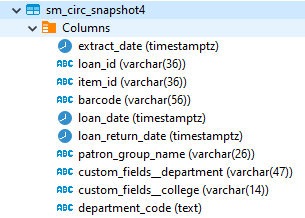
The circsnapshot for Metadb uses the table that was originally created in LDP to store additional updates to demographics information needed for certain circulation queries. This table was exported from the LDP and imported into the local_shared schema in Metadb. In the data import process, column data types were set to match the data types in the equivalent LDP table.
...
Here is a screenshot of the local_shared.sm_circs_snapshot4 table in Metadb.
The permissions for the local_shared.sm_circ_snapshot4 table are set to RW for z_slm5 and RO for all other users.
For instructions on setting permissions, see Setting Permissions for Schema Tables in Metadb.
The update_circ_snapshot4_metadb.sql query is automated to run daily at the following times:
...