*** This version of Confluence is for testing only and contains a copy of content from June 29th 2026. No changes will be preserved. ***

...
| Code Block | ||
|---|---|---|
| ||
apiVersion: v1
clusters:
- cluster:
    certificate-authority-data: LS0tLS1CRUdJTiBDRVJUSUZJQ0FURS0tLS0tCk1JSUJlRENDQVIyZ0F3SUJBZ0lCQURBS0JnZ3Foa2pPUFFRREFqQWpNU0V3SHdZRFZRUUREQmhyTTNNdGMyVnkKZG1WeUxXTmhRREUzTURjeE56SXpNRFl3SGhjTk1qUXdNakExTWpJek1UUTJXaGNOTXpRd01qQXlNakl6TVRRMgpXakFqTVNFd0h3WURWUVFEREJock0zTXRjMlZ5ZG1WeUxXTmhRREUzTURjeE56SXpNRFl3V1RBVEJnY3Foa2pPClBRSUJCZ2dxaGtqT1BRTUJCd05DQUFSeG5lcFhxd1oxSUNGcXBrcmNqNkNIdDlxK3daSUV6N093ajM5VXJmRnoKTHBBS2tpUzhpS2NIRGNHMTZiazFjaEhzbVdTLzZjV0ptZm5ueEs3cTg2WDNvMEl3UURBT0JnTlZIUThCQWY4RQpCQU1DQXFRd0R3WURWUjBUQVFIL0JBVXdBd0VCL3pBZEJnTlZIUTRFRmdRVUpsRGJlajRVa2IyV0ZVRjBDREd2CnNrWkUzOG93Q2dZSUtvWkl6ajBFQXdJRFNRQXdSZ0loQUxKelRCZTQyZFZtMmtTWUJWQW5TZW05bWw1TSt1NVcKQVkya1cyamcvMy80QWlFQXdhMTlENk1IcThPTS9pMTlSWitXYUxrdkJYV3Uwb1MwWmJCV2UzdFJvY2c9Ci0tLS0tRU5EIENFUlRJRklDQVRFLS0tLS0K
    server: https://127.0.0.1:6445
  name: diaper-server
contexts:
- context:
    cluster: diaper-server
    user: <Kubernetes service account name>
  name: diaper-server
current-context: diaper-server
kind: Config
preferences: {}
users:
- name: <Kubernetes service account name>
  user:
token: <Kubernetes service account token> |
| Code Block |
|---|
k9s |
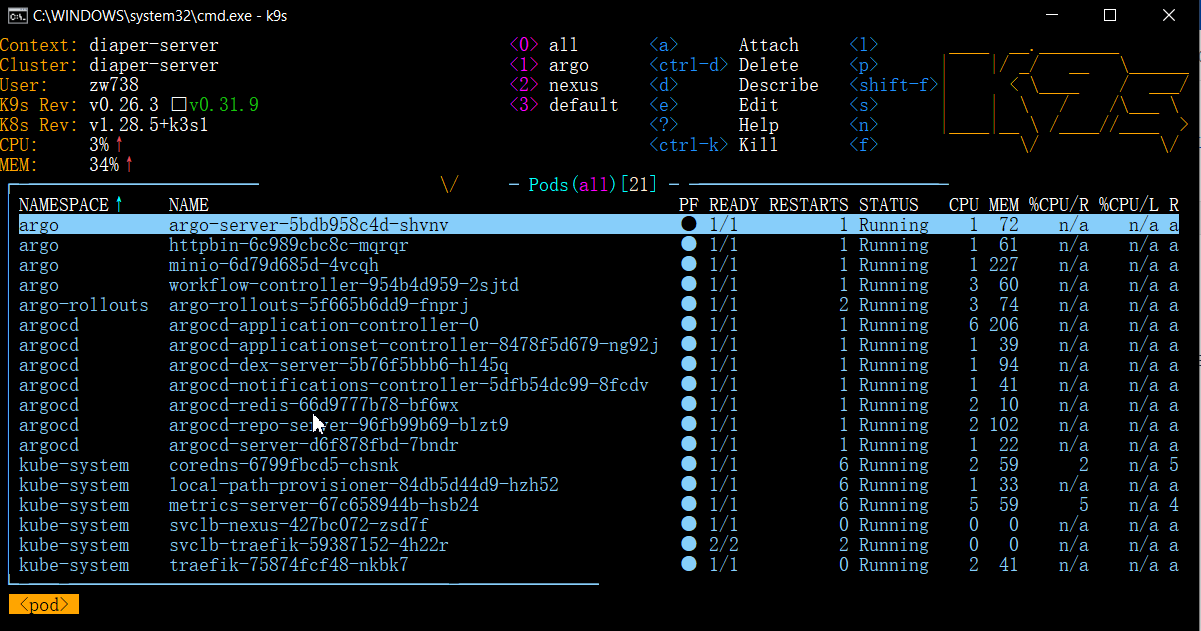
:services or :deployments or :pods
More k9s Tutorial: derailed/k9s: 🐶 Kubernetes CLI To Manage Your Clusters In Style! (github.com)
