...
Title Changes
Format Changes
...
A. Title Changes
- If a title change is suspected without having the book in hand, update the POL note for the old title (ex: Possible title change after 2021 - give to Paul upon receipt.)
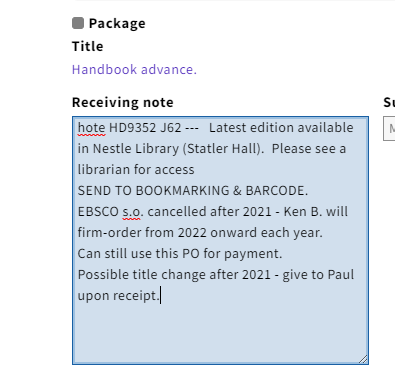 Image Added
 - If the title change is caught after the book has already been received, the Instance record will need to be updated. Review the Check-In record: Have all issues published to date and due on our subscription/standing order been received?
If yes, continue with Step 3.
If no, claim.
- Review Expected Date for timeliness of next issue's arrival.
- Record title change information in Check-In Note for old title.
Example: Changed to [new title]
- Search for the new title in Voyager.
If found, continue to Step 6.
If not found, search OCLC Connexion.
- If a record is found, import the desired record to Voyager.
If a record is not found, create preliminary Bibliographic and Holding Records. - Update records for pending title change information for all locations served by LTS staff.
- Create Purchase Order(s) for the new title.
- Use Purchase Order number of the previous title with the added extension "a".
Example: 1ABC1234a
- Record title change information in Check-In Note of new title.
Example: Changed from [old title]
- Record the title change in the line item note of the old title and new title purchase orders:
Example: Old title Purchase Order note: Continued by: new title
Example: New title Purchase Order note: Continues: old title
...

