 Sign-up for free online course on ANSYS simulations!
...
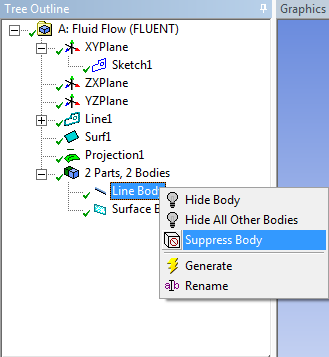
In Details window, select Target > Apply . Finally, press  . The line should now be projected on the surface. Now that we have the surface and the projection, we no longer need the line body we first created. In the Outline window, Expand 2 Parts, 2 Bodies . Right click Line Body and select Suppress Body
Change type to "Fluid"
Under "Tree Outline", select "Surface Body". Then set the type "Fluid/Solid" to Fluid.
Save Project
Now that we have completed the geometry. Save the project, and close the Design Modeler.
Go to Step 3: Mesh
...