 Sign-up for free online course on ANSYS simulations!
...
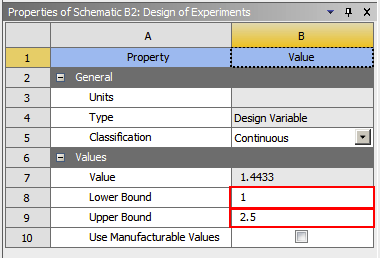
Now, that the radius of the hole is properly constrained click on  . ANSYS just picked what it thinks are the best sampling points according to an algorithm. Note that these sampling points are not necessarily linearly spaced. To get a numerical solution for each of these radii, click Update. Twiddle your thumbs a bit while ANSYS performs some time-consuming matrix inversions.
The previous commands has ANSYS solve for the von Mises Stress for an array of radius values between 1 inch and 2.5 inches, thus it will take some time. After the update has completed, click on Return To Project. You may want to save again at this point.
...