 Sign-up for free online course on ANSYS simulations!
...
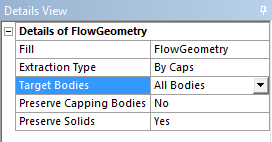
Next, we need to create the fill geometry. Once again, go to Tools > Fill. Name the fill, Flow Geometry FlowGeometry. Also, we need to change the Extraction Type. Select Extraction Type > By Caps. The other parameters should be left as their defaults. Press  to create the fill geometry.
Connect Geometry to Project
Finally, we are ready to connect the geometry to the project. C