 Sign-up for free online course on ANSYS simulations!
...
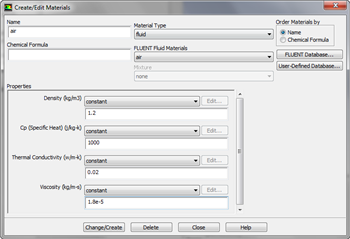
In the Outline window, highlight Materials. In the Materials window, highlight Fluid, and click Create/Edit.... this will launch the Create/Edit Materials window; here we can specify the properties of the fluid. Set the Density to 1.2, the Specific Heat to 1000, the Thermal Conductivity to .02, and the Viscosity to 1.8e-5.
| newwindow | ||||
|---|---|---|---|---|
| ||||
https://confluence.cornell.edu/download/attachments/146921319/MaterialsLarge.png?version=1&modificationDate=1305338022000 |
Once finished, click Change/Create, then Close.