 Sign-up for free online course on ANSYS simulations!
...
In this step, we will open fluent and define the boundary conditions of the problem. If you haven't already, close the meshing window to return to the Project Outline window. Now, Double click Setup. The Fluent Launcher Window should open. Check the box marked Double Precision
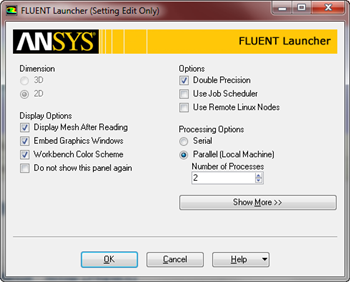
Select the Solver
Click OK to launch Fluent. The first thing we will do once Fluent launches is define the solver we are going to use. Select Problem Setup > General. Under Solver, select Density-Based.11
Next, we will define the model we are going to use. We do this by going Problem Setup > Models > Viscous-Laminar. Then press Edit... This will open the Viscous Model Menu Window. Select Inviscid and press OK. Now, we will specify characteristics of the fluid. Because we specified the fluid as inviscid, we will only have to define the density of the fluid. To make matters even simpler, we are only looking for non-dimensionalized values like pressure coefficient, so we will define the density of our fluid to be 1 kg/m^3. To define the density, click Problem Setup > Materials > (double click) Air. This will launch the Create/Edit Materials window.
...