 Sign-up for free online course on ANSYS simulations!
...
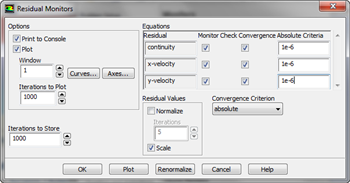
Let's begin by going to Solution > Moniters. In the Moniters Window, look under Residuals, Staistic, and Force Moniters. Select Residuals - Print,Plot and press Edit. In the Residual Moniters Window, we want to change all of the Absolute Criteria to 1e-6. This will give us some further trust in our solution.
Now, we need to initialize the solution. Go to Solution > Solution Initialization. In the Solution Initialization Window, select Compute From > Inlet. Ensure the values that appear are the same values we inputted in Step 5. If the are, initialize the solution by clicking Initialize.
Continue to Step 6 - Results
Go to all FLUENT Learning Modules