 Sign-up for free online course on ANSYS simulations!
...
| Info | ||
|---|---|---|
| ||
Click here for the FLUENT 6.3 version. |
Step 6: Results
Velocity Vectors
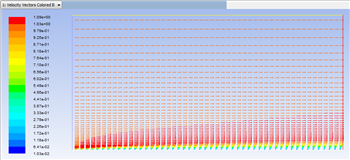
One can plot vectors in the entire domain, or on selected surfaces. Here, the vectors will be plotted for the entire domain. First, click on Graphics & Animations . Next, double click on Vectors which is located under Graphics. Then, click on Display in the Vectors menu. You should obtain, the following output.
| newwindow | ||||
|---|---|---|---|---|
| ||||
https://confluence.cornell.edu/download/attachments/118771111/VectPlot_Full.png |
Plot Velocity Vectors
Let's plot the velocity vectors obtained from the FLUENT solution.
...