 Sign-up for free online course on ANSYS simulations!
...
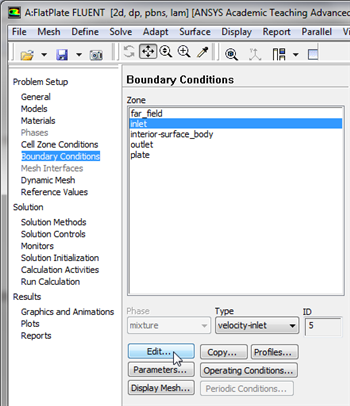
In order to start the process (Click) Boundary Conditions > inlet > Edit... as shown in the following image.
| newwindow | ||||
|---|---|---|---|---|
| ||||
https://confluence.cornell.edu/download/attachments/118771050/InletBC_Full.png |
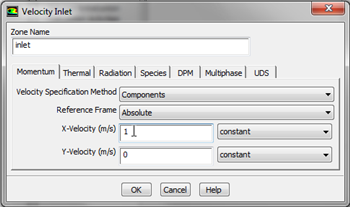
Note that the Boundary Condition Type should have been automatically set to velocity-inlet. Now, the velocity at the inlet will be specified. In the Velocity Inlet menu set the Velocity Specification Method to Components, and set the X-Velocity (m/s) to 1 m/s, as shown below.
| newwindow | ||||
|---|---|---|---|---|
| ||||
https://confluence.cornell.edu/download/attachments/118475240/SetInletBC_Full.png |
| newwindow | ||
|---|---|---|
| Click Here for Higher Resolution | Click Here for Higher Resolution | https://confluence.cornell.edu/download/attachments/118475240/VelMenu118771050/SetInletBC_Full.png |
Then, click OK to close the Velocity Inlet menu.
...